ES
FR
DE
GB
IT
C13148123_GB.fIDM
English
-
21
-
Use and installation manual
Fan speed
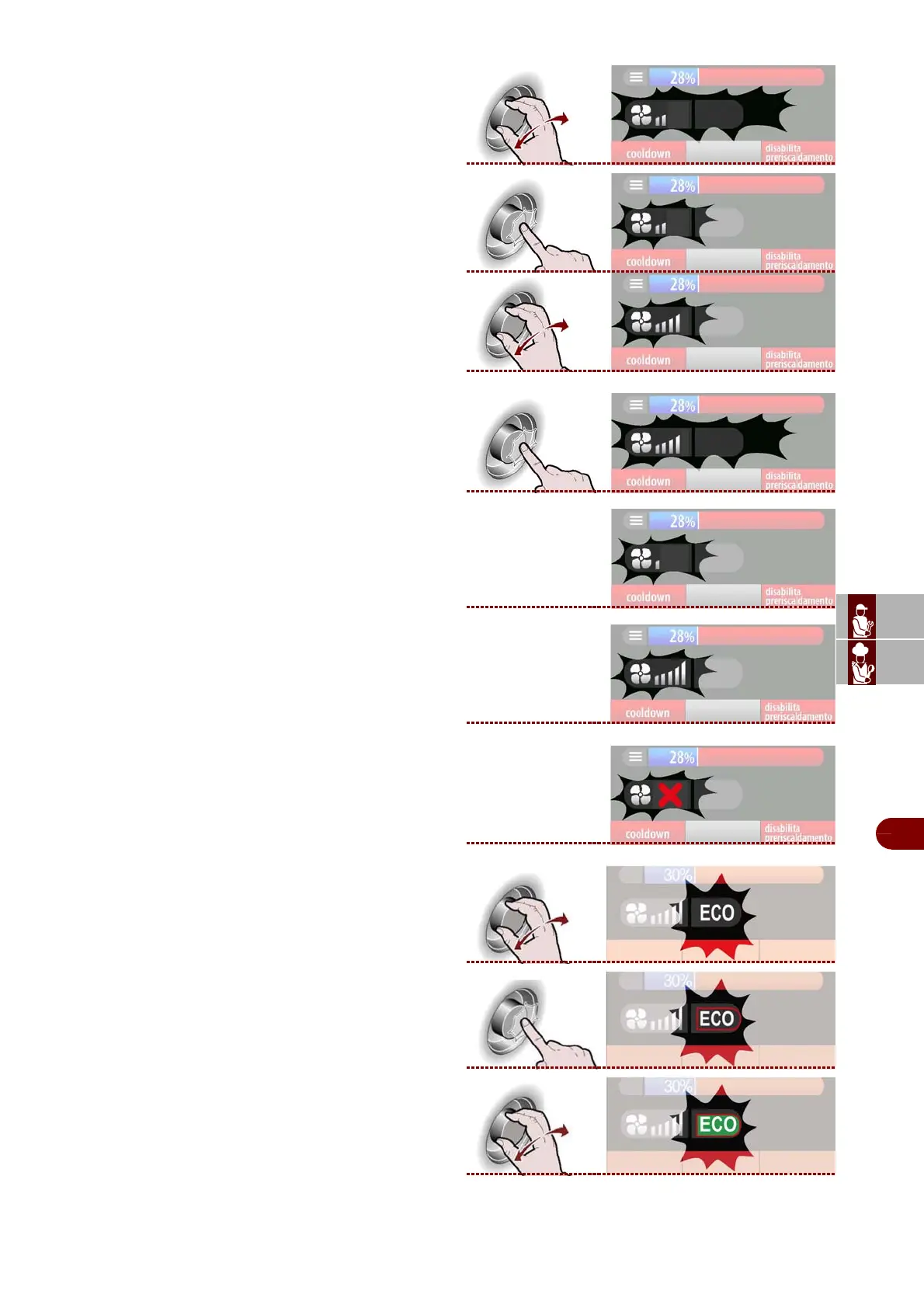
1–Select the "fan speed" zone using the knob.
>>>
2–Press the knob to confirm the selected zone.
>>>
3–To modify the cooking fan speed, turn the knob to
increase or reduce the number of notches on the
graduated scale. >>>
4–Press the knob to confirm the selected value.
>>>
The symbol shows that the cooling fan speed is on
the minimum setting. >>>
The symbol shows that the cooling fan speed is on
the maximum setting. >>>
The symbol shows that the cooling fan is set in on-off
mode (the fan switches on and off automatically).
>>>
ECO
1–Select the "ECO" function using the knob. >>>
2–Press the knob to confirm the selected function.
>>>
3–Turn the knob to activate or deactivate the "ECO"
function (icon lit with green light).
>>>
This function allows to save energy, but only for re-
duced loads.



 To Next Page