CNC Motion Setup/Testing Utility
P/N 70000635C
Setting the Balance (F6)
Install the Servo Amplifier Communications Cable, P/N 33001389,
between the amplifier's J1 connector and the CNC's RS-232 port.
1. At the Software Options menu, select Motion Setup/Testing.
2. Press and release the
E-STOP button.
3. Press the SERVO RESET to energize the system.
4. Select an axis to be tested by pressing the corresponding key on the
keypad (X, Y, Z, or U).
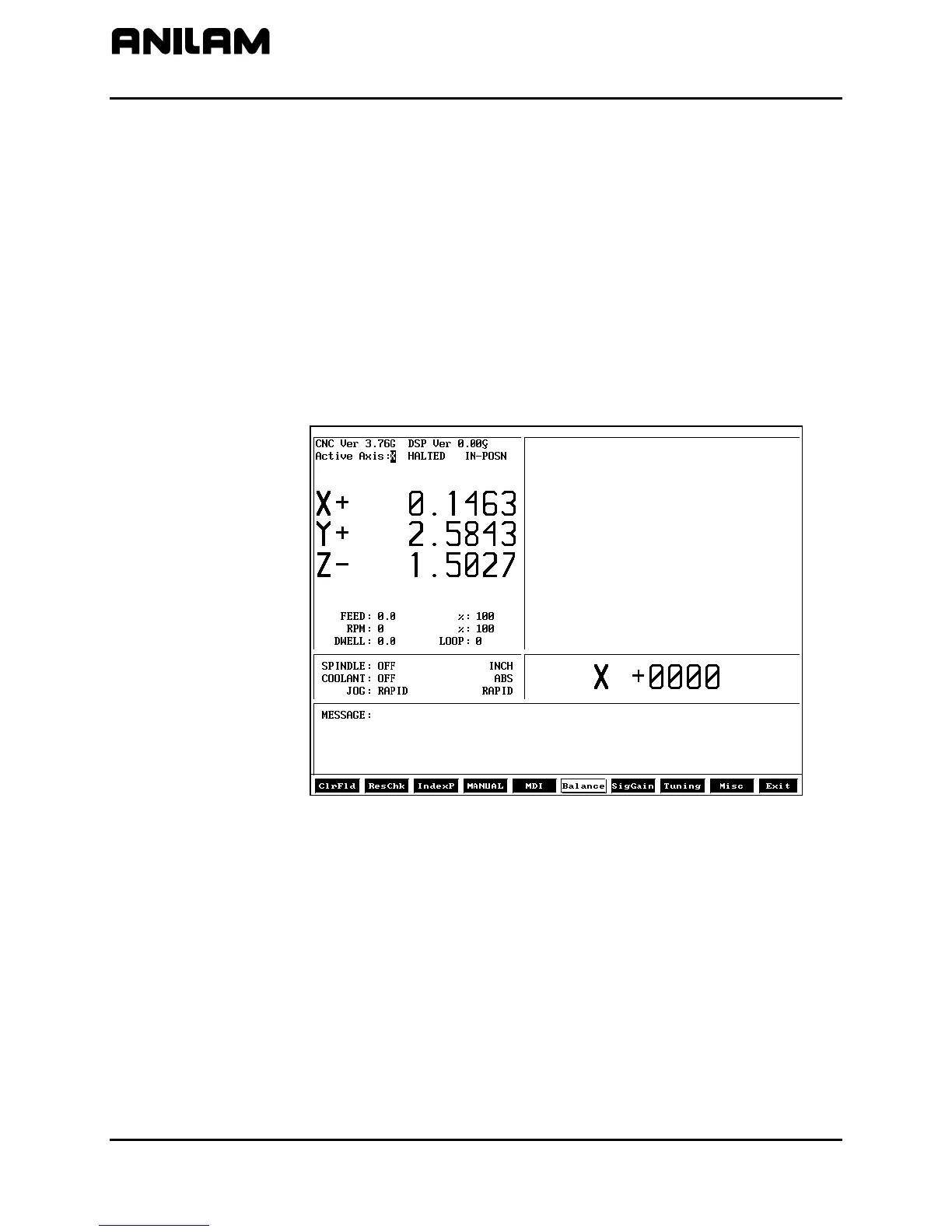
5. Press Balance (F6) to perform the balance test on the selected
amplifier (axis) and display the balance test screen. Refer to
Figure 15.
3000BALANCE
Figure 15, Balance Test Screen, AC Systems
6. Use the keypad up and down ARROW keys to change the axis offset
until the selected axis reads: +0000. Use the left and right
ARROW
keys to change the Offset value.
7. To cancel the balance test, press MANUAL (F4).
All rights reserved. Subject to change without notice.
November 2009
26



 To Next Page