98
03/2010 Rev. 0.1
03/2010 Rev. 0.1
99
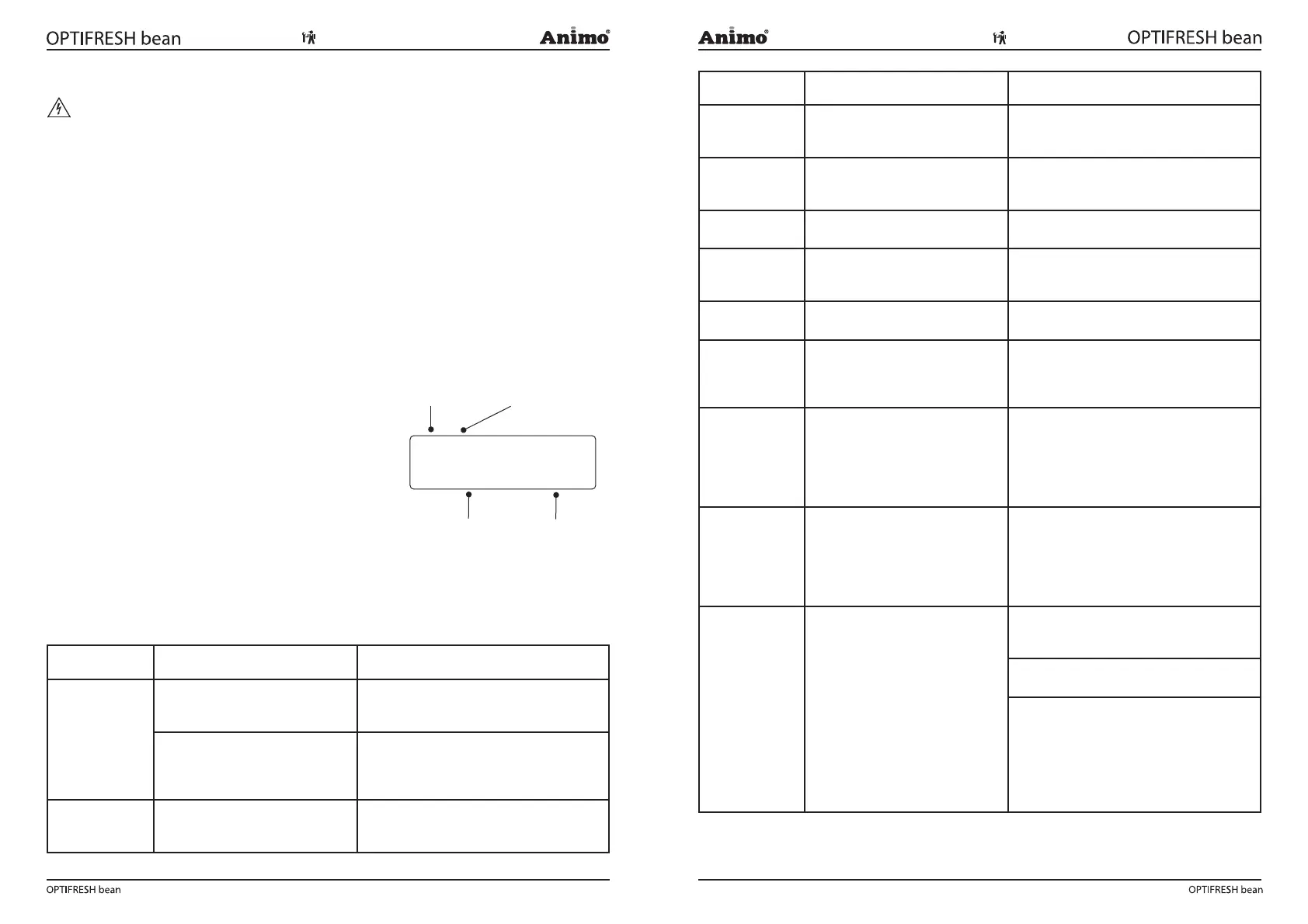
Display Possible cause Action
Out of order
Drip tray full
Drip tray full.
Once the drip tray is emptied, the message
automatically disappears and the drink
selection buttons are reactivated.
Out of order
Waste bin full
The maximum number of coffee
cups that the waste bin can hold
has been reached.
Empty waste bin. The cup counter is
automatically reset when the waste bin is
replaced.
Out of order
Waste bin is missing
Waste bin is not detected. Check the waste bin.
Out of order
Door open
For safety reasons, the machine
automatically switches off if the
door is opened.
The machine can be operated with the door
open by using the door pin (User manual:
section 8.1 ).
Out of order
Stand-by
The machine is on standby.
This function can be set manually or auto-
matically.
Out of order
E1 Level error
Minimum electrode error: mini-
mum electrode detects no water
but maximum electrode does. Inlet
valve shuts.
Check that the level sensors are function-
ing. See service menu 2.7 Hardware test.
Switch the device off and on again.
Out of order
E2 Level error
Maximum electrode error:
maximum electrode not reached
within 30 sec. Inlet valve shuts.
Boiler lls up too slowly. Water
pressure has dropped or the water
tank (stand-alone) is empty.
Check the water pressure, turn the water
supply tap completely open and check the
connection tube for any kinks. Switch the
device off and on again.
Out of order
E3 Level error
Electrode error: minimum
electrode not reached within 90
sec. Boiler lls up too slowly
Water pressure has dropped or
the water tank (stand-alone) is
empty.
Check the water pressure, turn the water
supply tap completely open and check the
connection tube for any kinks. Switch the
device off and on again.
Out of order
E4 Brewer error
Brewer was not started from its
initial position. Brewer motor not
turning.
Check the brewer motor function in the
service menu 2.7 Hardware test. Switch
the device off and on again.
Check uted pin of Brewer motor.
Replace if broken ( g 33).
Check the brewer switch.
When brewer motor is in its home position,
switch lever must fall into driving wheel
notch ( g. 34A). Contact must be closed.
When brewer motor rotates, switch lever
must be pressed IN ( g. 34B). Contact
must be open.
8. TROUBLESHOOTING
WARNING
When carrying out repairs and cleaning the device, the plug should always be removed from the
wall socket before the device is opened.
Preface
Before searching for the defect, check that all parts are in their correct position. To do this, remove
the device’s rear plate and check that all printed circuit boards, connectors, wire beams and pipes are
mounted correctly.
After carrying out a general parts inspection, use section 8.3 Troubleshooting analysis to verify the
probable cause of the problem.
#) If the column solution advises replacement of the part concerned, there is always the possibility
that the defect may be caused by another problem. The functioning of the device should therefore be
thoroughly tested to make sure that the defect does not reappear.
8.1 Read log
The last 20 error messages displayed during use are
registered and saved ( g. 32).
To read out these error messages activate the menu item 2.8.
The rst error is the most recent error message.
• The rst line shows the same error codes listed in
the troubleshooting analysis table (see section 8.3)
• The second line shows the date and time at which the
error message occurred.
8.2 Clear log
Use the Clear log function in service menu 2.9 to clear the log.
8.3 Troubleshooting
Display Possible cause Action
Out of order
Boiler lling
When used for the rst time: boiler
is still empty and is being lled.
No action required. When boiler reaches
the appropriate level, the display will show
'Boiler is heating up'.
During use: boiler is not lling
up or is lling up too slowly. After
60 sec. the display will show 'E3
Level error'.
Check the water pressure, turn the water
supply tap completely open and check the
connection tube for any kinks.
Out of order
Boiler heating
The boiler temperature is
(temporarily) too low because too
much water has been used.
Once the temperature is restored, the
message automatically disappears and the
drink selection buttons are reactivated.
!
"#$"$" "%"
Number Trouble code
Date Time
Fig. 32



 To Next Page