Wiring a Signaling Line Circuit (SLC) Installation
IQ-301 PN 50036:F 10/29/2001 51
additional connection of 24 VDC filtered, low-noise and resettable power on
FZM-1 Terminals 3 (–) and 4 (+).
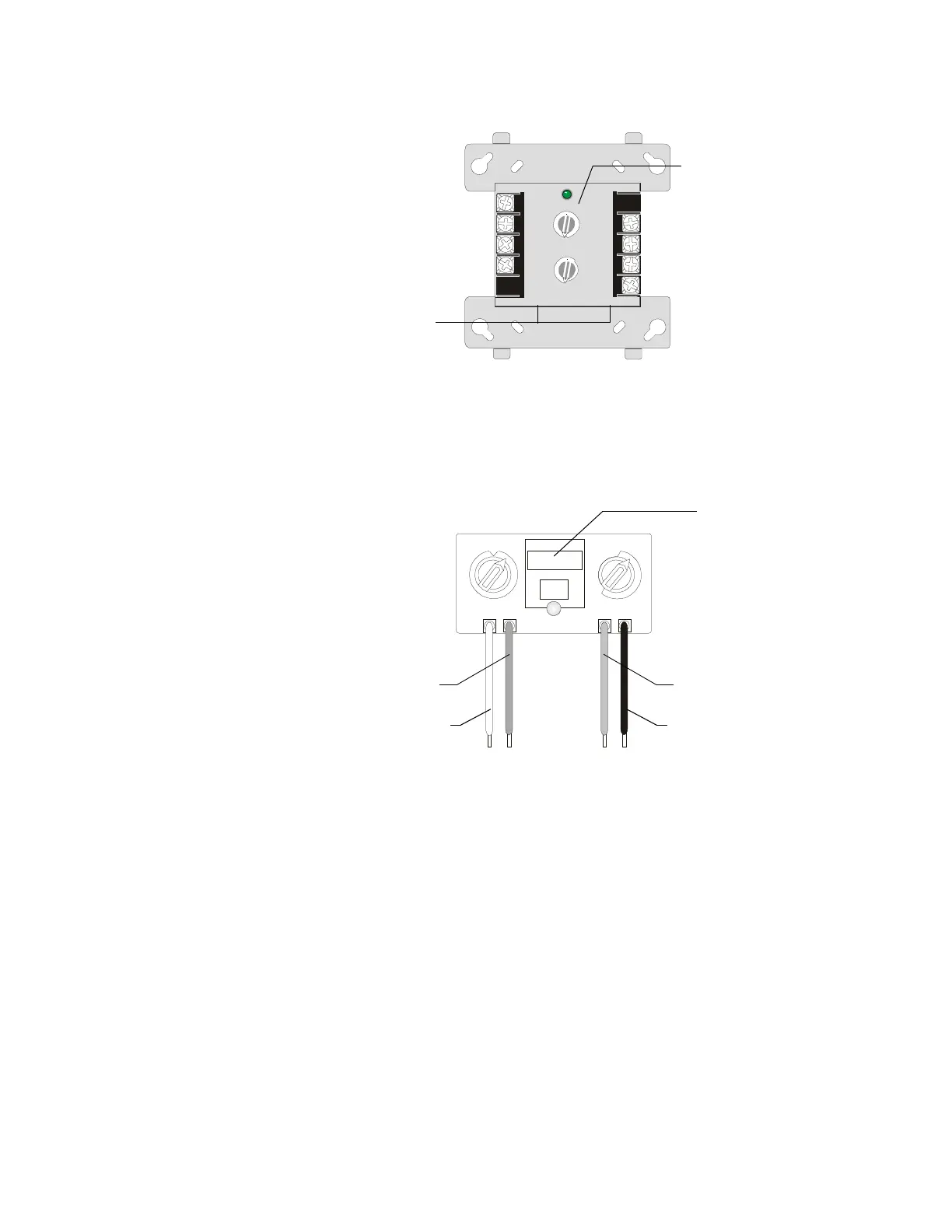
Figure 32 Standard Monitor Module (FMM-1)
and Two-wire Detector Module (FZM-1)
• FMM-101 (Style B circuits only). The FMM-101 is a miniature addressable
module that is functionally and electrically identical to an FMM-1 module.
Because of the smaller size, an FMM-101 is suitable for mounting directly in the
electrical box of a monitored contact-type device.
Figure 33 Miniature Monitor Module (FMM-101)
Wiring a Monitor Module
Connect the SLC wiring to terminals 1 (–) and 2 (+) of FMM-1 and/or FZM-1. SLC
wiring on the FMM-101 are the red and black wires identified in Figure 33. The
monitor module takes one module address on the SLC.
When installing FMM-1 and FMM-101 modules, note the following:
1. With these modules, the IDC provides the following services (do not mix):
• Fire Alarm Service.
• Automatic/Manual Waterflow Alarm Service with normally open contact
devices.
• Sprinkler Supervision with normally open contact devices.
• Security Service.
2. Maximum IDC wiring resistance is 20 ohms.
Note: Refer to Installation Document shipped with each two-wire detector monitor
module for specific installation notes for this variety of module.
8
9
10
11
12
13
14
150
1
2
3
4
5
6
7
8
9
0
1
2
3
4
5
6
7
TENS
ONES
LOOP
LOOP ADDRESS
ADDRESS
8
9
7
6
5
9
8
7
6
5
0
1
2
3
4
4
3
2
1
0
TENS
ONES
8
9
0
1
2
3
4
5
6
7
8
9
10
11
12
13
14
15
0
1
2
3
4
5
6
7
FMM-1.cdr
Rotary Switches
Areas used to record
the device address
and SLC number.
SLC-
SLC+
24 VDC
-
(FZM-1 only)
24 VDC + (FZM-1 only)
IDC Return +
IDC Return
-
IDC Out +
IDC Out
-
0
10
11
12
13
14
15
ADDRESS
LOOP
1
2
3
4
TENS
ONES
6
7
8
9
5
0
1
2
3
4
6
7
8
9
5
Labels – Use to record
the device address and
SLC number.
SLC + (Red)
SLC - (Black)
IDC + (Violet)
IDC - (Yellow)



 To Next Page
 Loading...