Appendix
Install OS Into Serial ATA Hard Disk for UX661 Series
UX661 is equipped with powerful SiS 964 chip with Serial ATA function. Please notice that when
installing OS into Serial ATA hard disk, there will be some limitations due to the limitation of SiS 964
chip. Please carefully follow the installation guides below to install Windows 2000/XP or Windows
98SE/ME.
1. Power on and then press <Delete> to enter BIOS during POST (Power On Self Test).
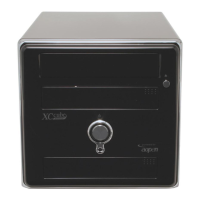
2. Select Integrated Peripherals > SIS OnChip PCI Device > SiS Serial ATA Mode.
3. For installing Windows 2000/XP, please select “IDE” mode; Floppy drive is not necessary.
4. For installing Windows 98SE/ME, please select “RAID” mode; Floppy Drive is not necessary,
but make sure FDD is disabled in BIOS or FDD is correctly connected to motherboard.
5. Finally, press <F10> to save the setting and exit BIOS setup.
A



 To Next Page