PAGE 4 AR7030 OPERATING MANUAL
2-3 Quick reference guide
Key
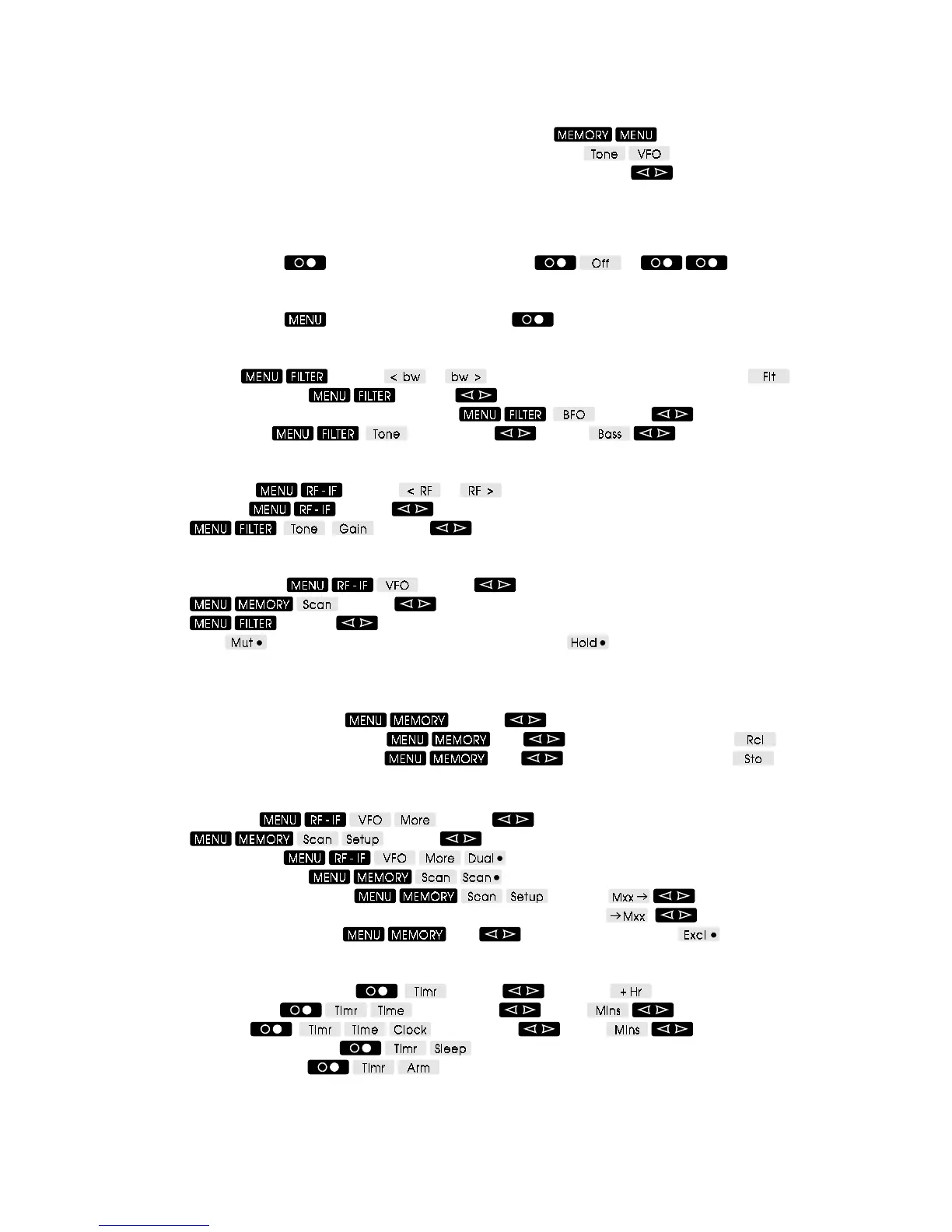
Buttons shown white on black are labelled on the front panel, for example
Buttons shown black on grey are soft-keys labelled on the display, for example
The spin-wheel is labelled on the display and shown with up/down arrows, for example Gain
Soft keys shown with a bullet after the legend operate as toggles (on / off). The bullet shows the current state -
solid for on and hollow for off.
Power
To turn the receiver on, press To turn the receiver off, press or
Display
To display the S-meter, press To display the clock press
Filters
To change filter, press and use or Alternatively, cycle through filters with
To shift the filter passband, press and use PBS
To adjust audio frequency in CW and DATA modes, press
and use BFO
To adjust audio tone, press
and then use Treb or Bass as required
RF and IF Gain
To adjust RF gain, press and use or for adjustment in 10dB steps
To adjust IF gain, press
and use Gain (for RF and IF controls together)
OR press
and use Gain (for IF gain with filter bandwidth)
Squelch
To adjust squelch level, press and use Sql (for squelch with dual VFO)
OR press
and use Sql (for squelch with memory scan)
OR press
and use Sql (in NFM mode for general listening)
With squelch active
will mute the receiver’s audio with no signal, and will stop scanning if a
signal is present
Memories
To select and preview a memory, press and use Mxx
To recall from a memory (into the VFO), press
, use Mxx to preview then press
To store into a memory (from the VFO), press , use Mxx to preview then press
Scanning
To set scan speed, press and use Dly (for dual VFO scanning)
OR press
and use Dly (for memory scanning)
To scan the two VFOs, press
To scan memory channels, press
To set memory block for scanning, press then use From
or
To
To exclude memories from scan, press
, use Mxx to select then press
Clock and Timer
To set timer run time or sleep time, press and use Mins and
To set timer start time, press and then use Hrs or Mins as required
To set clock time, press
and then use Hrs or Mins as required
To start sleep mode countdown, press
To arm timer for switch-on, press



 To Next Page