AR7030 OPERATING MANUAL PAGE 19
Manual synchronous AM : If you prefer to be in total
control, the automatic synchronous AM system may be
switched off and a manual system used in its place with
selectable wide and narrow bandwidths.
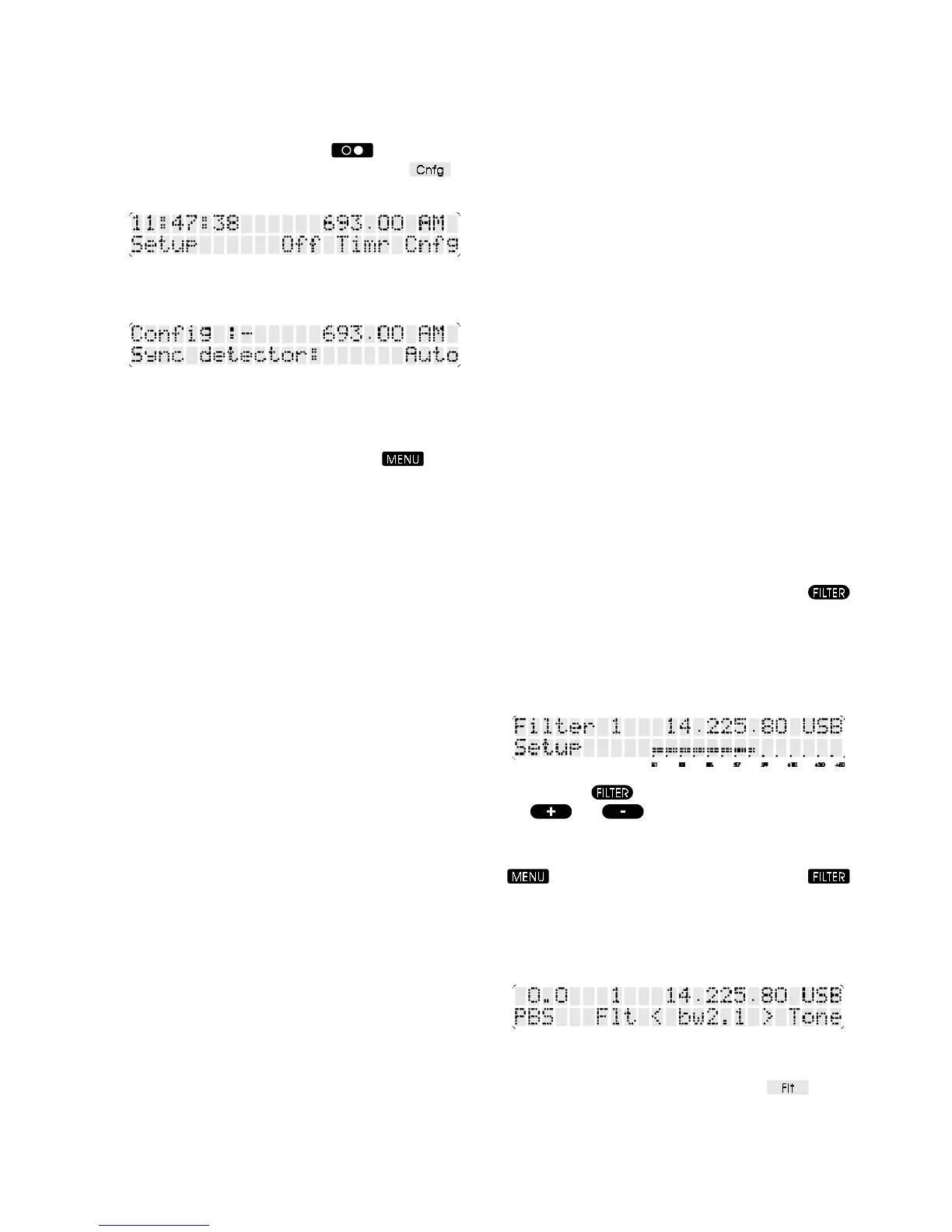
From the SETUP menu (press the
button if Setup
is not displayed above the spin-wheel) choose
to
go the to CONFIGURE menu.
Rotate the spin-wheel until the display indicates
Sync detector:
Pressing the soft-key on the right will change the
synchronous detector through its three modes:- Auto,
Narrow and Wide. Narrow and Wide are both manual
modes. Operational changes are made immediately so
that you can assess the results. Press the
button
to exit from CONFIGURE.
In wide mode the synchronous detector is easy to tune
but deep fades may result in an unlock and some
distortion. Narrow mode requires precise tuning but copes
better with deep fades. In either mode the frequency
indicated at the lock point may be offset by a couple of
hundred Hertz from the transmission frequency. This is
quite normal and will vary with temperature. The frequency
readout is not accurate because the detector calibration
is by-passed in manual mode. Once the receiver is locked,
phase error is used to produce tuning aid symbols
<<< or >>> to enable optimum tuning.
In manual synchronous mode, the AR7030 should be
tuned in a similar manner to any other receiver equipped
with synchronous AM - so that there is no beat note (this
is referred to as zero beat). Zero beat is a null point at the
centre of an AM transmission where the carrier is phase
locked to an injected carrier generated by the AR7030.
There will be ascending tones when tuning to either side
when the carriers are not locked.
Even when tuning in manual synchronous AM, the AR7030
provides useful status information:-
Snc Synchronous AM mode is selected and is locked.
This is always displayed for the first couple of seconds
after synchronous mode is selected.
(U) Synchronous AM is unlocked, you can usually hear a
beat note.
<<<The detector is locked but not optimally tuned to give
the best audio quality. To correct this, tune the receiver to
a lower frequency by rotating the main dial anti-clockwise.
>>>The detector is locked but not optimally tuned to give
the best audio quality. To correct this, tune the receiver to
a higher frequency by rotating the main dial clockwise.
(A) The receiver is being tuned and has temporarily
switched to AM mode. While synchronous AM is selected,
you may turn the main dial to tune the receiver without
first returning to AM mode. The receiver will automatically
drop back to AM mode and will display the legend (A) to
indicate this. The synchronous AM system will
automatically reactivate a few seconds after tuning has
stopped.
6-6 IF filter bandwidth selection
As standard the AR7030 is fitted with four different filter
bandwidths. USB, LSB, CW and DATA modes require a
narrow filter of 2.5 kHz or less while AM and Synchronous
AM require a wider bandwidth of 4.0 to 7.0 kHz and NFM
requires a bandwidth of 9.0 to 15.0 kHz. The wider the
filter, the better the audio quality but the receiver is then
more prone to adjacent channel interference. For this
reason different bandwidths can be selected for each
mode. A further two filters, giving a greater selection of
bandwidths, may be installed.
The receiver identifies its filters by number, 1 being the
narrowest up to 4 as the widest on the standard unit. If
more are fitted the order is maintained, so the widest may
be number 5 or 6. The numbers are independent of the
circuit position where the filters are installed. To help the
operator, the receiver also displays the bandwidth of the
current filter selected. This figure is established by the
receiver for each filter fitted when the calibration routine
is run (see section 6-2).
To review the current filter at any time press the
key on the infrared controller and the currently selected
filter will be displayed in the top left corner of the LCD for
about 5 seconds.
On the standard model fitted with four filters, the
USB/LSB default filter (2.2 kHz) is displayed as:-
After pressing the bandwidth can be changed using
the
and keys.
Filter selection from the receiver’s front panel requires the
FILTER menu. If the S-meter is not displayed, press the
button to return to the menu root. Press the
button to choose the FILTER menu - the LCD will show
PBS, filter number, filter bandwidth plus a menu link to
TONE. The exact form of the menu depends on the
selected mode, for example NFM has squelch in place of
PBS and CW or DATA modes include BFO.
To change filter, press the buttons beneath the up or down
arrows on either side of the displayed filter bandwidth. To
cycle through the available filters, press the
button
(available in LSB, USB, AM and Sync modes).



 To Next Page