PAGE 18 AR7030 OPERATING MANUAL
The setting of AGC speed is important for SSB reception.
Usually a SLOW setting provides the best results when
background noise will usually be reduced. Select the 2.2
kHz IF filter and experiment with the AGC and IF GAIN
for best results. If splatter is encountered from adjacent
channels, it may help to reduce the bass audio tone control
to -5 and the treble control to no more than +2.
When listening to amateur band nets and wishing to keep
background noise to a minimum, rotate the IF gain control
anti-clockwise to reduce gain so that the S-meter graphic
just lifts with voice peaks, this can reduce the background
noise especially during pauses in speech.
Do remember that reducing the IF GAIN control (which
increases deflection of the S-meter) reduces the sensitivity
of the receiver, the normal position is fully clockwise: 99%
= maximum sensitivity.
USB Upper Side Band - The same comments apply as
for LSB. By convention, radio amateurs use USB above
10MHz. USB is used by most commercial long distance
point-to-point communication links on short wave including
shipping and oceanic air traffic control.
CWContinuous Wave - Often referred to a carrier wave
or Morse code. The BFO injection frequency may be
varied for optimum reception. An optional Collins, 500Hz,
7 resonator, mechanical filter may be fitted and will greatly
aid rejection of unwanted signals on this mode.
Dat Data mode - the data mode enables different carrier
reinsertion (BFO) and pass band (PBS) settings so that it
can be tailored for whatever decoder is attached to the
receiver (FAX or RTTY, etc).
When the PBS menu is chosen in CW or DATA modes,
the BFO frequency is also displayed (where the filter
number is usually shown).
NFM Narrow-band Frequency Modulation - this provides
high quality communication for relatively short distance
operation. NFM uses a greater frequency bandwidth than
other modes such as SSB so is only used at the higher
frequency end of the HF band. Typically, on short wave,
FM is used by Citizen Band radio in some geographical
locations and 10m amateur band operation centred around
29.6 MHz. Always select the widest filter (10 kHz).
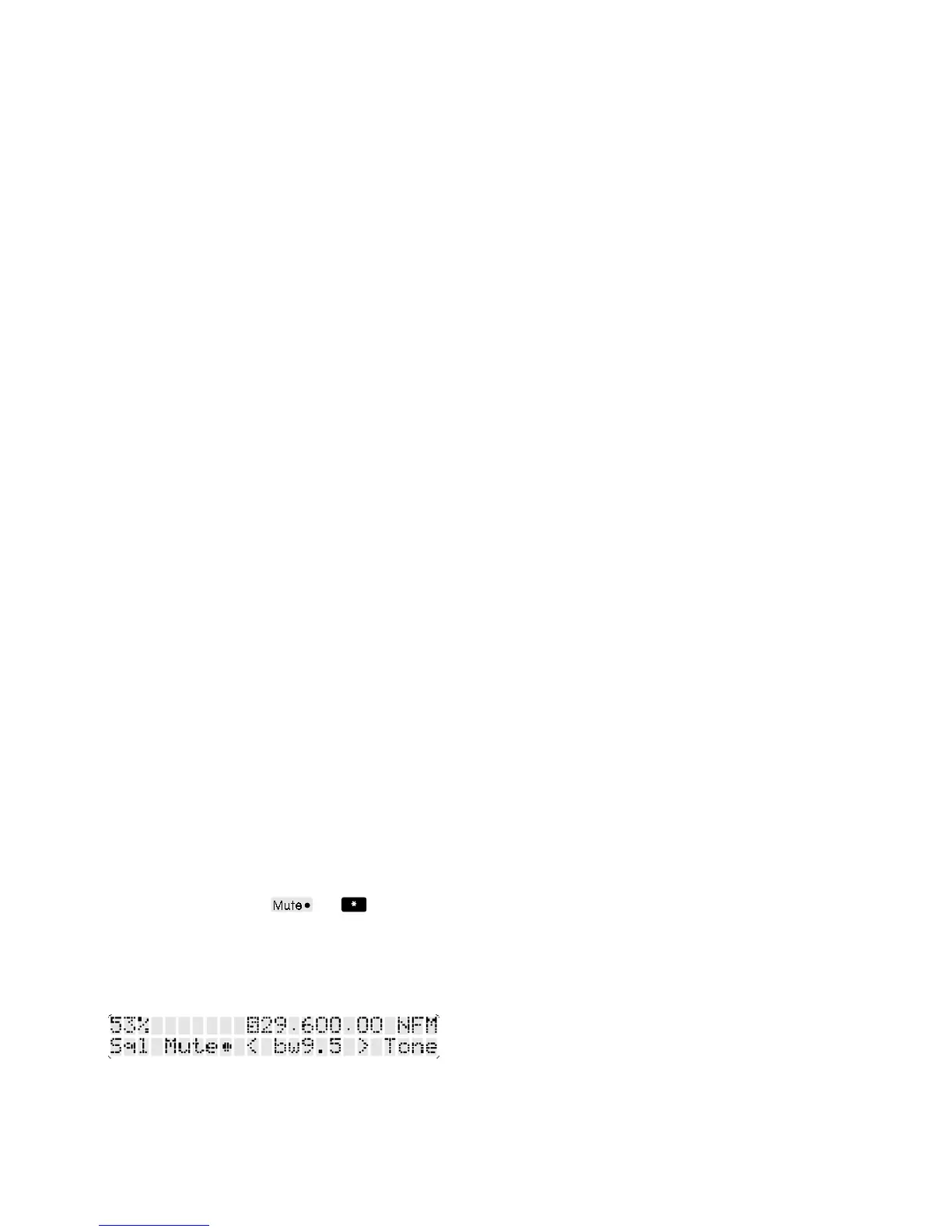
On the FILTER menu the spin-wheel is assigned to squelch
level, in place of PBS on other modes (PBS is pointless in
NFM mode). The squelch level is expressed as a
percentage and the soft key
(the button) turns
squelch muting on or off. When the squelch is advanced
far enough to cancel the background noise, a reversed
S is displayed to the left of the frequency readout. If the
Mute bullet is filled (i.e. muting enabled) the audio will be
silenced in the absence of a transmission.
If the squelch control is set too low, or muting is not enabled
the background noise may be quite loud in the absence
of a transmission. For ease of listening the squelch control
should be rotated clockwise until the reversed S indicator
just comes on. This adjustment should be carried out when
no signal is present - the point where the squelch indicator
changes is known as the threshold point. Do not advance
the squelch control more than necessary or the receiver
will not un-mute when weak signals are received.
Note regarding squelch: The squelch operation on the
AR7030 is driven from signal strength, so it will work in all
reception modes. The reverse S on the LCD indicates
when the squelch is active... you may enable or disable
muting as you wish. The squelch is also used to control
scanning and dual VFO operation.
Automatic synchronous AM: The receiver will display
an (S) as the mode indication on the LCD while evaluating
the frequency of the tuned signal, then will re-tune the
receiver automatically before locking on to the
transmission. Even if the transmission subsequently moves
in frequency to some degree, the AR7030 will track it
automatically, but the display will not change. The auto-
track reduces the chances of unlock due to thermal
changes in the receiver or wandering transmitters.
The exact process is:-
(S) The receiver is in AM mode, switches off any passband
shift and evaluates the frequency of the transmission. The
receiver is automatically re-tuned as necessary. The set
is capable of determining centre frequency to better than
100 Hz with an error of around 30 Hz being typical.
Sometimes it is spot on!
Initially a wide synchronous detector bandwidth is
employed as the receiver ‘homes in’ on the desired signal.
When almost on target a narrow bandwidth is selected
which can cope with deep fades.
Any previous PBS setting is re-applied.
Snc The receiver is now locked onto the transmitters
carrier signal. Any carrier reduction and the accompanying
selective fading distortion will be greatly reduced.
Even if the transmission frequency wanders (such as
pirate, low cost stations) the receiver will track it and remain
firmly locked. Although the set is effectively re-tuned to
maintain lock, the display is not updated, this reduces any
annoying effect of numbers blinking back and forth.
(A) While Snc mode is selected, you may turn the main
dial to tune the receiver without first returning to AM mode.
The receiver will automatically drop back to standard AM
and will display the legend (A) to indicate that it is
temporarily receiving in AM mode. This is to prevent
unpleasant whistles which are associated with tuning a
receiver while in synchronous AM mode. The synchronous
AM system will automatically reactivate a few seconds
after tuning has stopped.
Note: Pass band tuning may be used in conjunction with
synchronous AM for selecting double sideband, upper
sideband or lower sideband. Do not swing the PBS control
too far while receiving in synchronous AM because the
receiver will have difficulty locking when the carrier is
moved outside of the filter passband.



 To Next Page