AR7030 OPERATING MANUAL PAGE 17
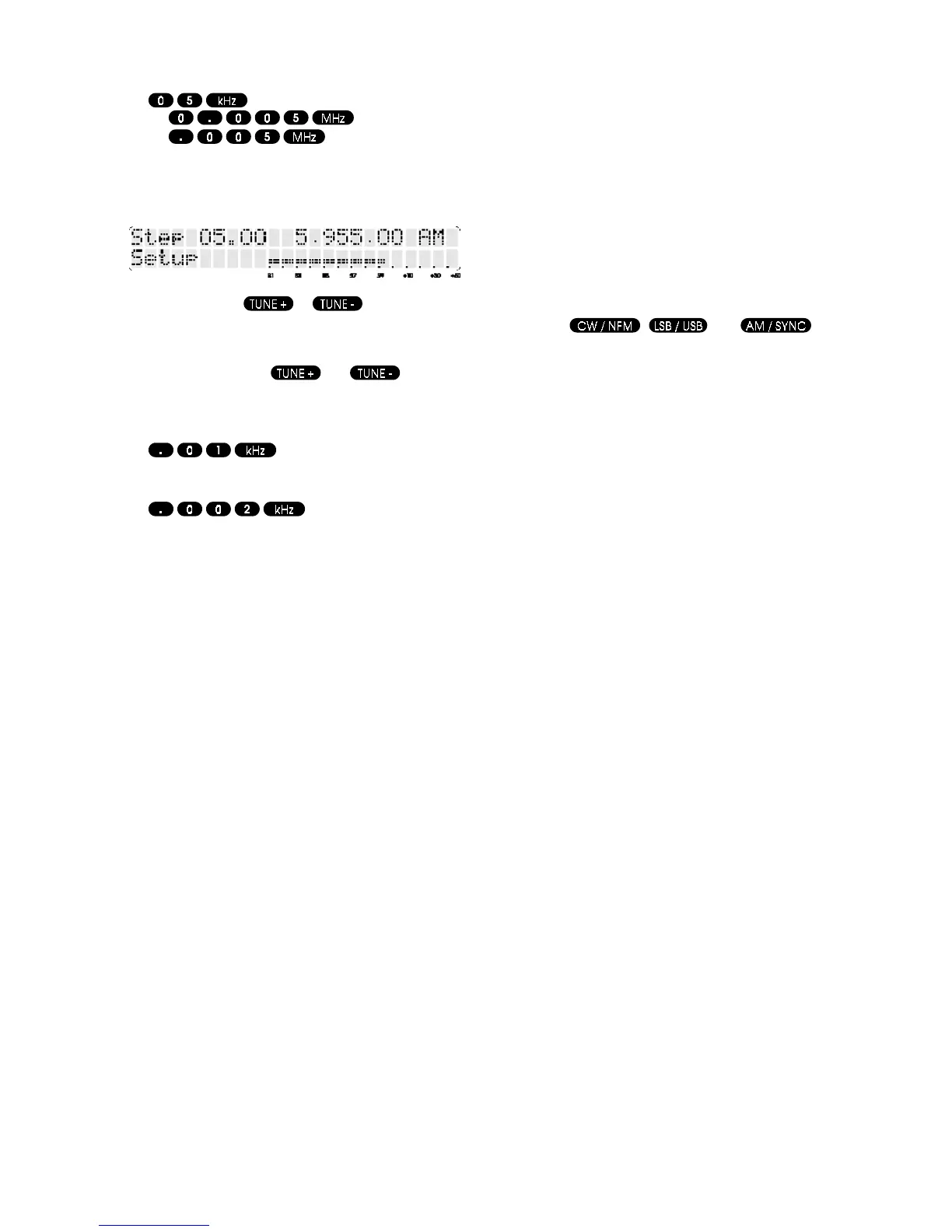
Other permutations are also accepted:-
or
or
The LCD briefly confirms entry as Step 05.00 in the top
left of the LCD to show that the entry is accepted as a
step size and not a frequency to tune to.
Each time the keys or are pressed, the
receiver will step up or down by 5kHz (as this is the step
size currently selected). The LCD frequency readout
changes as the receiver tunes to new frequencies. You
may hold down the
or keys for
continuous tuning in the selected step size.
To select a tuning step of 10 Hz, type
To select the smallest possible tuning step, type
VFO-A and VFO-B can store different step sizes.
Note: The receiver stores all of its frequencies in binary
steps (the AR7030 doesn’t think in decimal!) and as a
result the last digit of the displayed frequency may gain or
loose 10 Hz especially if the TUNE keys are used
repeatedly. This is simply because the step size cannot
be stored as an exact number of kHz.
d. Other methods of frequency selection
It is also possible to recall memories into the active VFO
as a means of changing frequency. For instance, a number
of memory channels could be set up with the centre or
most popular section of your favourite amateur bands or
broadcast bands then recalled as the starting point for
manual tuning.
Frequency selection may also be accomplished using an
external computer connected to the remote port.
6-5 Changing reception mode
The AR7030 is equipped with seven reception modes as
standard, these being:- DATA, CW, USB, LSB, AM,
Synchronous AM and NFM.
Mode selection buttons are ergonomically placed above
the main dial, located toward the top right corner of the
front panel. These mode buttons have only one function
and are not used for anything else, this makes them
available at all times - reception mode may be changed
regardless of what menu is displayed on the AR7030 LCD
(except when it’s switched off!).
The mode buttons select from a rolling list:-
Dat (data reception)
CW
LSB
USB
AM
Snc (synchronous AM)
NFM
The reception mode is displayed to the right of the
frequency readout on the LCD. Any reception mode may
be selected on any frequency within the receiver’s short
wave coverage.
Mode may also be changed using the keys of the infrared
controller
, and . Data
reception mode cannot be selected from the infrared
controller.
The keys select the mode listed first (to the left) i.e. CW,
LSB and AM unless that mode is already in operation,
when they will select the mode listed second i.e. NFM,
USB and SYNC.
AM Amplitude Modulation - Used by broadcast services
throughout the world on long wave, medium wave and
short wave.
For best results use either the 5.5 kHz IF filter (for normal
operation) or the 7.0 kHz IF filter for higher fidelity when
signals are strong and free from interference. You will have
to experiment with the setting of the AGC so medium
speed (Med) may be a good starting point.
Snc Synchronous AM - the AR7030 uses a new
automatic variable bandwidth synchronous AM circuit
which is capable of automatically tuning the receiver and
locking on to fading transmissions. It is also possible to
select manual synchronous AM although the default is
automatic.
Synchronous AM is a special form of AM detection capable
of reducing the effects of fading on long wave, medium
wave and short wave signals.
LSB Lower Side Band - is a form of Single Side Band
(SSB). LSB tends not to be used commercially but is
extensively used by radio amateurs on frequencies below
10 MHz. This assists the separation of commercial and
amateur users on traditionally shared bands and prevents
them from unintentionally speaking with each other.
SSB is a very efficient method of transmission as the
unwanted second sideband and carrier have been
removed. This allows the full transmitter power to be
employed in carrying useful information within the wanted
sideband. As a result greater distances are possible on
SSB and a smaller frequency bandwidth is required than
most other modes.
The AR7030 uses true carrier re-insertion so that voice
becomes intelligible - with ease. However due to the
complexities of SSB, audio may never sound quite 100%
natural and often listeners comment on it sounding a little
like Donald Duck. This is normal, and with practice you
soon become used to tuning and listening to SSB... it is
not a problem specific to the AR7030.



 To Next Page