© Ikonix USA
31
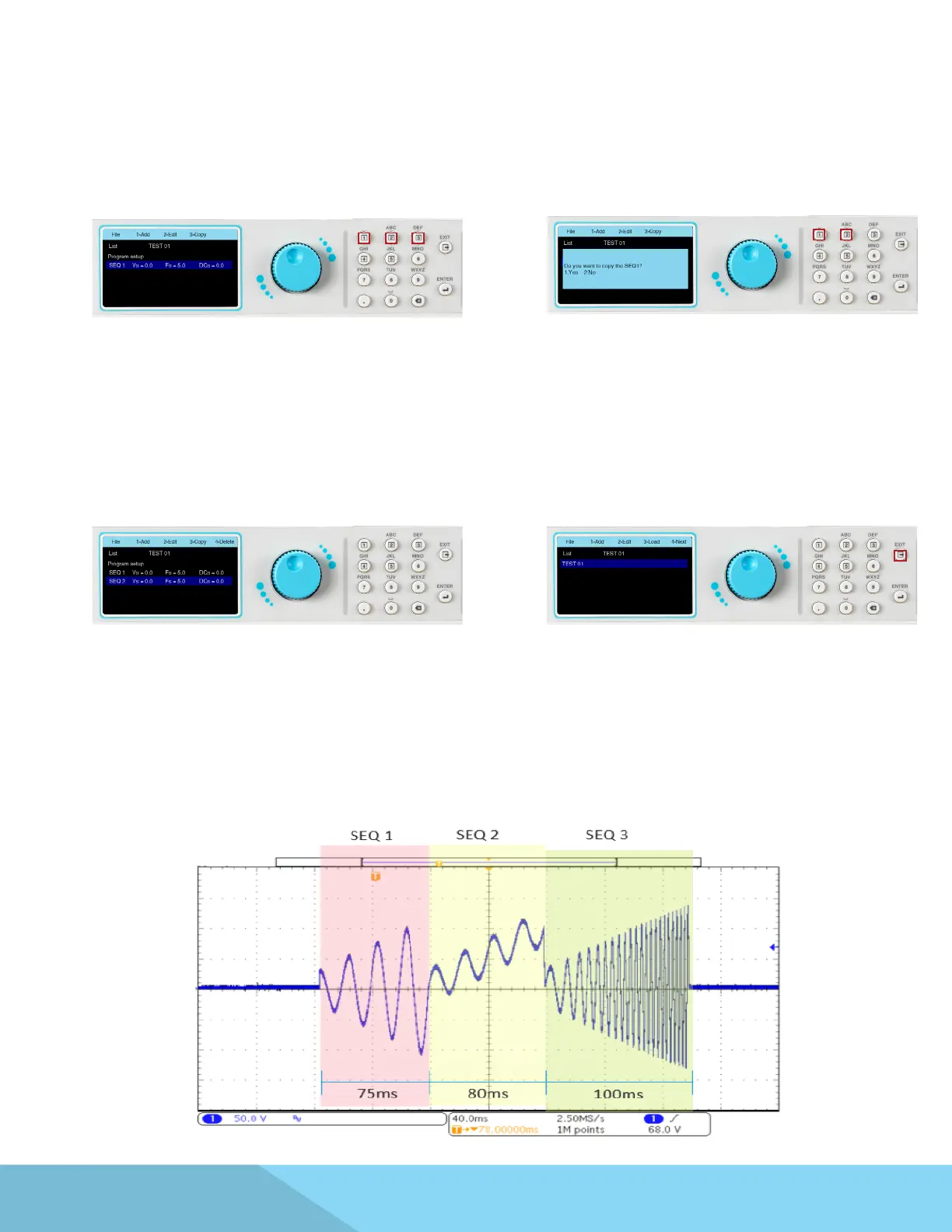
3. When copying a sequence, if Yes is selected
the next screen will display the second sequence
along with options on the menu bar to Add, Edit,
copy or Delete a sequence:
1. To Add a new sequence press the number 1
key on the keypad, to Edit press the number 2
key, and to Copy a sequence press the number
3 key as displayed on the menu bar:
2. When choosing to copy a sequence the
message on the screen below will be displayed.
Select 1 for Yes or 2 for No:
The Program Setup and sequence parameters can be edited in the exact same manner as described in
the previous sections, using a combination of rotary knob and keypad.
4. Once all the Program Setup parameters
have been programmed and all the sequences
have been created press the EXIT key on the
keypad and the screen will display your newly
created test le (along with other test les that
may have already been saved):
4.4.4 List Mode – Test Parameters
The List Mode allows you to create and generate complex output sequences with varying time, amplitude,
frequency, and voltage. The List Mode can be used to create a wide range of waveforms to simulate power
grid faults and disturbances. A typical waveform for List Mode with three sequences will perform as
follows:



 To Next Page