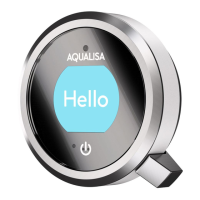
In My Q
TM
you will find the
Create icon. Push the
Q
TM
lever to start creating
your very own shower
profile, which you can save
for every time you need it.
You can create up to a
maximum of 9 personal
profiles; this includes
bath profiles.
Creating a My Q
TM
profile
CREATING PROFILES
There are 4 parameters in creating your personal
profile: temperature, flow, outlet and duration.
These settings are highlighted in turn. Adjust each
parameter by moving the Q
TM
lever left and right.
Push the Q
TM
lever to confirm your selection.
SAVING PROFILES
When you have confirmed all the settings, you
can save them, or edit them. If you save the
settings, they will be assigned the lowest profile
number available. The screen will return to the
Home screen, showing the new profile. Shower
profiles can’t be edited, but you can delete them
in the Settings menu (see page 18).
AUTO SAVE SHOWER
An easy way to save a profile is by switching on
Auto Save Shower in the Settings menu (see
page 18).
37
4
04:00
Save profi le
Edit pro
le
Auto save
shower
My Q
+
Push lever
to set
bath profi le
Recording
bath profi le
1
Push lever at
required depth
Bathing with Q
TM
Q
TM
bath can be switched on in the same way as Q
TM
shower. Adjust the
temperature with the Q
TM
bezel. Bath fill will always be at maximum flow.
SETTING BATH PROFILES
If you have selected the Bath icon in Settings/Configure Outlets (see
page 19) you will be able to set bath profiles. These enable Q
TM
to run the
bath to your perfect depth every time. Note that you can only create or
select bath profiles before you start the water.
First, enter My Q
TM
, then browse to the Create Bath icon. You will be
asked to fill the bath to your desired depth by pushing the Q™ lever.
Making sure the plug is in, switch on the water with the Q™ lever. Run the
bath to your desired depth and switch the water o with the Q™ lever. This
will automatically save your bath profile, and assign it the lowest available
number. Water temperature will not be recorded, so you can adjust it to suit
you every time.
13 14


 To Next Page
 Loading...