MANUAL
V1.0
TV+
PLAYING MUSIC > P. 19
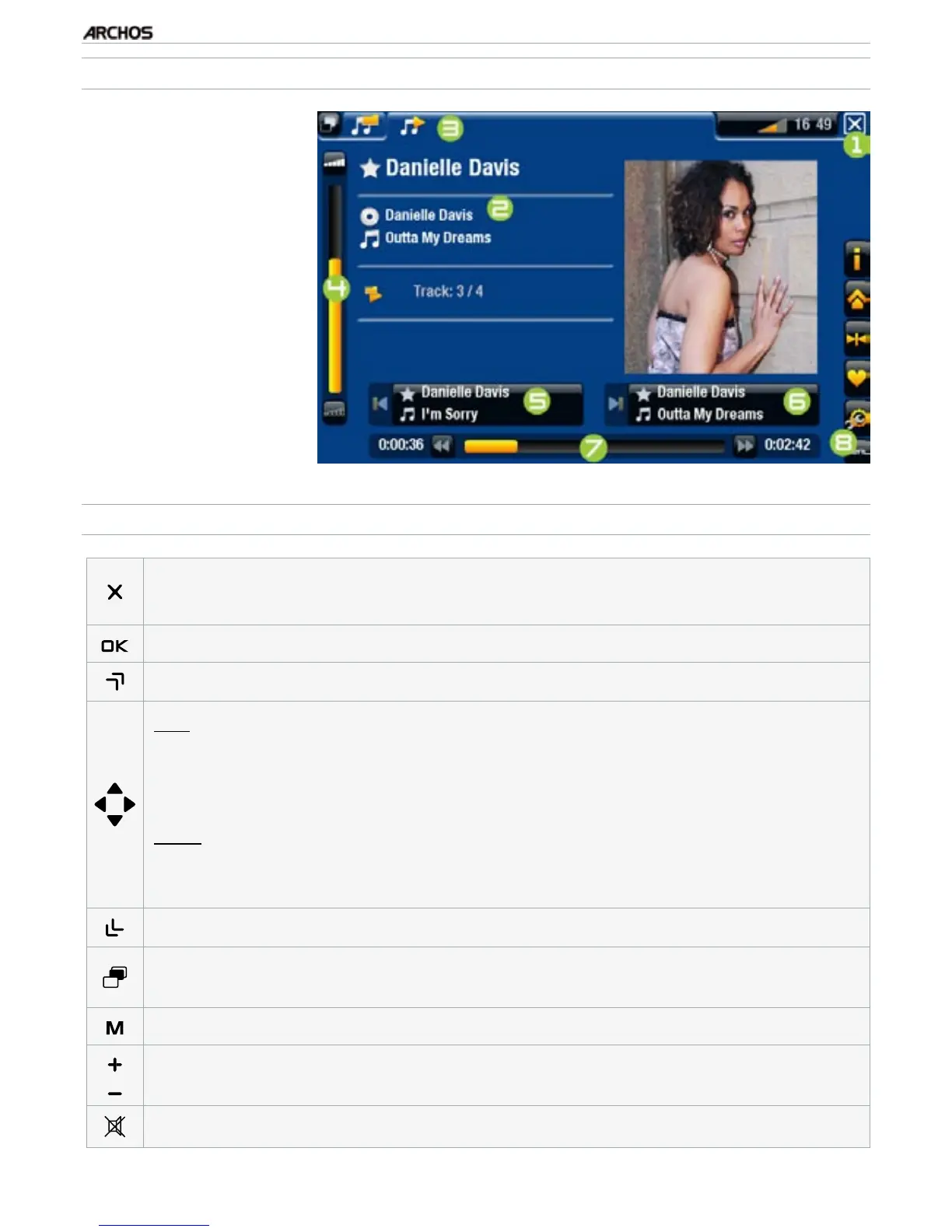
MUSIC PLAYBACK SCREEN
1.
Exit icon
2.
artist name, album
title, song title, play-
back status icon(s)
and track number
3.
available tabs
4.
volume level
5.
previous track
6.
next track
7.
progression bar
8.
menu items
MUSIC PLAYBACK BUTTON CONTROLS
press once: stop the song
and go back to the
“Music”
Library or browser
hold: exit the Music mode and go back directly to the Home screen.
-
-
pause/resume the song
accelerated fast forward
left:
press once: back to the beginning of the song, or previous song (in the
rst 10 seconds of a track)
hold: fast rewind
right:
press once: next song
hold: fast forward
-
-
-
-
accelerated fast rewind
tabs back to the Music Library or Music browser (depending on which mode
you launched the song from)
display available menu items
increase/decrease volume
Mute sound



 To Next Page