MANUAL
V1.0
TV+
USING THE FILE BROWSER > P. 33
4.2 using The file brOwser while lisTening TO MusiC
You can browse your les while listening to music:
Choose the “ARCHOS home screen” menu item while playing a song.
In the Home screen, select the “Files” icon to enter the File Browser and start
browsing through your les.
To go back to the Music playback screen, go to the Home screen and select the
“Music” icon.
4.3 using The pdf reader
Your ARCHOS features a PDF reader with hyperlink support.
In the Browser, PDF les are displayed with the
icon.
To view a PDF document, highlight the PDF document in the File Browser and
press OK.
ATTENTION: The ARCHOS PDF reader may not implement all PDF features.
For example, you will not be able to open password protected PDF les.
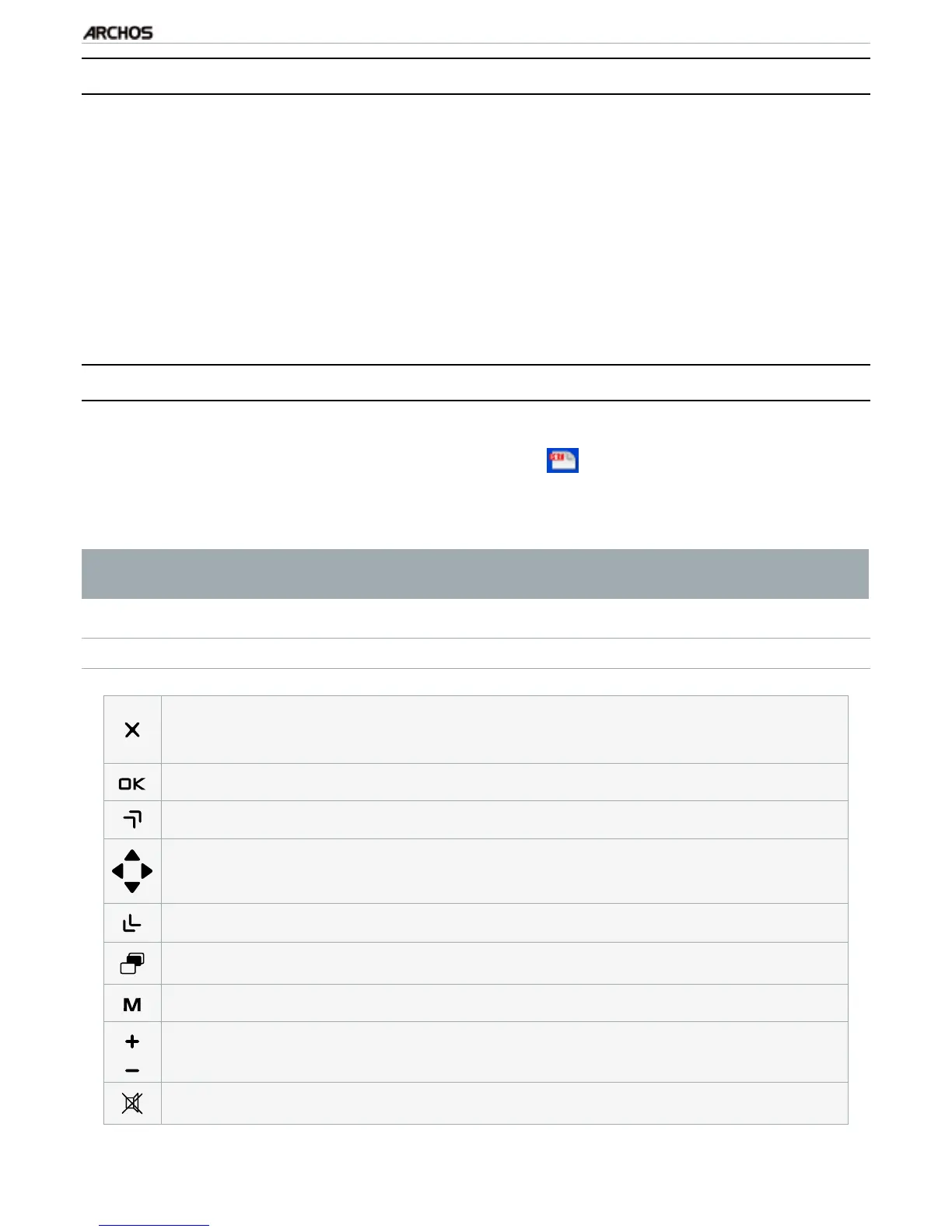
PDF BUTTON CONTROLS
1
st
press: t to width (if zoomed)
2
nd
press: exit PDF reader
-
-
follow a highlighted link (surrounded by a red outline)
previous page
navigate within the current page
next page
-
display available menu items
-
-
•
•
•
•
•
•



 To Next Page