MANUAL
V1.0
TV+
VIEWING PHOTOS > P. 29
3.3 phOTO Viewer seTTings
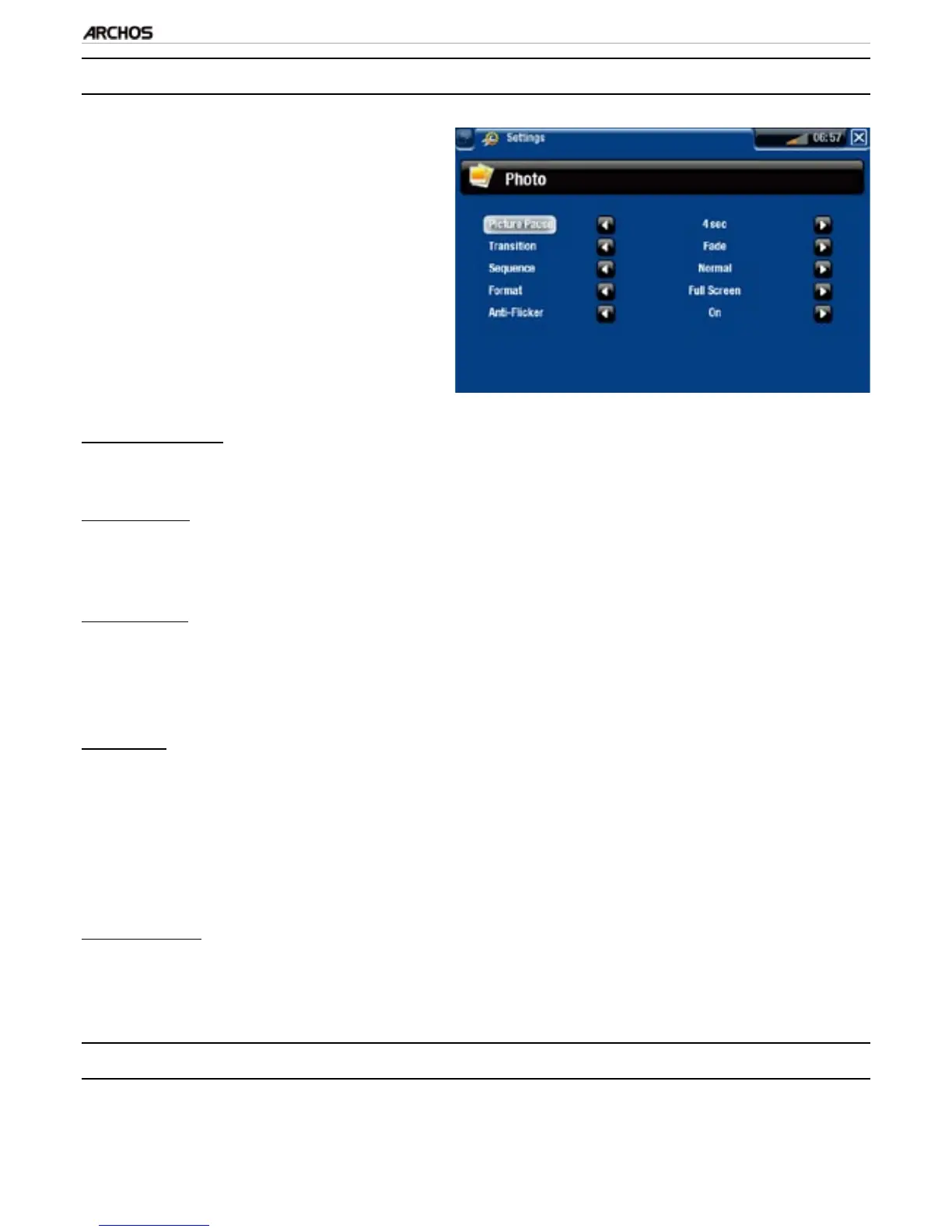
In the Photo mode, you can access
the Photo viewer settings screen via
the “Settings” menu item.
Use the left/right arrows to select a
different setting for a parameter.
•
•
“Picture Pause”
denes the time that each picture will be displayed during a slideshow.
“Transition”
denes the transition effect to be used between two pictures. There are several
cool effects that you can choose from.
“Sequence”
allows you to enable/disable the shufe mode. If this parameter is set to
“Shufe”, your pictures will be displayed randomly. To disable the shufe mode,
select “Normal”.
“Format”
allows you to change the way the picture is displayed.
“Original”: displays the entire picture in its original format.
“Full Screen”: enlarges the picture to ll the screen. In order to t the screen of
your TV, your device might need to cut small parts of the image, most likely at
the top and bottom.
“Anti-icker”
if you have a regular tube type television (CRT), you can set this to “On” if you
nd that some photos icker.
3.4 playing a slideshOw
To view a slideshow, highlight a picture le in the “Photo” browser or while view-
ing a photo, and choose the “Start slideshow” menu item.
-
-
-
-
-
-
-
•



 To Next Page