MANUAL
V1.0
TV+
MAIN SETTINGS > P. 50
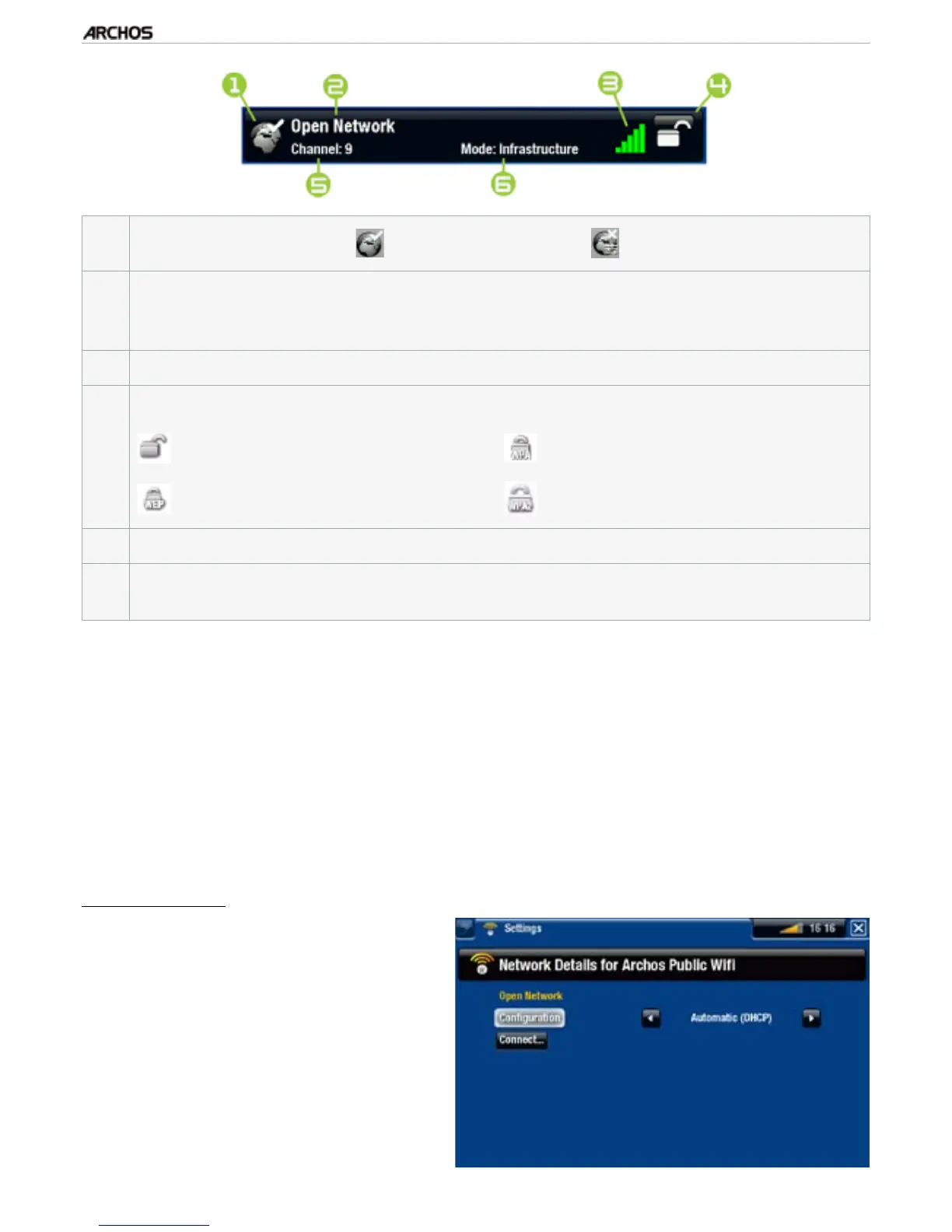
1.
Conguration status: congured network uncongured network
2.
The name of the network (SSID), if it is broadcasted
(if the SSID is not broad-
casted, you will be prompted to enter it in the next conguration screen if you
congure this network).
3.
The strength of the signal.
4.
The type of encryption key that is required:
Open network (no key)
WEP key
WPA key
WPA2 key
5.
The channel used by the network.
6.
The type of network (Infrastructure or Ad-Hoc).
Ad-Hoc networks are not sup-
ported at this time.
Use the navigation buttons to highlight a network and press OK.
You will be taken to the conguration screen for this network, where you will
have to enter some information to set up your access to this network.
WiFi Network Conguration
In order to connect to a wireless network, the ARCHOS will need some specic infor-
mation about the network. Your device will automatically pick up certain pieces of in-
formation that it needs from the WiFi router. You can enter the rest of the information
manually in the network’s conguration screen, as shown in the following sections.
Open Networks (also valid for Ethernet cable connection)
Open networks do not require an
authentication key.
If the network has automatic con-
guration turned on (DHCP)*, sim-
ply select the “Connect” button,
and your ARCHOS will connect to
this network, provided the signal is
strong enough.
•
•
•
•



 To Next Page