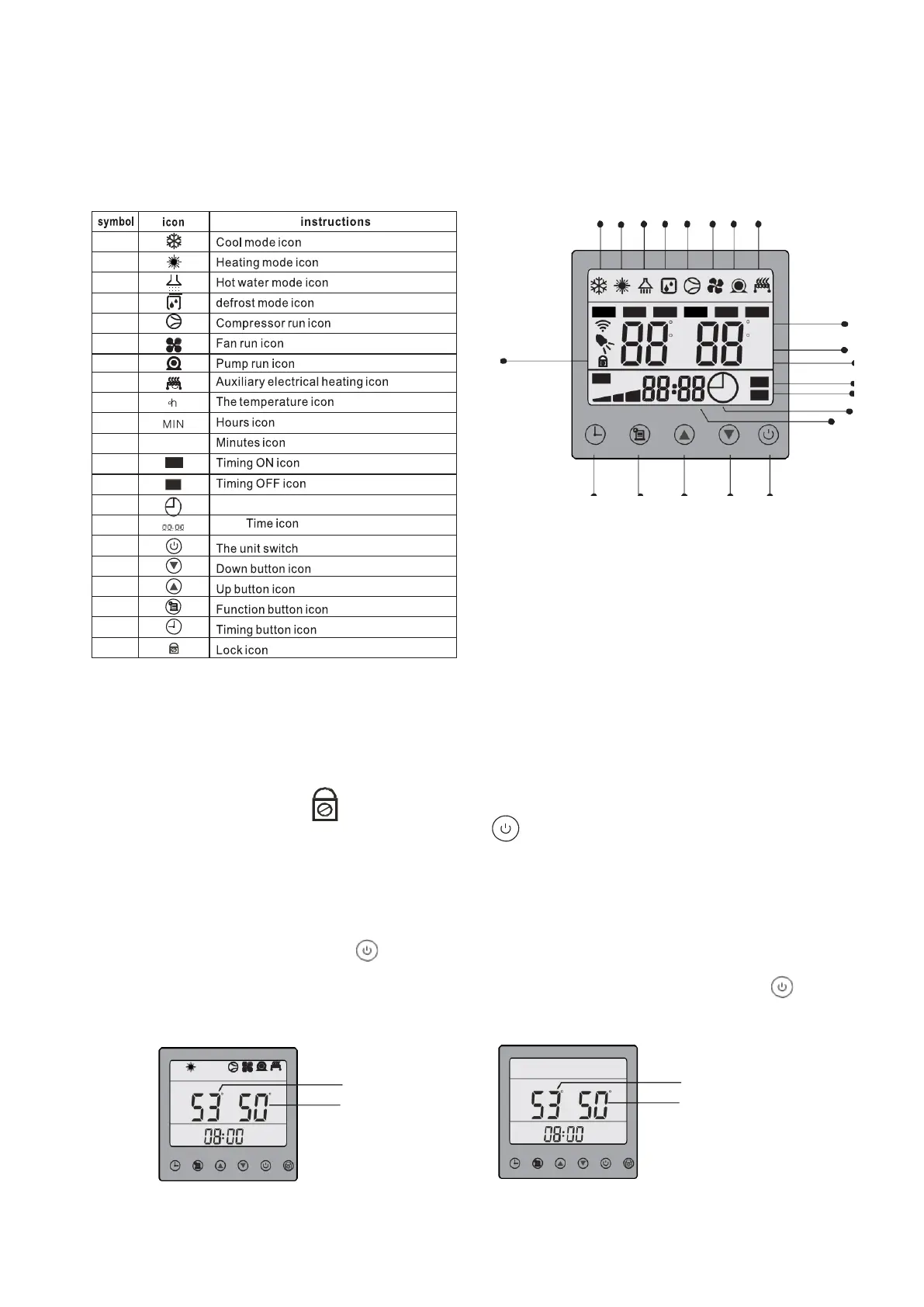
The Use of the Wired Controller
Buttons and Display Symbols Explanation
The User Interface and Functions Display is as below:
A B C D E F G H
SET OUT AMB.T IN
C
F
h
HOT ECO
C
F
h
M
A1
FAN AUTO
MIN
MIN
N
1
ON
O
2
OFF
P
Q
R
X
W
V
U
T
Wired Controller Operations
Keyboard Locking / Unlocking Operation
If no buttons are depressed on the controller for 30 seconds, the unit will switch to locked mode
automatically and the lock icon will display on the wired controller. It means that the keys
(buttons) are locked. To unlock, long-press the on/off button for 3 seconds
Turning the Unit ON/OFF
Under standby status (electric power is present, but unit is not operational), the display will look as
right figure below. Press the on/off button to turn the unit on. The operation mode icon will
display on the wired controller (cool or hot water mode or both). Long-press the on/off button
again, and the unit will turn off and show the Standby display.
制热
压缩机
风机
水泵
电辅热
Setting inlet temp. Setting inlet temp.
C C
inlet temp.
C C
inlet temp.
Working Status Standby status



 To Next Page