Modifying the Temperature Setting
While in operating status, short-pressing the button or button, which will modify the
temperature setting. For example, if in the hot water mode, it will modify the hot water tank
temperature setting. If in cooling condition mode, it will modify the setting of the returning
inlet temperature to the heat pump.
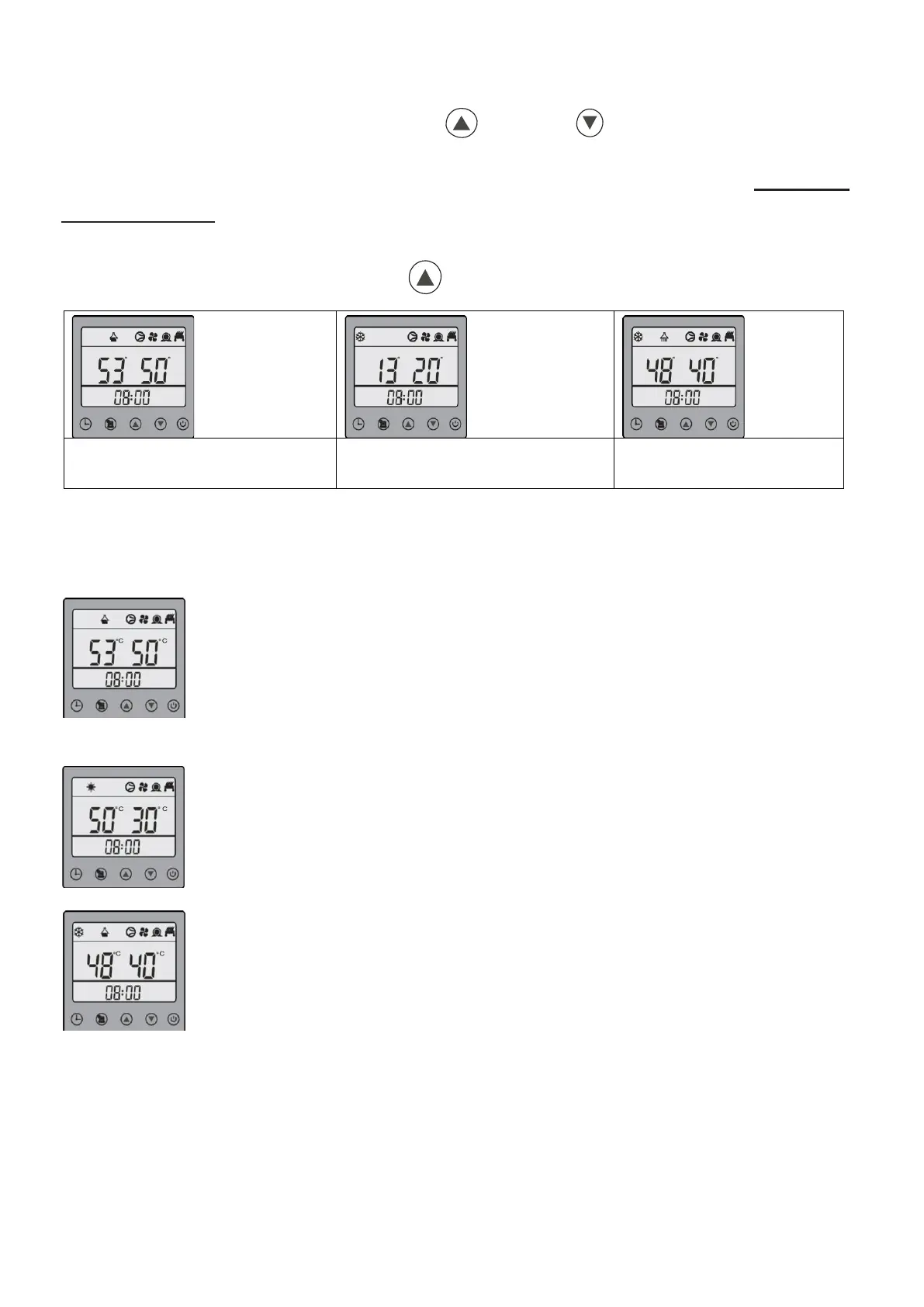
Mode Select Operation
While in operating status, long-press the button to change the operational mode.
In hot water mode, the temperature on the left side of the wire controller is
the temperature setting for the hot water tank, and on the right side is the
actual temperature of the hot water tank.
In cooling mode, the temperature on the left side of the wire controller is the
temperature setting for the returning water to the heat pump and on the right
side is the actual temperature of the returning water.
In hot water & cooling mode, the unit default priority is the hot water mode.
So, the unit will run the hot water mode at first, and the temperature on the left
side is the temperature setting for the hot water tank, while on the right side is
the actual temperature of the water in the hot water tank. When the hot water
tank temperature reaches its setting, the unit will switch to cooling mode
automatically. Now the temperature on the left side of the wire controller is the
temperature setting for the water returning to the heat pump, and on the right
side is the actual temperature of the returning water.


 To Next Page