31
Installing expansion card
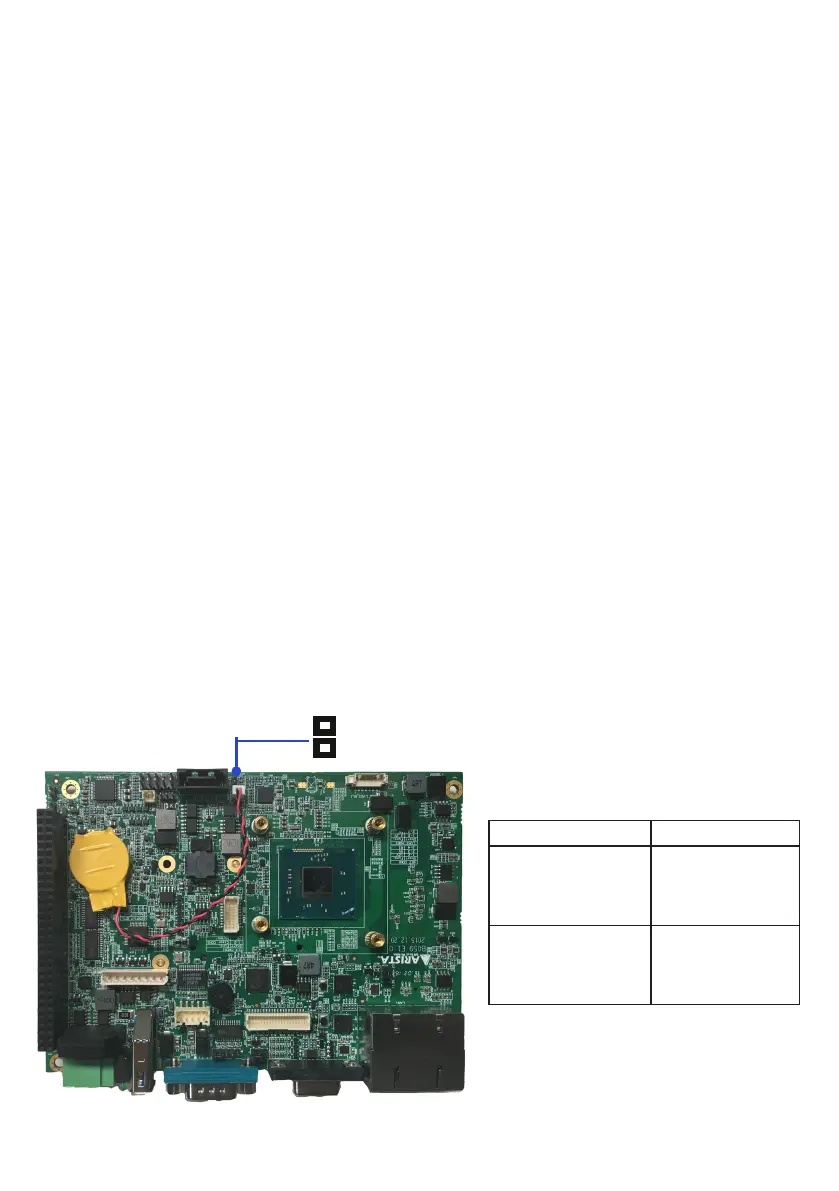
Clearing CMOS data
The MINI-PCIE slot supports PCIE cards such as a Wi-Fi LAN card, mSATA SSD,
SCSIcard,USBcard,andothercardsthatcomplywithPCIEspecications.The
followinggureshowsaWi-FiLANcardinstalledontheMINI-PCIEslot.
1. Locate the Wi-Fi LAN card on MINI-PCIE slot and align the notch on the card
with the key on the slot.
Follow the steps outlined below to install a Wi-Fi LAN card.
3. Press the Wi-Fi LAN card down and secure the card to the B059 motherboard
with the screws.
2. Insert the card into the slot at 45-degree angle, then push it in until the golden
ngeronthecardisdeeplyinsertedintotheslot.
As shown in the figure below, Clear CMOS jumper allows you to erase CMOS
data and reset setting to factory default. Normally this jumper should be set with
pins 1-2 closed.
If you want to reset the CMOS data, set the Clear CMOS jumper to pin1-2 closed
for just a few seconds, and then move the jumper back to pin1-2 open. This
procedure will reset the CMOS data to its default settings.
Description Pin setting
Keep CMOS
data(Normal)
Pin1-2
Open(Default)
Clear CMOS data
Pin1-2 Closed
2
1
Clear CMOS jumper


 To Next Page