Chapter 4: SURFboard Central mobile app features
5. To delete a device from a profile, on the user profile, expand Associated Devices by
tapping +, and swipe left on the device name to display the delete option. Tap on the
delete option to confirm.
Add time schedule to user profile
The Schedule Time feature of Parental Control sets enabled and disabled Internet access
times for profiles by days and hours. These days and hours of disabled Internet access are
called Rules. Rules are associated with profiles and all devices associated with the profile are
affected. You must create a profile before adding devices, and add devices to a profile before
creating the access restrictions for the profile.
Note: You must have a profile with associated devices created (page 43), and be
sure that Parental Control is enabled (page 41) before beginning.
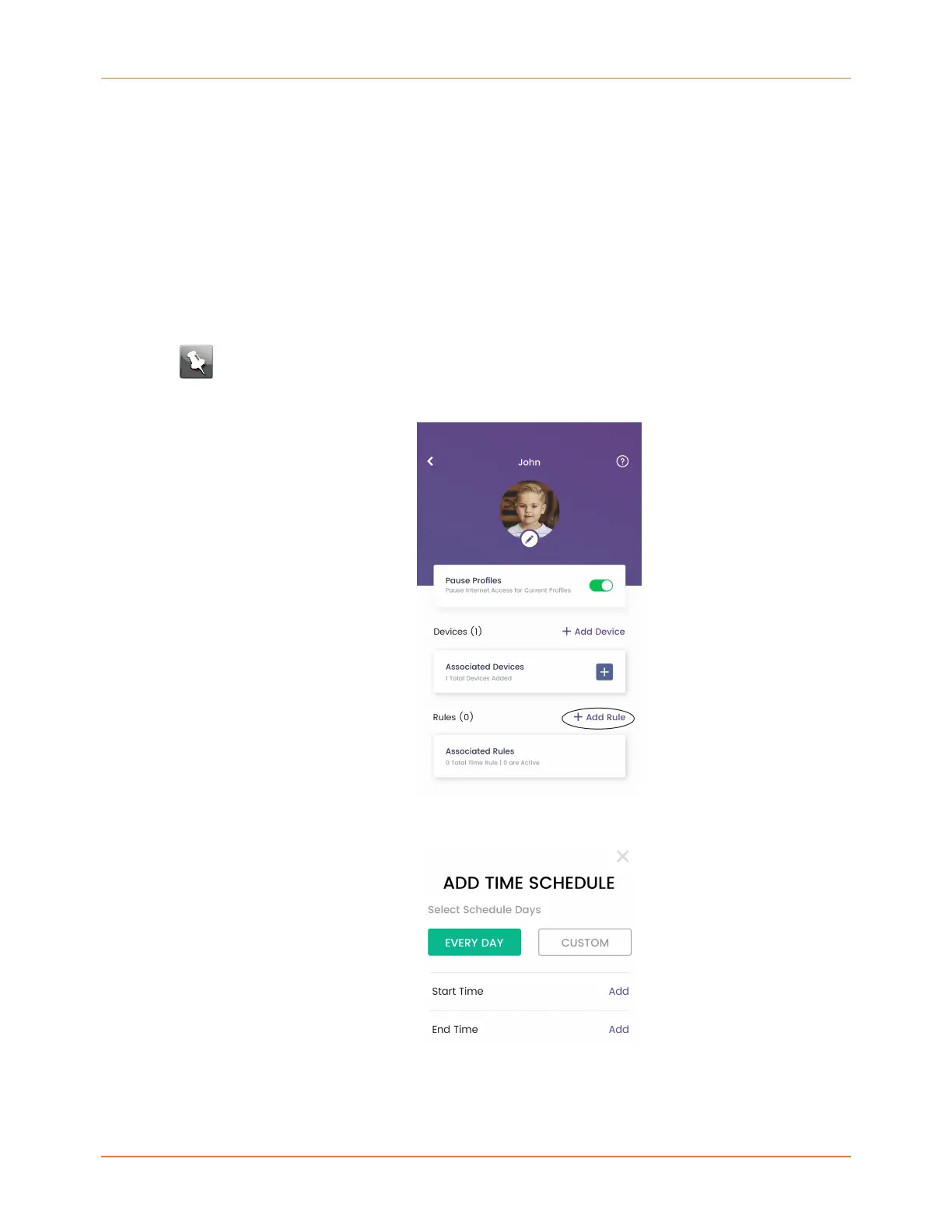
1. On the user profile, tap + Add Rule.
2. Tap ADD TIME SCHEDULE.
3. On the ADD TIME SCHEDULE window, select the days of the week (EVERY DAY or
CUSTOM) to disable Internet access for this profile. If you choose CUSTOM, a window
will display for you to tap the days of the week to disable Internet access for the profile.
SURFboard mAX User Guide Standard Revision x.1 44














 To Next Page