Chapter 4: SURFboard Central mobile app features
Parental Control
Your mAX router uses profiles to assign personal devices to members of the household and
manage their network access. Parental Control allows you to enable and disable access for
time blocks of hours, days, or weeks by profile. When you assign devices to a profile, the
time blocks you create control all devices on the profile. You can even instantly pause and
unpause Internet access by profile or for all profiles on the entire network.
The steps to setting up Parental Control are ordered. You must first enable Parental Control.
Then, you will create user profiles, add devices to the profiles, and finally create time
schedules designed to enable and disable access to your home Wi-Fi network.
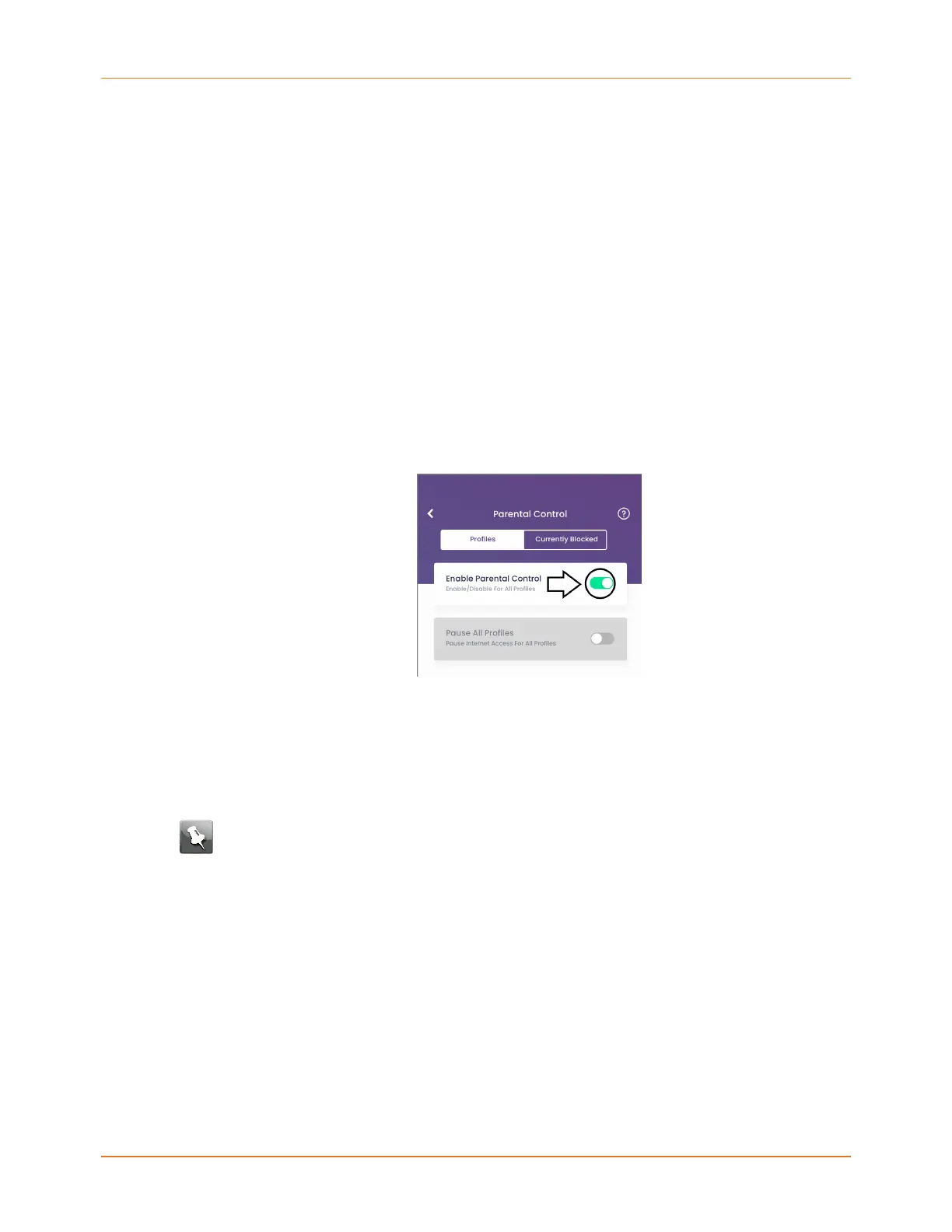
Enable Parental Control
1. Tap Parental at the bottom of the SURFboard Central mobile app.
2. Move the Enable Parental Control slider to the right to enable the feature.
Work with user profiles
This topic covers how to add, edit, and delete user profiles for Parental Control. Creating
profiles for individuals with access to your home Wi-Fi network and associating the devices
used by the profile allows you to control when Internet access is allowed and when it is not.
Note: Be sure Parental Control is enabled (page 41) before beginning.
1. Tap + Add Profile.
SURFboard mAX User Guide Standard Revision x.1 41













 To Next Page