56
5.6. Sound Sensors
Sound Sensors are used to measure the volume of a sound.
5.6.1. Connecting a Sound Sensor
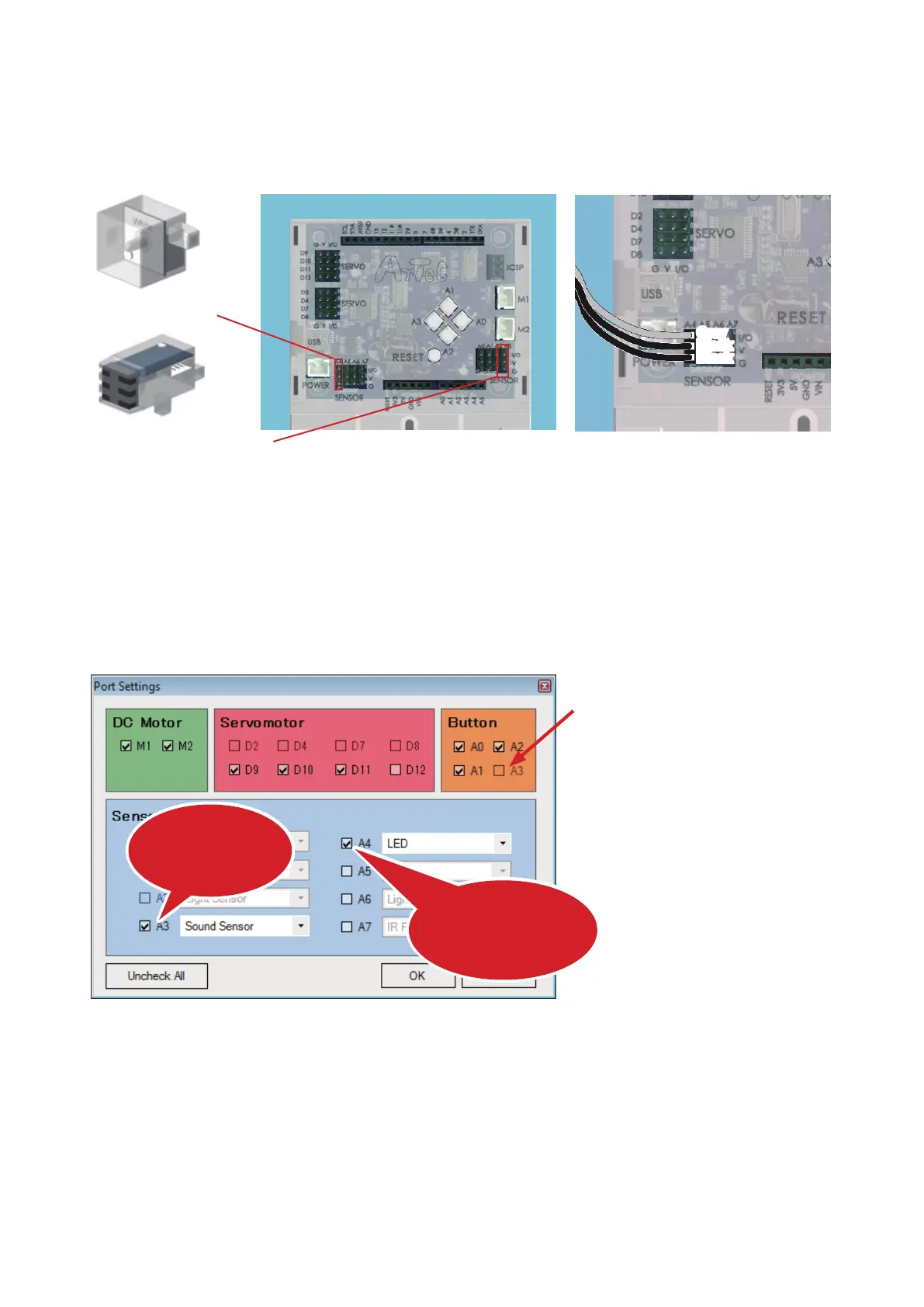
Connect an LED to Sensor/LED/Buzzer connector A4 on your Studuino and your Sound Sensor to A3
Gray
Black
Black
A4
A3
Keep an eye on your cables!
The gray wire should be at the top.
LED
Sound Sensor
5.6.2. Port Settings
Before programming, you'll need to set the ports in the Block Programming Environment to match the parts
connected to your Studuino. Select Edit from the menu and choose Port Settings to open the Port Settings
dialog box. Uncheck Button A3. Now check A3 under Sensor/LED/Buzzer and choose Sound Sensor.
You’ll also need to check A4 and choose LED.
Check and choose
LED
Check and choose
Sound Sensor
① Uncheck



 To Next Page