ARTEX/ACR Electronics, Inc.
A3-06-2824 Handheld Programmer Operations Manual
Y1-03-0272 Rev. F Company Confidential Page 42
6.4 Reader Database
All recorded messages are automatically saved to a database (up to 1000 records).
Select “Review” from the initial Sarcalc screen. The latest message will be displayed with
the date and time the message was recorded.
Navigate between older and newer saved messages by selecting “Prev” or “Next”. Any
displayed message can also be printed (if optional printer software is installed).
The number of records kept can be changed by selecting “Prefs” from the initial Sarcalc
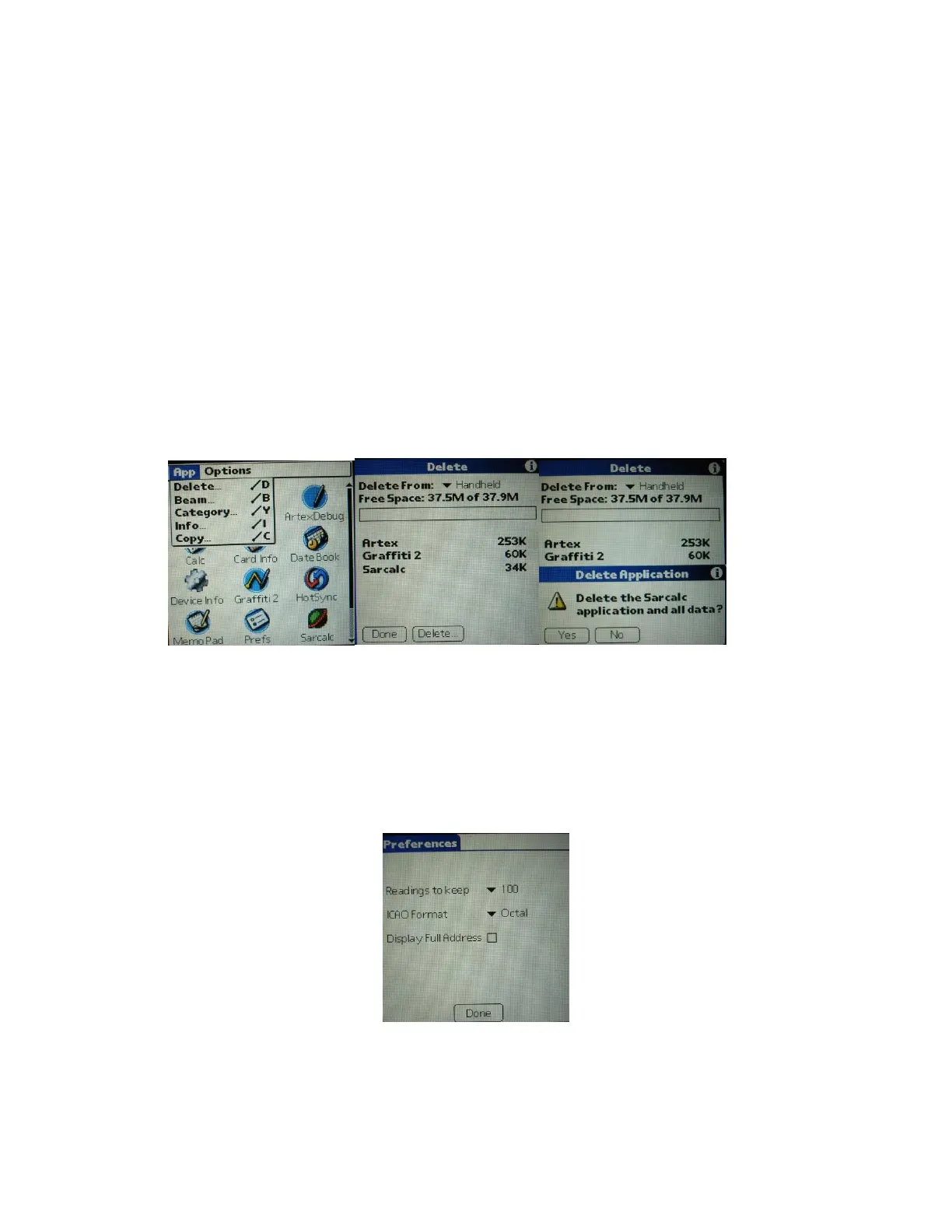
screen (Subsection 6.5). The database can be erased by deleting the database
“SarcalcDB” from the main Meazura screen, as shown in Figure 24.
1. Tap the upper left-hand corner of the main screen to show the “App” drop-down
screen.
2. Select “Delete”.
3. Select “SarcalcDB” to delete. Individual records cannot be erased.
Figure 24: Database Delete Screen Sequence
6.5 ELT Reader Preferences
If “Prefs” is selected from the initial Sarcalc screen (Figure 20), the following items may
be selected (Figure 25):
Figure 25: Sarcalc Preferences
• Readings to keep – 10, 20, 100, 1000 (Maximum number of readings to store in the
database)



 To Next Page