ARTEX/ACR Electronics, Inc.
A3-06-2824 Handheld Programmer Operations Manual
Y1-03-0272 Rev. F Company Confidential Page 13
3. Palm™ Desktop Software
Prior to use, the Palm™ Desktop, as supplied on the CD-ROM disc (Artex P/N 510-1200),
must be installed on the Windows XP-SP3 or later, Windows 7 PC that will be used to
interface with the Handheld Programmer. Follow the on-screen instructions for
installation.
If the CD-ROM disc cannot be found, follow these instructions:
1. Open desktop browser and go to www.acrartex.com
2. From the top menu, click Support.
3. From the left side Support menu, click ARTEX Support.
4. Go to Downloads and click Palm Desktop Drivers.
5. Unzip File Folder SFW_WINX32_PALM-DESKTOP_V4.1_20110322.ZIP
6. Double click Palm Desktop Installation.
7. Double click Palm Desktop.
8. Pop-up appears. Select Run.
9. Install Shield Wizard will open. Select Next.
10. Read the SOFTWARE LICENSE AGREEMENT.
11. Select I accept the terms in the license agreement, then Next.
12. When asked Complete or Custom, select Complete.
13. Select Existing User or Create New User.
14. When asked about Connections, select USB.
15. Select Install, then Finish.
16. Open Palm Desktop.
NOTE: The Palm desktop software works most amiably if a single Meazura™ (Palm)
device is associated with a single computer. It is possible to use more than one
Meazura™ device with the same computer, but attention must be given to
selection of appropriate user names when transferring data to and from
different units.
The Palm™ software identifies the User Name when the Palm™ Desktop
application is installed on a PC. Only one User Name can be used with the Artex
applications.
Once installed and configured, the Palm™ Desktop software allows installation of
additional software applications, as well as performing the hot sync function to transfer
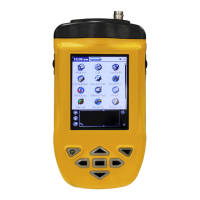
data to and from the Handheld Programmer (Meazura MEZ1500). ACR/ARTEX provides
a USB cable (452-0103) to connect to a PC.
3.1 Hot Sync
Once installed and configured, the Palm™ Desktop software allows installation of
additional software applications, as well as performing the hot sync function to transfer
data to and from the Handheld Programmer (Meazura MEZ1000). ARTEX provides a
USB cable (452-0103) to connect to a PC.



 To Next Page