ARTEX/ACR Electronics, Inc.
A3-06-2824 Handheld Programmer Operations Manual
Y1-03-0272 Rev. F Company Confidential Page 5
The primary differences between the previous Artex Programming Software (510-0406)
with Level Shifter (500-0232) and the Artex software used in the Handheld Programmer
are:
• Ease of use
• Portability
• Support of additional programming protocols
• Retention of programming information
• Rechargeable long life battery
NOTE: The Artex Handheld Programmer does not interface with the previous Artex
Programming Software (510-0406) or Level Shifter (500-0232).
1.3 Features
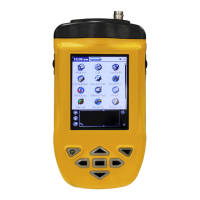
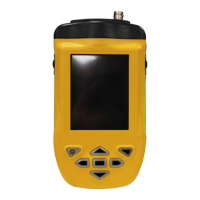
The A3-06-2824 Handheld Programmer (Figure 1) has the following features and
capabilities:
• Ability to program all Artex 406 MHz ELTs with supported protocols
• All ARTEX406 MHz aircraft protocols decoded
• Waterproof to IP67 standards
• Ruggedized case
• Internal database of received messages and programming
• Desktop application for database storage and review
• Long life rechargeable battery
• Built-in RF attenuator
1.4 Functionality
The heart of the Handheld Programmer is the Meazura MEZ1500 manufactured by
Aceeca International, Ltd of Christchurch, NZ. The Meazura MEZ1500 uses the
Palm/Garnet OS operating system.
Artex has customized operation of the Meazura MEZ1500 by utilizing the MZIO
interface inside the Meazura MEZ1500 unit. The “off-the-shelf” Meazura MEZ1500
combined with a custom module containing the Artex programming hardware interface
comprises the Artex Handheld Programmer.
CAUTION: AS DELIVERED BY ARTEX, THE MZIO INTERFACE IS NOT
ACCESSIBLE BY THE USER WITHOUT VOIDING THE ARTEX
WARRANTY.
NOTE: Aceeca International, Ltd refers to the Meazura MEZ1500 as an RDA, which
stands for “Rugged Digital Assistant”. This terminology is encountered on the
Aceeca web site and in their literature.
Additional operating information can be found at in the Aceeca documents MEZ1500
Quick Reference User Guide and MEZ1500 HotSync Configuration Guide available by
contacting Aceeca at support@aceeca.com.


 To Next Page