Arturia MiniBrute User's Manual 27 6 Legal notes
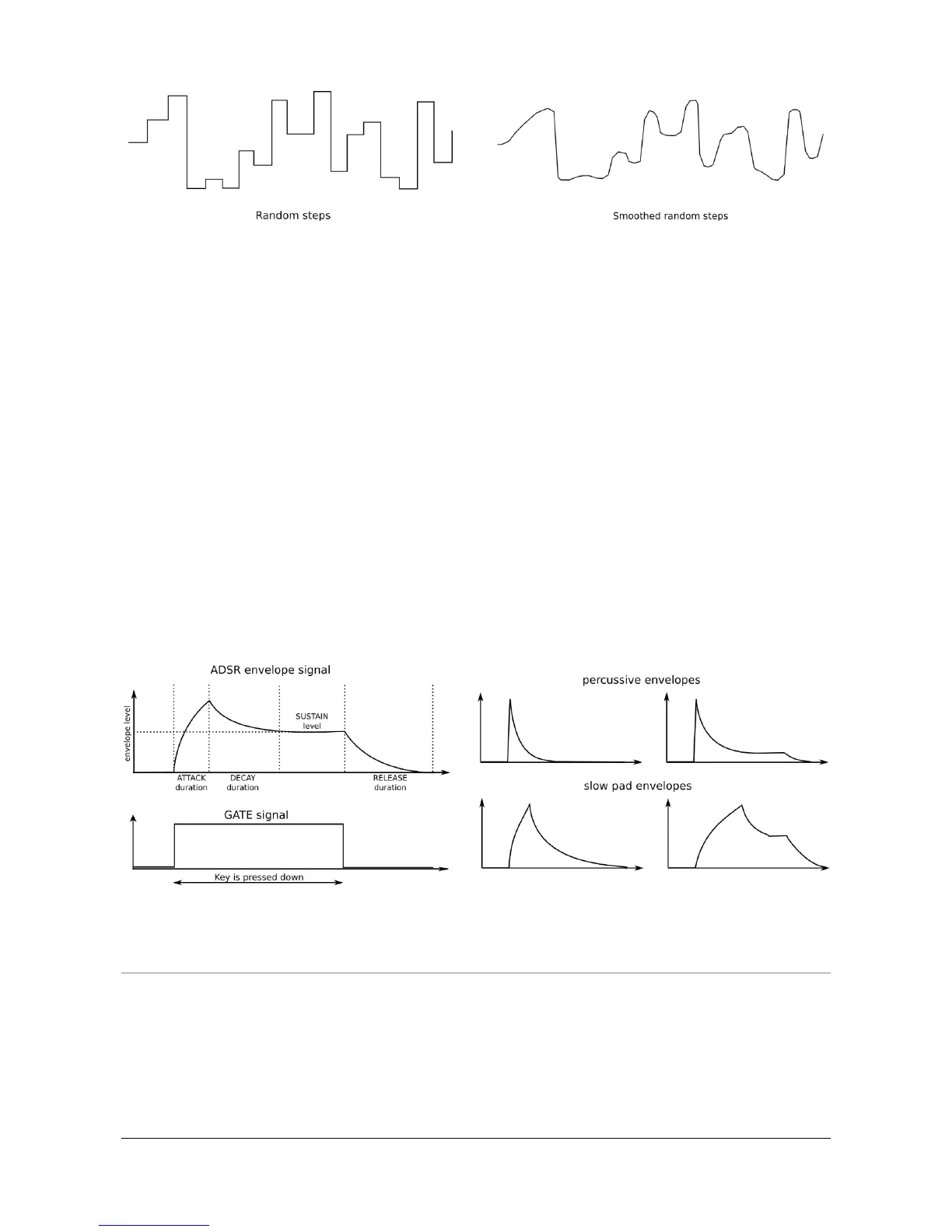
Contrary to an LFO, an envelope generator (or ADSR generator, for “Attack /
Decay / Sustain / Release”) does not provide a repeating pattern but is controlled
by the keyboard or Gate input. Pressing down a key or sending a gate signal
provides an evolving signal with four different stages:
The attack stage determines how long it takes for the envelope to go from
zero to its maximum level. The attack time can be as short as 1ms or as long
as 10 seconds.
The decay stage begins when the attack stage reaches its maximum value,
and determines the time it takes to decrease from this maximum value
down to a steady level (set by the sustain parameter; see next). The speed
of this decay can vary from 1ms to 10 seconds.
The sustain stage starts at the end of the decay phase, and remains at the
sustain value long as a keyboard key is held down or a gate signal remains
full on. The sustain level is variable between zero (no sustain) and the
envelope’s maximum value.
Finally, the release stage starts upon releasing the key, and sets the amount
of time for the level to decrease from the sustain level down to zero.
4.1.6 Player interface
To play a tune with your synthesizer, as a player you need a player interface. The
MiniBrute provides you with a two-octave, piano-type keyboard. Besides offering a
way to play notes, this keyboard provides additional controls for adding
expressiveness:
Aftertouch generates a signal that corresponds to how hard you press on a














 To Next Page