Aruba S2500 Series Mobility Access Switch | Installation Guide S2500 Mobility Access Switch | 13
The LED mode menu allows you to choose what information is communicated by the LEDs on each port.
Refer to Table 5 on page 10 descriptions of the LED behavior of each mode.
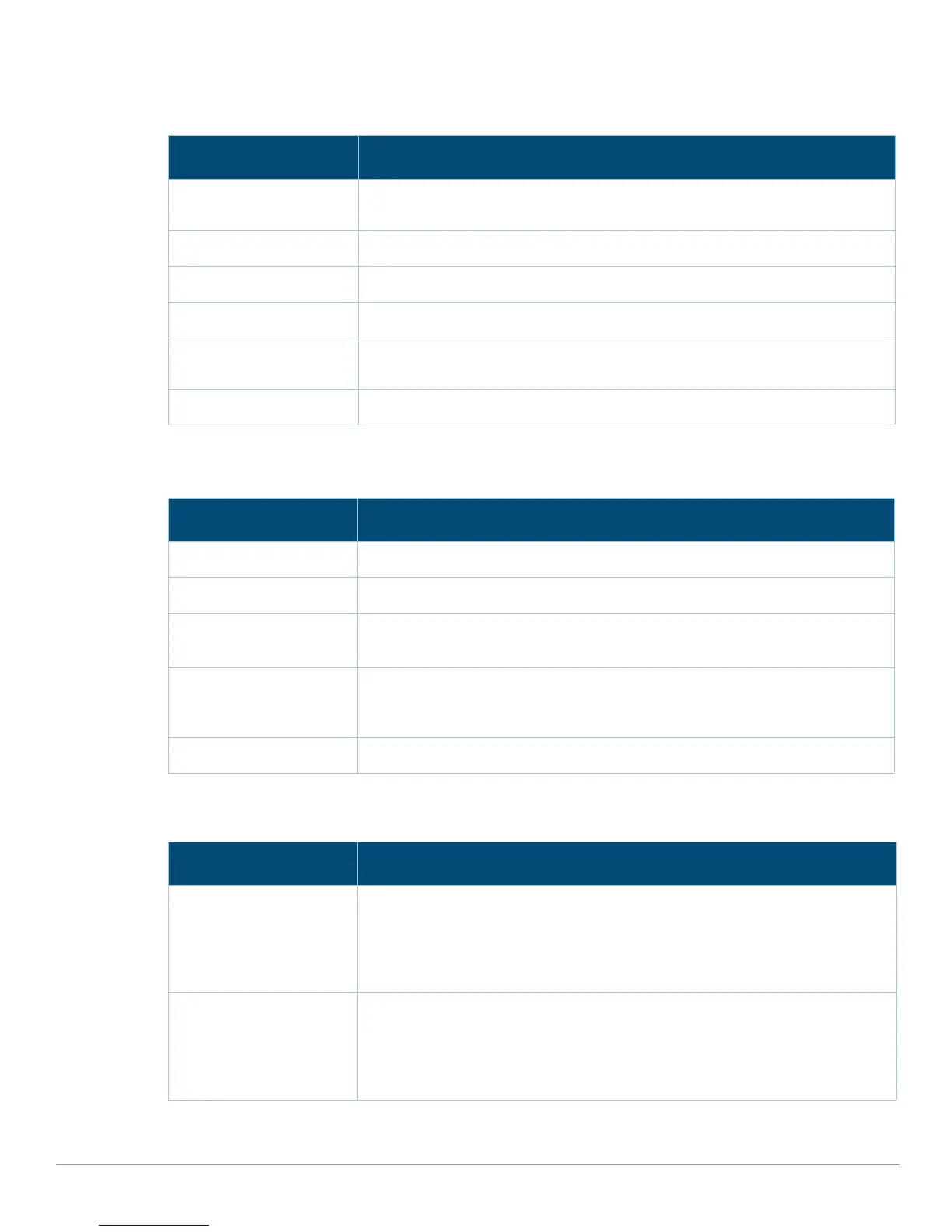
Table 8 LCD Panel Mode: LED Mode
Function/Menu Options Displays
Administrative LED MODE: ADM - displays whether or not the port is administratively enabled or
disabled.
Duplex LED MODE: DPX - displays the duplex mode of the port.
PoE LED MODE: POE - displays the PoE status of the port.
Speed LED MODE: SPD - displays the speed of the port.
Fault LED MODE: FLT - enables Fault Mode, which reports that a port security error has
been detected on the port.
Exit LED Mode EXIT LED MENU
Table 9 LCD Panel Mode: Status
Function/Menu Options Displays
Stack Displays the device’s role in the stack and slot number.
ArubaOS Version ArubaOS X.X.X.X
PS Status Displays status of the power supply unit.
PSU: [OK | Err]
Fan Tray Displays fan tray status.
FAN STATUS: [OK | Err]
FAN Speed: [OK | High | Low]
Exit Status Menu EXIT STATUS
Table 10 LCD Panel Mode: Maintenance
Function/Menu Options Displays
Upgrade Image Upgrade the software image on the selected partition from a predefined location on
the attached USB flash device.
Standalone: Partition [0 | 1] Upgrade Image [no | yes]
Primary: Partition [0 | 1] Upgrade Image [no | yes]
Non-Primary: N/A
Upload Config Uploads the mobility access switch’s current configuration to a predefined location
on the attached USB flash device.
Standalone: Upload Config [no | yes]
Primary: Upload Config [no | yes]
Non-Primary: N/A


 To Next Page