Aruba S2500 Series Mobility Access Switch | Installation Guide S2500 Mobility Access Switch | 9
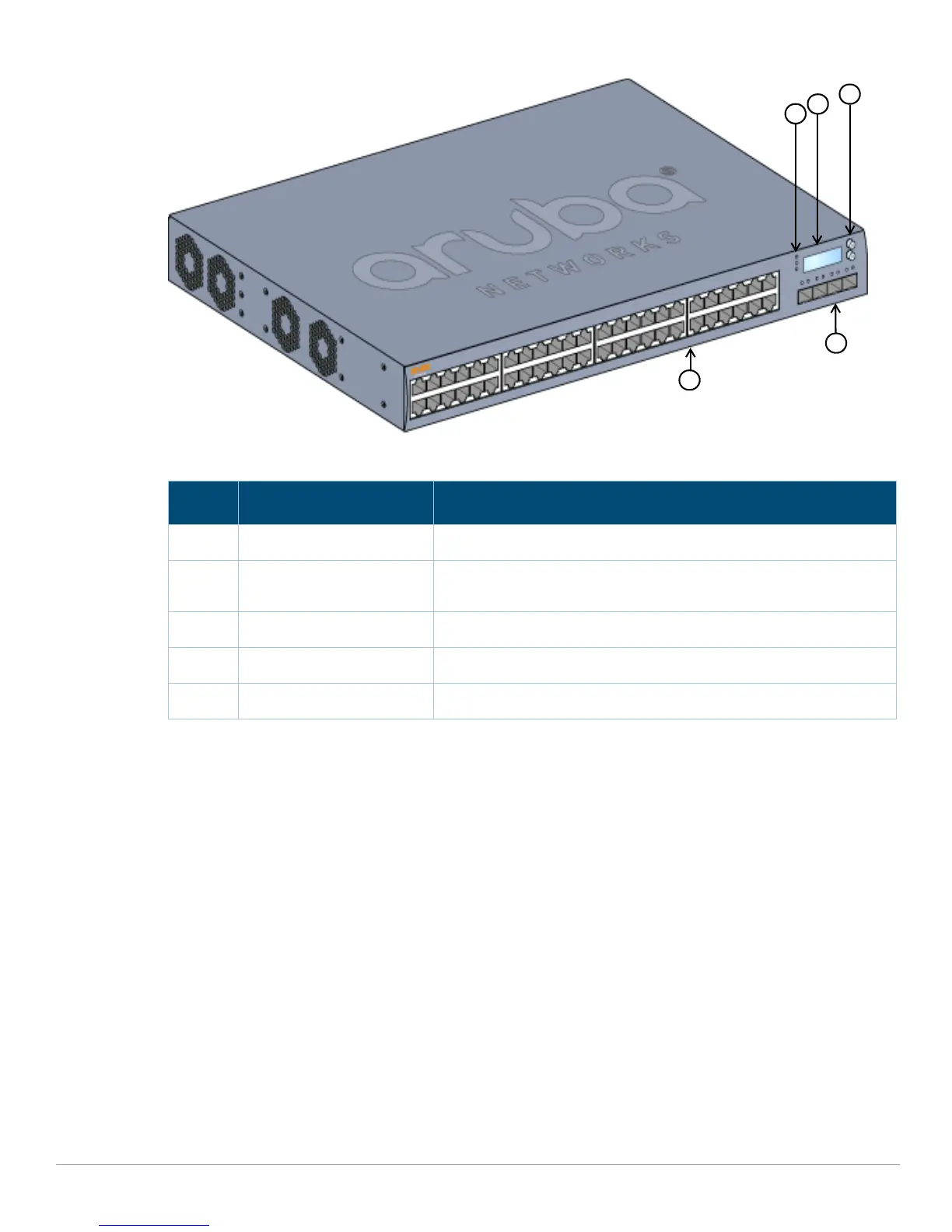
Figure 2 Front Panel of the Aruba S2500 48-Port
10/100/1000 Ethernet Ports
Depending on the model, the S2500 is equipped with 24 or 48 10/100/1000BASE-T Gigabit Ethernet (RJ-45)
ports. Gigabit Ethernet uses all eight wires and each pair is used in a bi-directional fashion, meaning the
same pairs are used for both data transmission and reception. Figure 3 illustrates the CAT-5 pin-out found
on an RJ-45 connector. The CAT-5 pin-out pairs the following pins on a 10/100/1000Base-T Gigabit Ethernet
port: 1/2, 3/6, 4/5, and 7/8. All Power over Ethernet (PoE) capable ports support IEEE 802.3af PoE, providing
Table 4 Front Panel Components
Callout Component Description
1 Power, Status, Stack LEDs Used for basic monitoring of the S2500
2 LCD Screen Used for the Quick Setup, controlling the LED behavior, and other basic
configurations
3 Menu and Enter Buttons Used to navigate the LCD screen
4 Access Ports 10/100/1000 Ethernet Ports
5 Uplink Ports 10GBASE-X Ports


 To Next Page