28 |Installation Aruba S2500 Series Mobility Access Switch | Installation Guide
2. Insert the coupler end of the AC power cord into the AC power connector on the power supply module.
3. Lower the power cord retaining clip over the AC power cord.
The S2500 should now be receiving power. Since the S2500 does not have an On/Off switch, you must use
the power cord to turn the device on an off. To turn the device off:
1. Lift the power cord retaining clip off the AC power cord.
2. Pull the AC power cord from the power supply module.
Installing an SFP
To install an SFP module into the S2500:
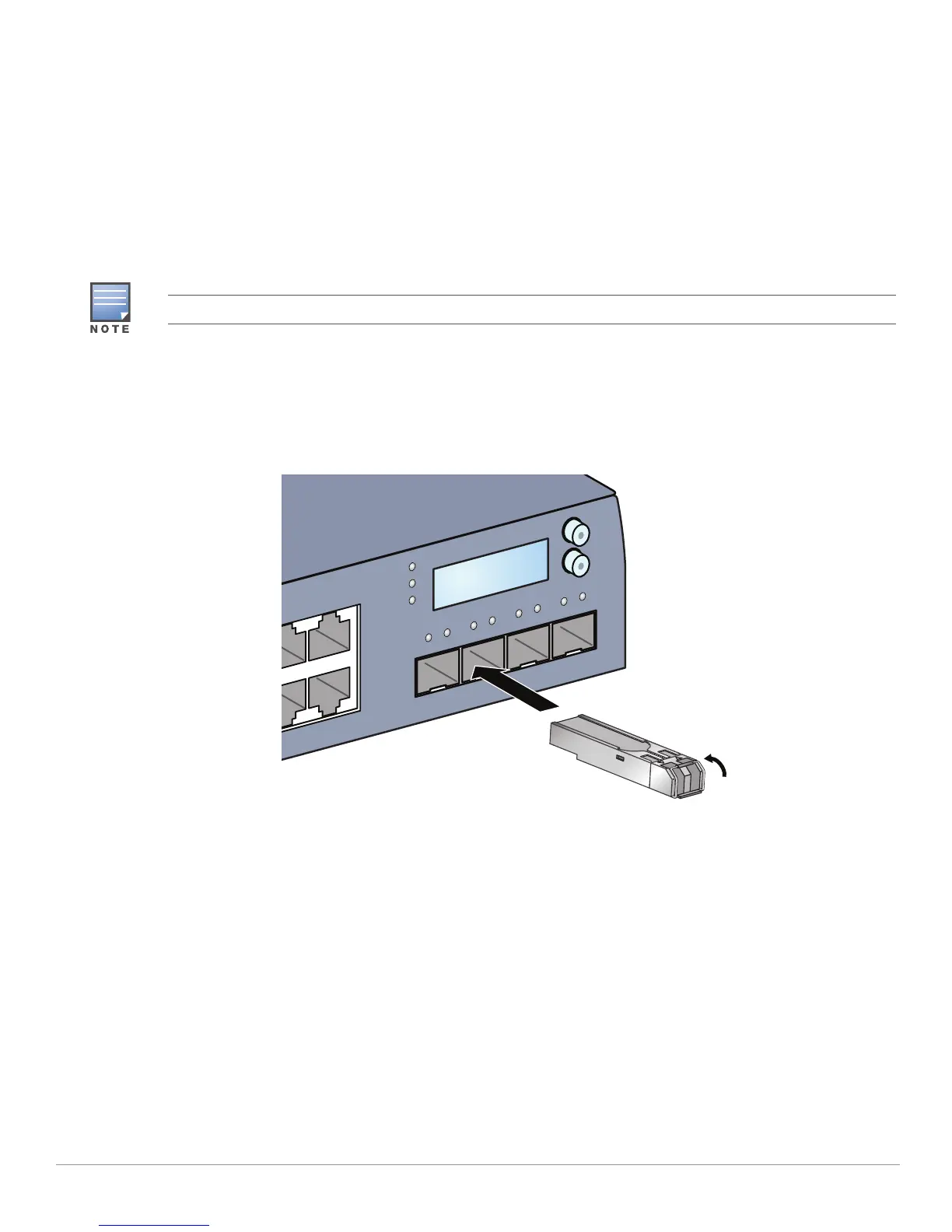
1. Slide the SFP module, top side facing upward, into a 1000Base-X port until a connection is made and an
audible click is heard. See Figure 15 for more information.
Figure 15 Installing an SFP
Removing an SFP
To remove an SFP module:
1. Open and release the latch on the SFP module.
2. Pull and remove the module from the port.
Connecting an LC Fiber Optic Cable
To connect an LC fiber optic cable into an SFP-SX or SFP-LX module:
1. Clean the fiber optic cable connector before inserting it into the SFP+.
2. Insert the fiber optic cable into the SFP module. Ensure that the latch on the cable faces the top of the
SFP module.
3. Slide the cable into place until a connection is made and an audible click is heard.
Use standard ESD precautions when installing or removing an SFP.
POWER
MENU
ENTER
STATUS
STACK


 To Next Page