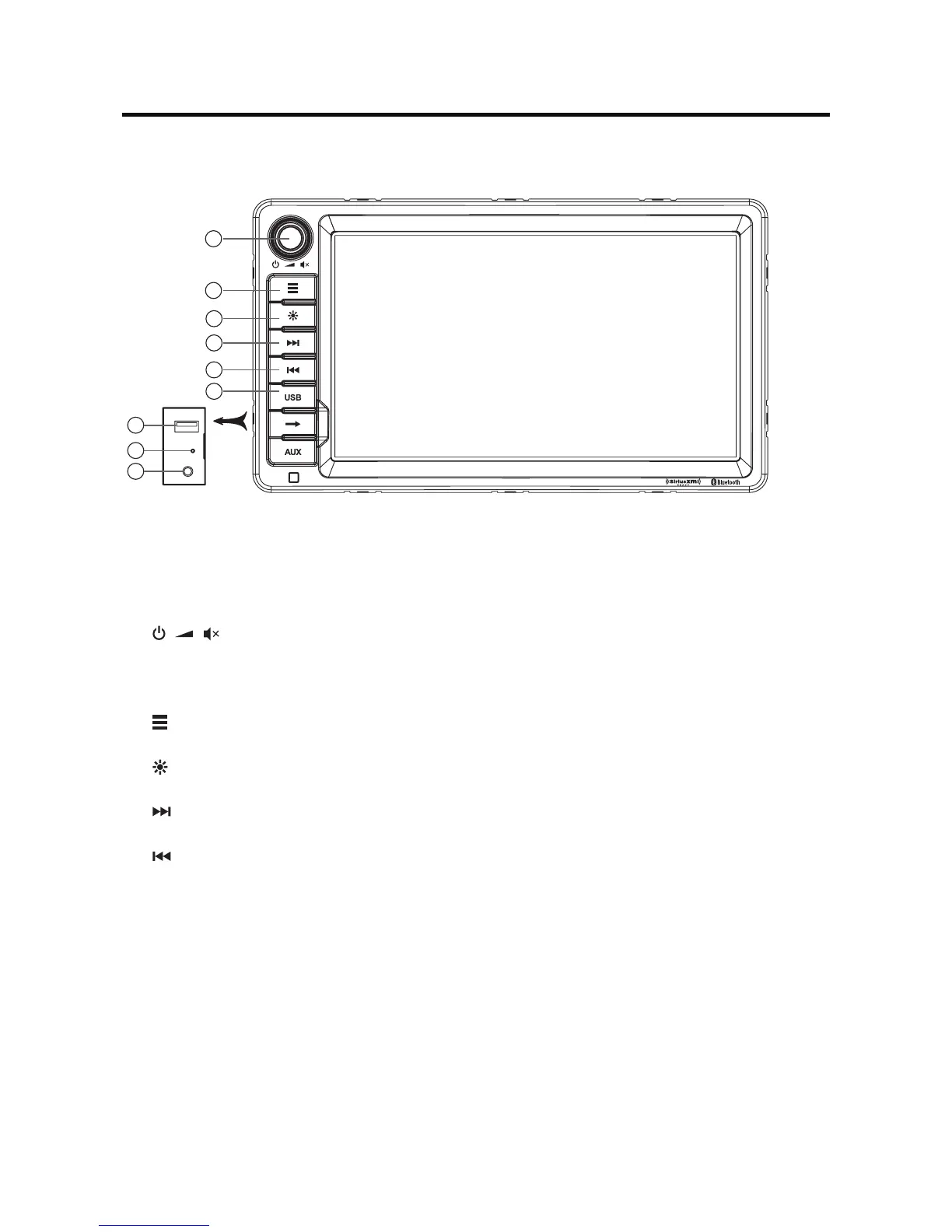
CONTROLS AND INDICATORS
1. [ ] Knob
Rotate to adjust the volume.
Press momentarily to activate the MUTE function. Press again to resume normal listening.
Press to turn the unit ON. Press and hold to turn the unit OFF.
2. [ ] Button
Press to switch between the sources menu and the previous source.
3. [ ] Button
Press to adjust the brightness of the screen.
4. [ ] Button
Next / Seek up
5. [ ] Button
Previous / Seek down
6. Interface Cover
Coversthe3.5mmAVIn,USBslot,andResetbutton.
7. USB Connector
Connect a USB device for playback of music/video les.
8. Reset Button
Press to reset system settings to factory default (except password and parental lock
settings).
9. A/V Input
Acceptsa3.5mmjackthroughwhichsignalsfromvariousaudio/videodevicescanbe
applied to the unit.
Notice:
The graphic in this manual is for reference only, and may be different
from the actual unit. Reference to actual unit is suggested.
1
2
9
3
7
8
4
5
6



 To Next Page