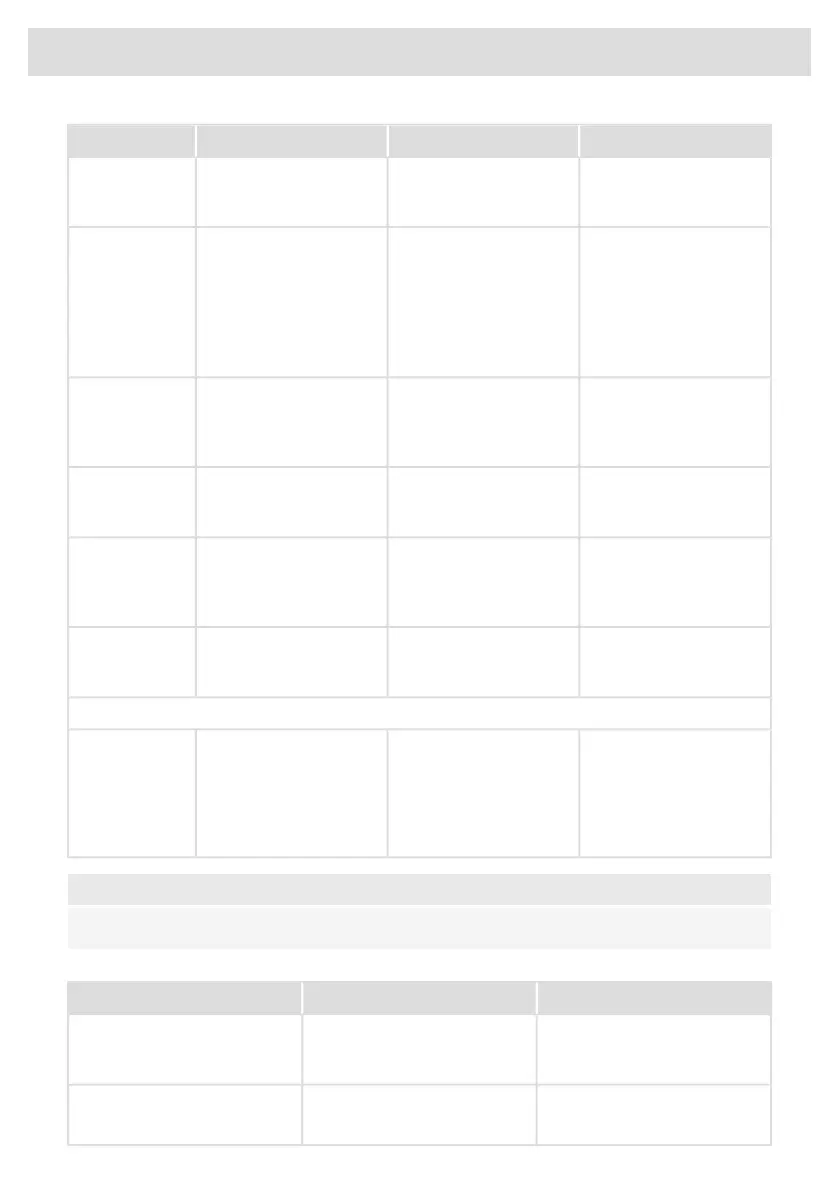
SolutionPossible causeSymptomError code
Connect the appliance in
accordance to rating plate
and instructions.
Voltage of the mains is too
high.
U 400 appears on display
with continuous sound
tone.
U400
Try to connect the device
to your network again.
Failed to connect to Wi-Fi
network.
E7 appears on display
after setting up the Wi-Fi
connection.
E7
Make sure that new
devices can connect to
the network (e.g. MAC
address filtering is
disabled).
Unblock the ventilator;
disconnect appliance
from main voltage for
10 sec.
Ventilator is blocked (eg
possible by item in the
drawer).
E8 appears on display.E8
Use Celsius°Cooking™
cookware.
Non-Celsius°Cooking™
cookware is not
supported.
Celsius°Cooking™ key is
blinking, together with
E65.
E65
Replace battery.Celsius°Cooking™
cookware was not found
(empty battery, out of
range, etc.).
E66 is blinking together
with the
Celsius°Cooking™ key.
E66
If handle cap is mounted
correctly; Replace battery
.
Celsius°Cooking™
cookware missing.
E67 is blinking together
with the
Celsius°Cooking™ key.
E67
Extraction module
Open the window to be
able to use the extraction
module or stop the
message by touching the
flashing - (minus) or +
(plus) key(s).
The window, with mounted
window sensor is not
opened.
E80 appears on display.E80
NOTE!
In case of other error codes: please write down the error code and contact the service department.
Troubleshooting Wi-Fi
SolutionPossible causeSymptom
The hob must be switched off,
then touch the on/off key and
hold it for 5 seconds.
Wi-Fi turned off.Wi-Fi icon not shown.
Check that your home network
signal is strong and internet
connection is working.
Home network issues.Wi-Fi setup failed.
Table continued from last page
54
Troubleshooting



 To Next Page