Interface Connection LDM41A and LDM42A Manual
Page 42 ASTECH GmbH
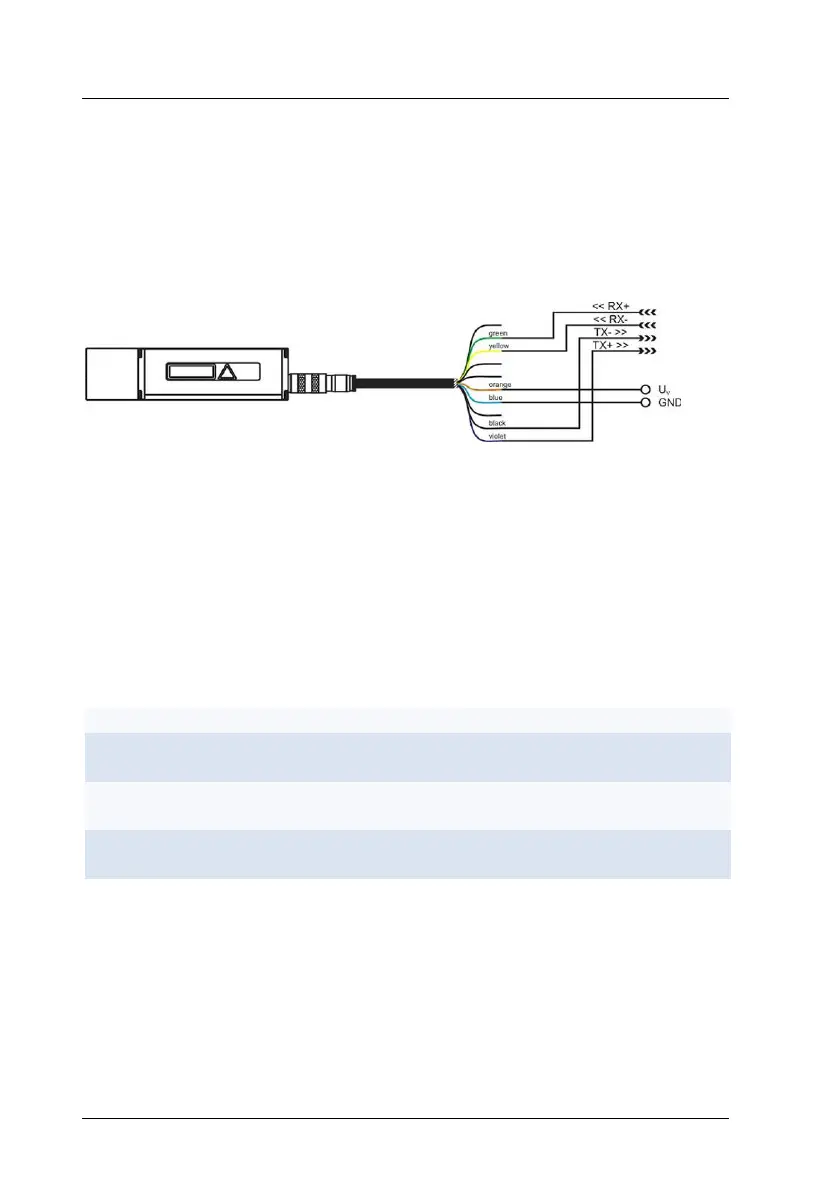
9.2 Serial Interface RS422
For configuration purposes and permanent data transmissions over a greater
length, the RS422 can be used. This type of interface is insusceptible to
interference and noise influences and qualifies for industrial use. Where
twisted cable pairs are involved, transmissions lengths up to 300 m can be
handled.
Figure 17 : RS232 wiring diagram
Since a standard PC typically includes no RS422 communication port, you
require an RS422 interface card or an RS422-to-RS232 converter for
communication.
9.3 Output Format on the serial interface
The output format on the serial interface is selected by the command SD.
There are three modes available:
<SPACE>xxxxxx<CR><LF>
x=0...F
Decimal with signal
quality
xxx.xxx<SPACE>yyyyyy<CR><LF>
x=0…9; y=0…9
SD affects all commands that output a distance value.
An output value is calculated from a given measured distance value (in mm),
multiplied by the scale factor SF.
Negative distance values are output in two’s complement notation.
The value for the signal quality varies between 0 and 1024. 0 means a bad
signal quality while 1024 indicates a very good signal quality.


 To Next Page