EasyManua.ls Logo

Astrodesign VG-879 - HDMI Data Transfer Method

Default Icon
156 pages
Print Icon
To Next Page IconTo Next Page
To Previous Page IconTo Previous Page
Loading...
Chapter 4 Digital Output Settings (DIGITAL OUTPUT)
39
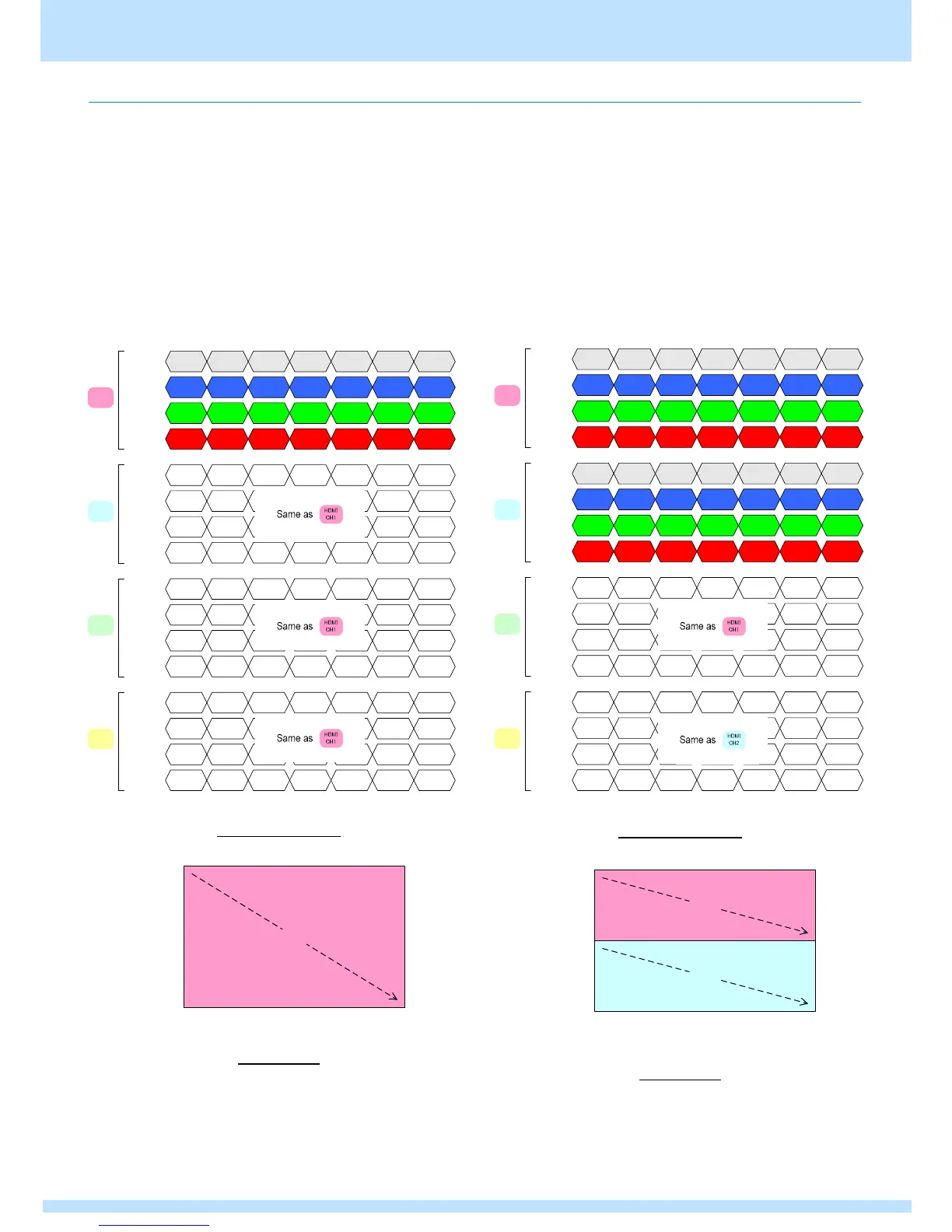
4.1.7 HDMI data transfer method
This section describes the data transfer method output from the HDMI unit.
Transfer method differs according to the dot clock operation mode (DotClk Mode).
For details on how to set the dot clock operation mode (DotClk Mode), refer to Dot clock operation mode DotClk Mode settings
in the instruction manual of the corresponding VG unit.
When single clock mode
This mode outputs via 1 HDMI connectors. The following
diagram shows video specifications and how data is
transferred.
Data transfer method
Screen panes

Dual clock mode /
Mode0, Mode2 (for 2 horizontal panes)
This mode outputs via 2 HDMI connectors. The following
diagram shows video specifications and how data is
transferred.
Data transfer method
Screen panes
Pixel(0,0)
B(0,0)
G(0,0)
TMDS
Channel
0
1
2 R(0,0)
Pixel(1,0)
R(1,0)
G(1,0)
B(1,0)
Pixel(2,0)
R(2,0)
G(2,0)
B(2,0)
Pixel(3837,2159)
B(3837,2159)
G(3837,2159)
R(3837,2159)
Pixel(3838,2159)
R(3838,2159)
G(3838,2159)
B(3838,2159)
Pixel(3839,2159)
R(3839,2159)
G(3839,2159)
B(3839,2159)
TMDS
Channel
0
1
2
HDMI
CH1
HDMI
CH2
TMDS
Channel
0
1
2
HDMI
CH3
TMDS
Channel
0
1
2
HDMI
CH4
Pixel(0,0)
B(0,0)
G(0,0)
R(0,0)
Pixel(1,0)
R(1,0)
G(1,0)
B(1,0)
Pixel(2,0)
R(2,0)
G(2,0)
B(2,0)
Pixel(3837,2159)
B(3837,2159)
G(3837,2159)
R(3837,2159)
Pixel(3838,2159)
R(3838,2159)
G(3838,2159)
B(3838,2159)
Pixel(3839,2159)
R(3839,2159)
G(3839,2159)
B(3839,2159)
Pixel(0,0)
B(0,0)
G(0,0)
R(0,0)
Pixel(1,0)
R(1,0)
G(1,0)
B(1,0)
Pixel(2,0)
R(2,0)
G(2,0)
B(2,0)
Pixel(3837,2159)
B(3837,2159)
G(3837,2159)
R(3837,2159)
Pixel(3838,2159)
R(3838,2159)
G(3838,2159)
B(3838,2159)
Pixel(3839,2159)
R(3839,2159)
G(3839,2159)
B(3839,2159)
Pixel(0,0)
B(0,0)
G(0,0)
R(0,0)
Pixel(1,0)
R(1,0)
G(1,0)
B(1,0)
Pixel(2,0)
R(2,0)
G(2,0)
B(2,0)
Pixel(3837,2159)
B(3837,2159)
G(3837,2159)
R(3837,2159)
Pixel(3838,2159)
R(3838,2159)
G(3838,2159)
B(3838,2159)
Pixel(3839,2159)
R(3839,2159)
G(3839,2159)
B(3839,2159)
HDMI
CH1
HDMI
CH1
HDMI
CH1
Pixel(0,0)
Pixel(3839,2159)
Pixel(3839,0)
Pixel(0,2159)
CH1
Pixel(0,0)
B(0,0)
G(0,0)
TMDS
Channel
0
1
2 R(0,0)
Pixel(1,0)
R(1,0)
G(1,0)
B(1,0)
Pixel(2,0)
R(2,0)
G(2,0)
B(2,0)
TMDS
Channel
0
1
2
Pixel(3837,1079)
B(3837,1079)
G(3837,1079)
R(3837,1079)
Pixel(3838,1079)
R(3838,1079)
G(3838,1079)
B(3838,1079)
Pixel(3839,1079)
R(3839,1079)
G(3839,1079)
B(3839,1079)
TMDS
Channel
0
1
2
TMDS
Channel
0
1
2
Pixel(3837,2159)
B(3837,2159)
G(3837,2159)
R(3837,2159)
Pixel(3838,2159)
R(3838,2159)
G(3838,2159)
B(3838,2159)
Pixel(3839,2159)
R(3839,2159)
G(3839,2159)
B(3839,2159)
Pixel(0,1080)
B(0,1080)
G(0,1080)
R(0,1080)
Pixel(1,1080)
R(1,1080)
G(1,1080)
B(1,1080)
Pixel(2,1080)
R(2,1080)
G(2,1080)
B(2,1080)
Pixel(0,0)
B(0,0)
G(0,0)
R(0,0)
Pixel(1,0)
R(1,0)
G(1,0)
B(1,0)
Pixel(2,0)
R(2,0)
G(2,0)
B(2,0)
Pixel(3837,1079)
B(3837,1079)
G(3837,1079)
R(3837,1079)
Pixel(3838,1079)
R(3838,1079)
G(3838,1079)
B(3838,1079)
Pixel(3839,1079)
R(3839,1079)
G(3839,1079)
B(3839,1079)
Pixel(3837,2159)
B(3837,2159)
G(3837,2159)
R(3837,2159)
Pixel(3838,2159)
R(3838,2159)
G(3838,2159)
B(3838,2159)
Pixel(3839,2159)
R(3839,2159)
G(3839,2159)
B(3839,2159)
Pixel(0,1080)
B(0,1080)
G(0,1080)
R(0,1080)
Pixel(1,1080)
R(1,1080)
G(1,1080)
B(1,1080)
Pixel(2,1080)
R(2,1080)
G(2,1080)
B(2,1080)
HDMI
CH1
HDMI
CH2
HDMI
CH3
HDMI
CH4
HDMI
CH1
HDMI
CH2
Pixel(0,0)
Pixel(3839,2159)
Pixel(3839,0)
Pixel(0,2159)
CH1
CH2

Table of Contents

Related product manuals