5-38
Chapter 5: BIOS Setup
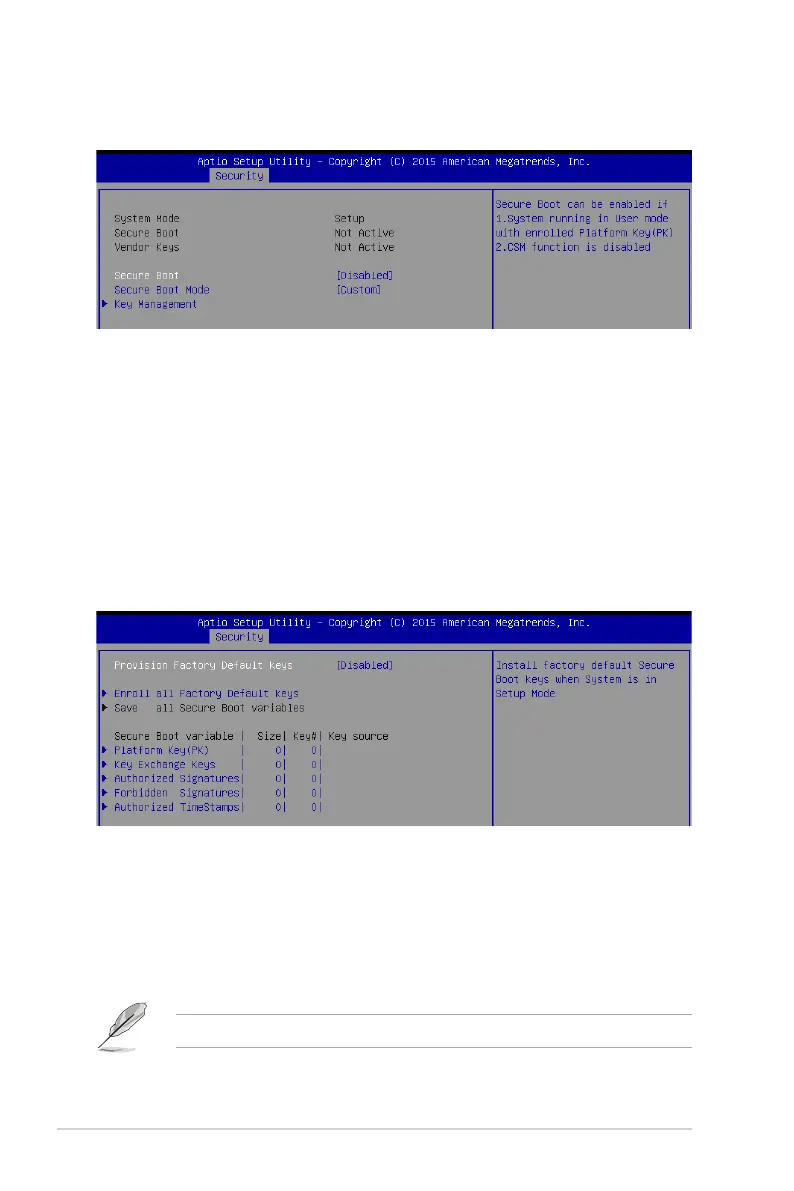
Secure Boot [Disabled]
ThisitemallowsyoutoenableordisabletheSecureBootowcontrol.
Congurationoptions:[Disabled][Enabled]
Secure Boot Mode [Custom]
This item allows you to select the mode of the Secure boot to change Execution policy and
Secure Boot Key management.
Congurationoptions:[Standard][Custom]
Secure Boot menu
This item allows you to customize the Secure Boot settings.
Key Management
This item only appears when you set the
Secure Boot Mode
to
[Custom]
. This allows you to
modify Secure Boot variables and set Key Management page.
Provision Factory Default Keys [Disabled]
Congurationoptions:[Disabled][Enabled]
Enroll All Factory Default Keys / Delete all Secure Boot variables
ThisitemwillaskyouifyouwanttoInstallFactoryDefaultsecurevariables.SelectYes
if you want to load the default secure variables, otherwise select No. This option will
change to
Delete all Secure Boot variables
oncedefaultkeysareloaded,selecting
thiswillthenasktodeleteallvariablesandresetthePlatformtoSetupMode.
The following item is only available when default secure variables are loaded.










 To Next Page