Chapter 2: Hardware Information
2-30
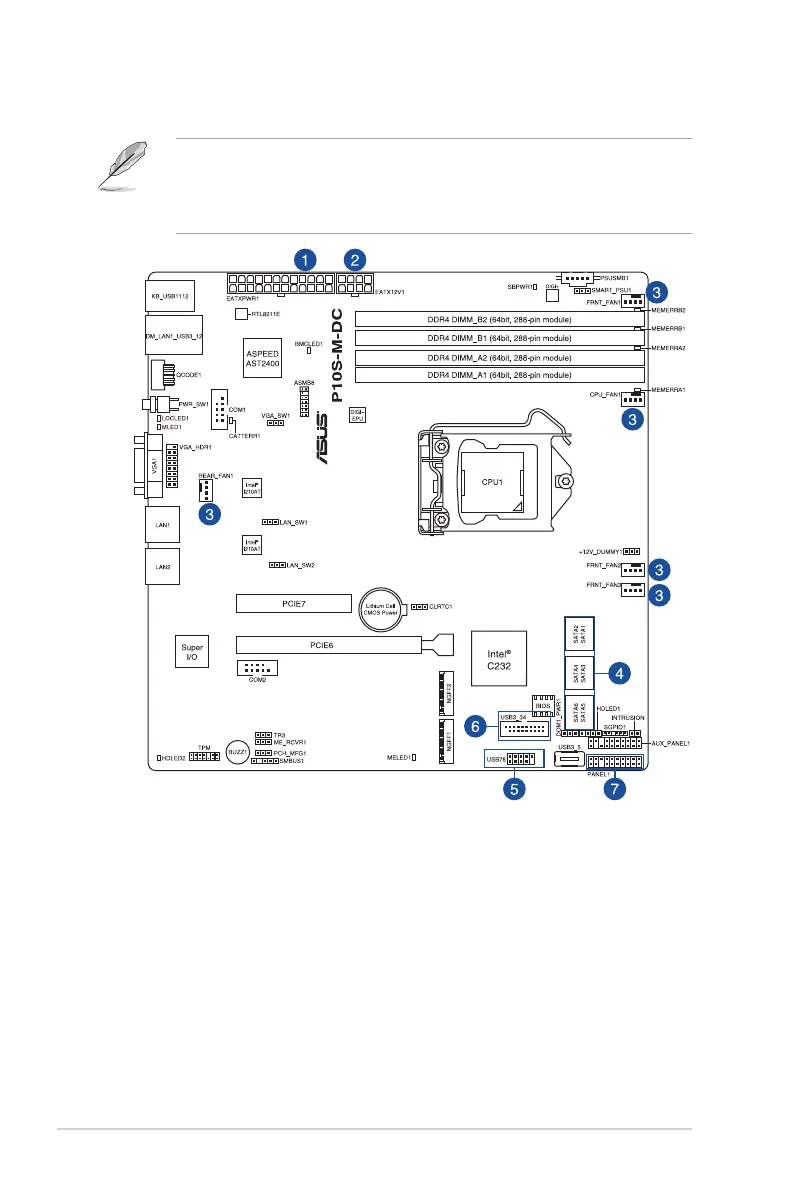
2.6 Cable connections
• Thebundledsystemcablesaresetupbeforeshipping.Youdonotneedtodisconnect
thesecablesunlessyouwillremovepre-installedcomponentstoinstalladditional
hardware components.
• Referto
Chapter 4
for detailed information on the connectors.
Standard cables connected to the motherboard
1. 24-pinATXpowerconnector(frompowersupplytomotherboard)
2. 8-pinATX12Vpowerconnector(frompowersupplytomotherboard)
3. SystemfansandCPUfanconnectors(fromsystemfantomotherboard)
4. SATAconnectors(systemdefault;frommotherboardtoSATAdevices)
5. USB2.0connector(frommotherboardtofrontI/Oboard)
6. USB3.0connector(frommotherboardtofrontI/Oboard)
7. Systempanelconnectors(frommotherboardtofrontI/Oboard)




 To Next Page