2-19
ASUS RS100-E9-PI2
2.4.3 Installing a hard disk drive to the HDD bay 2
Toinstalla3.5-inchSerialATAHDDtoHDDbay2:
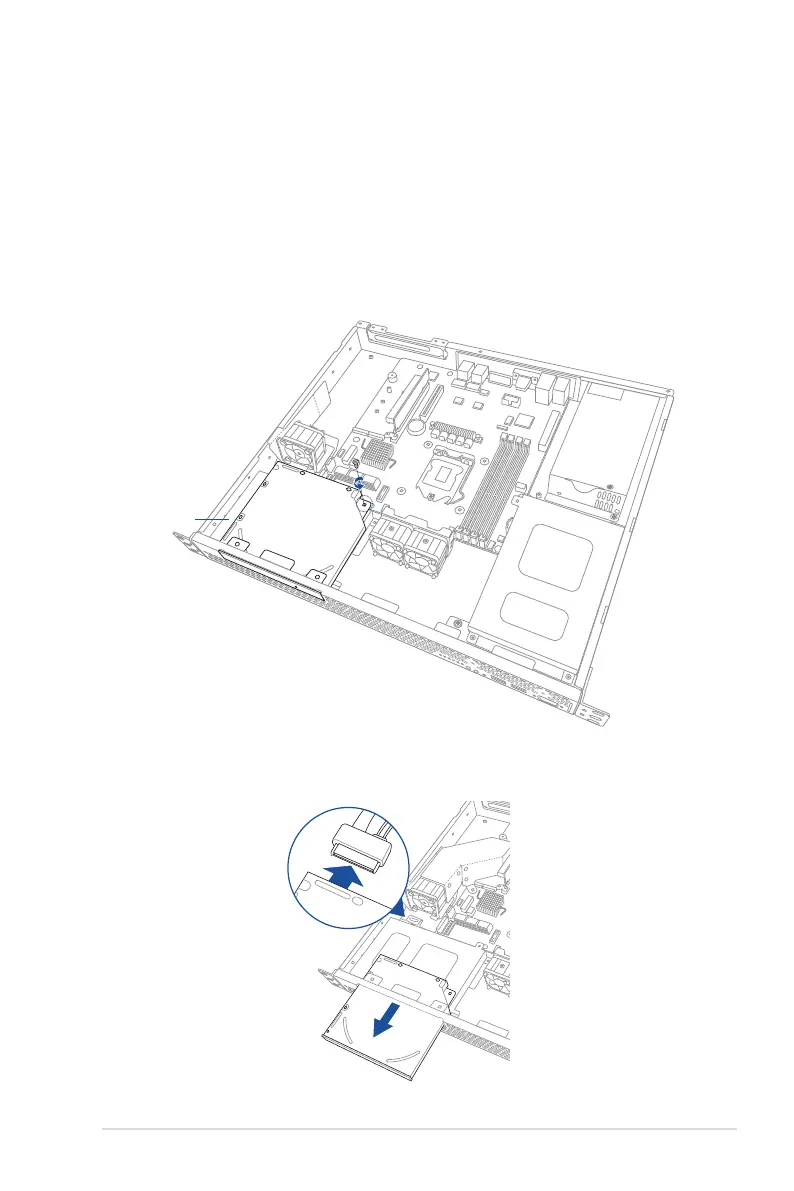
1. IfyouhaveanOpticalDiscDrive(ODD)installed,removeitrstbeforeinstallinga3.5-
inchSertialATAHDDtoHDDbay2.
To remove the ODD:
1.a Locate the ODD in the server chassis.
1.b ReleasethescrewthatsecurestheODDtothechassisandsetaside.
HDD bay 2
1.c PushtheODDoutwardslightlytodisconnecttheSATAandpowercablefromthe
ODD. Then, remove the ODD as shown.




 To Next Page