ASUS RS100-E9-PI2
4-13
4.5 Connectors
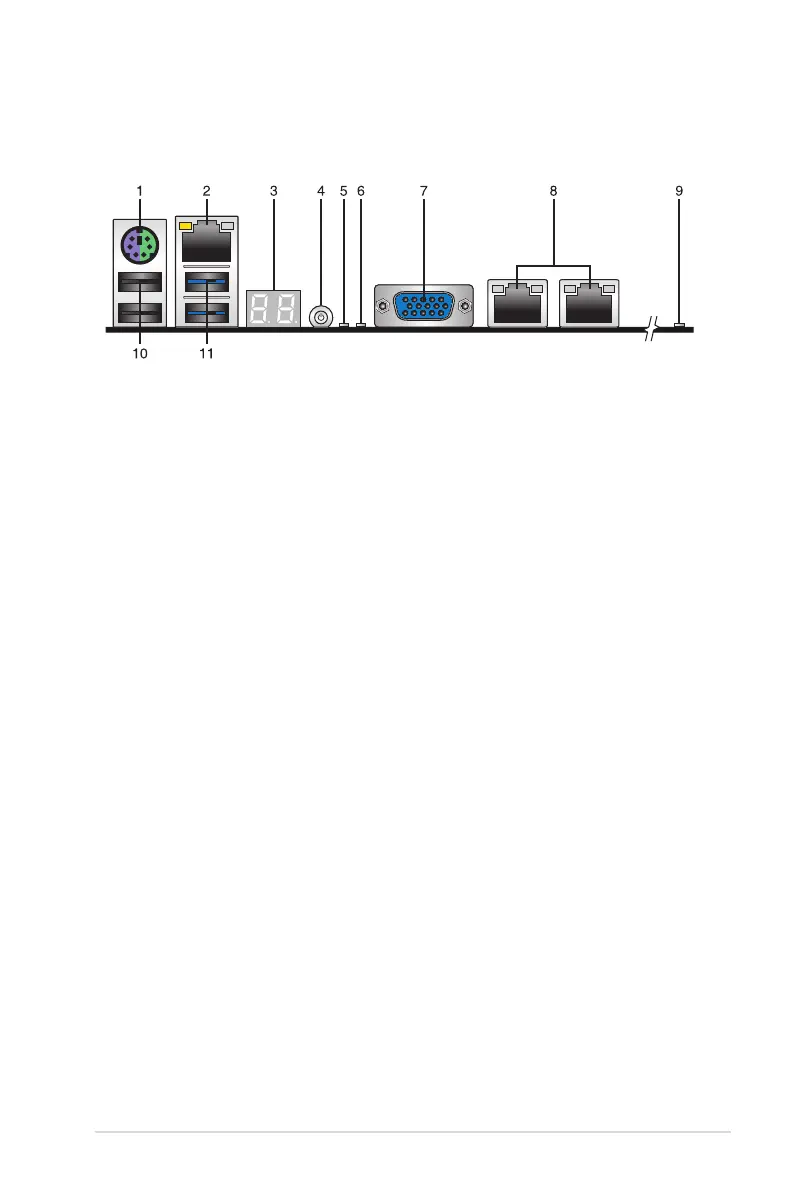
4.5.1 Rear panel connectors
1. PS/2 keyboard/mouse port (purple/green):
ThisportisforaPS/2keyboardor
mouse.
2. RJ-45 port for iKVM:
ThisRJ-45portfunctionsonlywhenyouenableASMB8
Managementcard.
3. Q-Code LED:
TheQ-CodeLEDprovidesa2-digitdisplaythatshowsthestatusofyour
system.Refertothe
Q-Code table
of this user guide for more information about the
2-digit codes.
4. Power-on Button:
Press this button to turn on the system.
5. Location LED:
TheLocationLEDisanonboardLEDthatlightsupwhentheLocation
Buttononthefrontpanelispressed.ThisLEDhelpsyouvisuallylocatetheserver
amongotherserversespeciallywhenyouarelocatedatthebackoftheserverrack.
6.
Message LED:
TheMessageLEDisanonboardLEDthatlightsuptoindicatean
abnormaleventoccurrence.
7.
Video Graphics Adapter port:
ThisportisforaVGAmonitororotherVGA-compatible
devices.
8.
RJ-45 ports for LAN 1-2:
TheseportsallowsGigabitconnectiontoaLocalArea
Network(LAN)throughanetworkhub.RefertothetablebelowfortheLANportLED
indications.
9.
Hard disk LED:
TheIDELEDlightsuporasheswhendataisreadfromorwrittento
theHDD.
10.
USB 2.0 ports 1 and 2:
Thesetwo4-pinUniversalSerialBus(USB)portsareavailable
forconnectingUSB2.0devices.
11.
USB 3.0 ports 1 and 2:
Thesetwo4-pinUSBportsareavailableforconnectingUSB3.0
devices.














 To Next Page