Chapter 2: Hardware Information
2-10
2.3.2 Memory Configurations
YoumayinstallunbufferedDDR4DIMMsintotheDIMMsocketsusingthememory
congurationsinthissection.
UDIMM
DIMM Slot
Per Channel
DIMM Populated
per Channel
DIMM Type Speed Rank per DIMM
2 1 UnbufferedDDR4 2133
SingleRank
DualRank
2 2 UnbufferedDDR4 2133
SingleRank
DualRank
• AlwaysinstallDIMMswiththesameCASlatency.Foroptimumcompatibility,itis
recommendedthatyouobtainmemorymodulesfromthesamevendor.
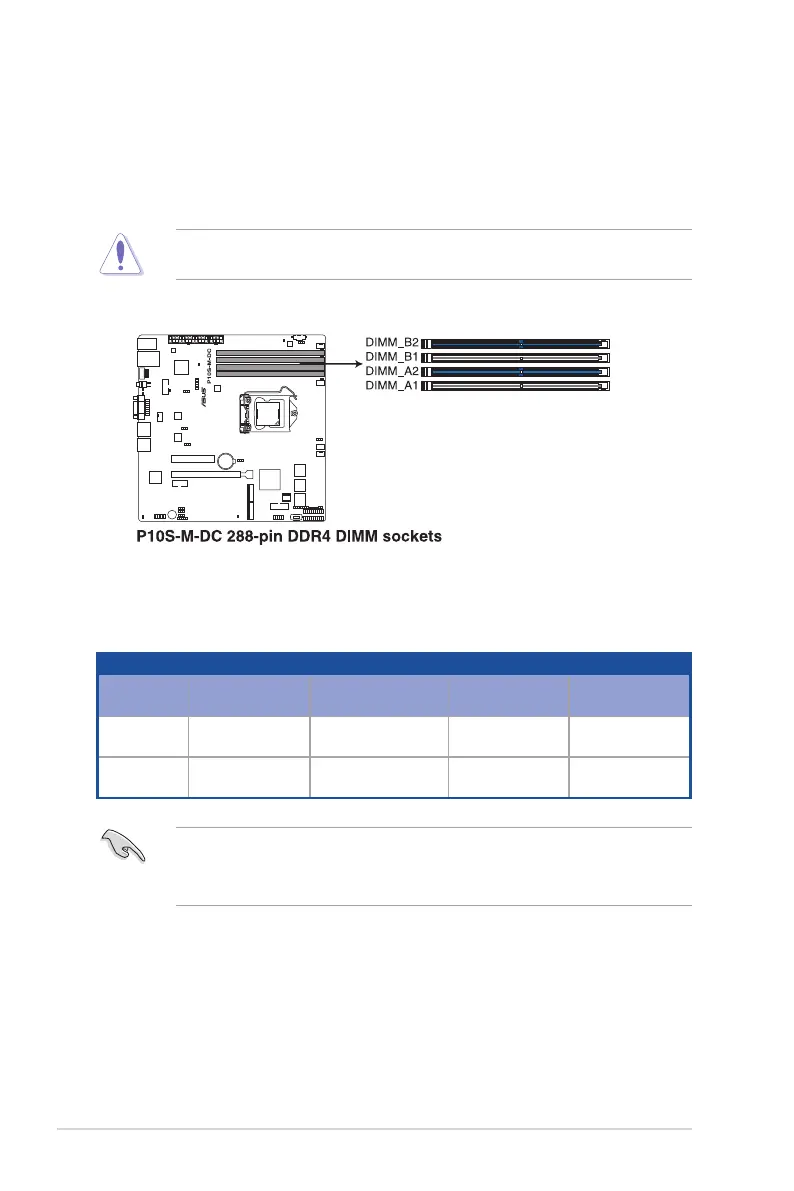
• StartinstallingtheDIMMsinslotsA2andB2(Blue).
2.3 System memory
2.3.1 Overview
ThemotherboardcomeswithfourDoubleDataRate4(DDR4)DualInlineMemoryModules
(DIMM)sockets.
ADDR4moduleisnotcheddifferentlyfromaDDR,DDR2,orDDR3module.DONOT
installaDDR,DDR2,orDDR3memorymoduletotheDDR4slot.
ThegureillustratesthelocationoftheDDR4DIMMsockets:














 To Next Page