2-35
ASUS RS100-E9-PI2
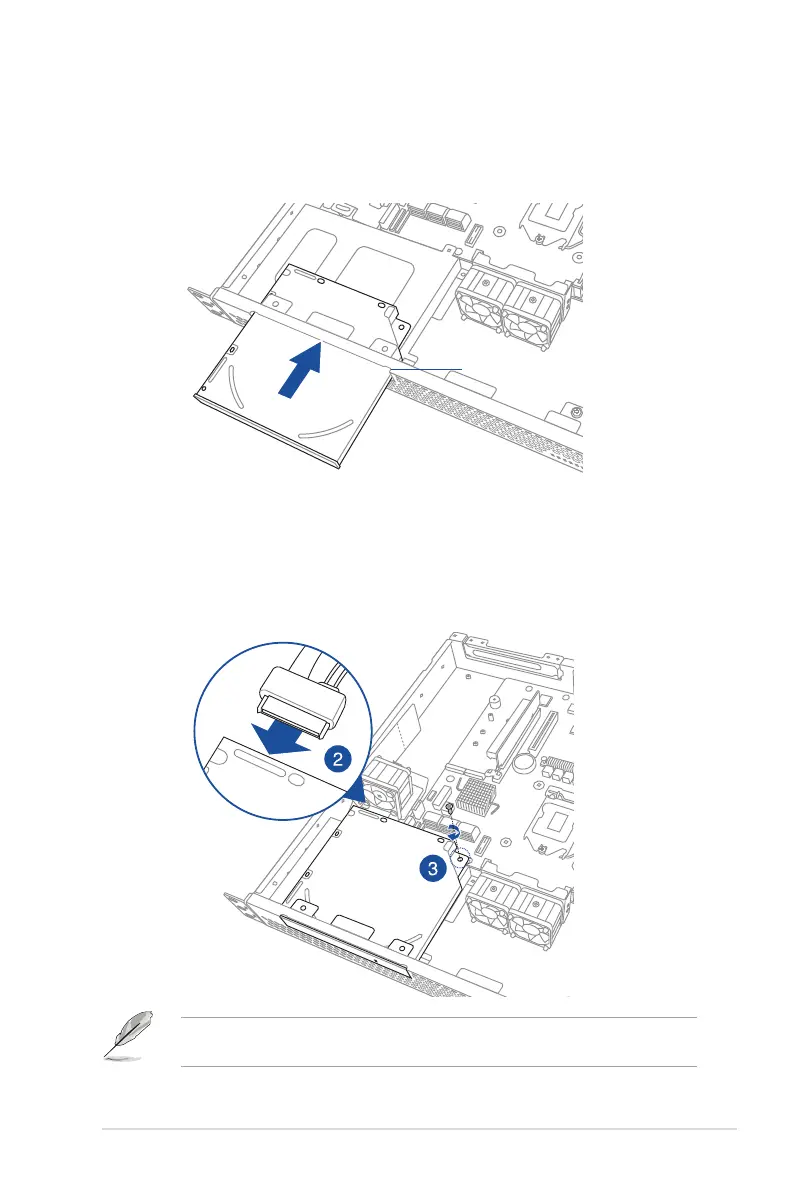
2. ConnecttheODDcabletotheopticaldiskdrivebeforeslidingtheopticaldisk
drive all the way into the drive slot.
3. AlignthescrewholeoftheODDbracketwiththescrewholeonthechassis.
Secure the ODD with a screw.
Optical disk drive slot
2.7.3 Optical disk drive (optional)
Toinstalltheopticaldiskdrive:
1. Slidetheopticaldiskdriveintothedriveslot.
YoumayinstalleitheroneODDortwo2.5-inchSSDstothereservedspaceinHDDbay2.
Refertosection
2.4.4
for more information.














 To Next Page