2-31
ASUS RS100-E9-PI2
2.7 Removable/optional components
You may need to remove previously installed system components when installing or removing
system devices or you may need to install optional components into the system. This section
discusses how to remove/install the following components:
1. System fans
2. Expansioncardairduct(optional)
3. Opticaldiskdrive(optional)
4. ASUSASMB8-iKVM(optional)
Ensurethatthesystemisturnedoffbeforeremovinganycomponents.
2.7.1 System fans
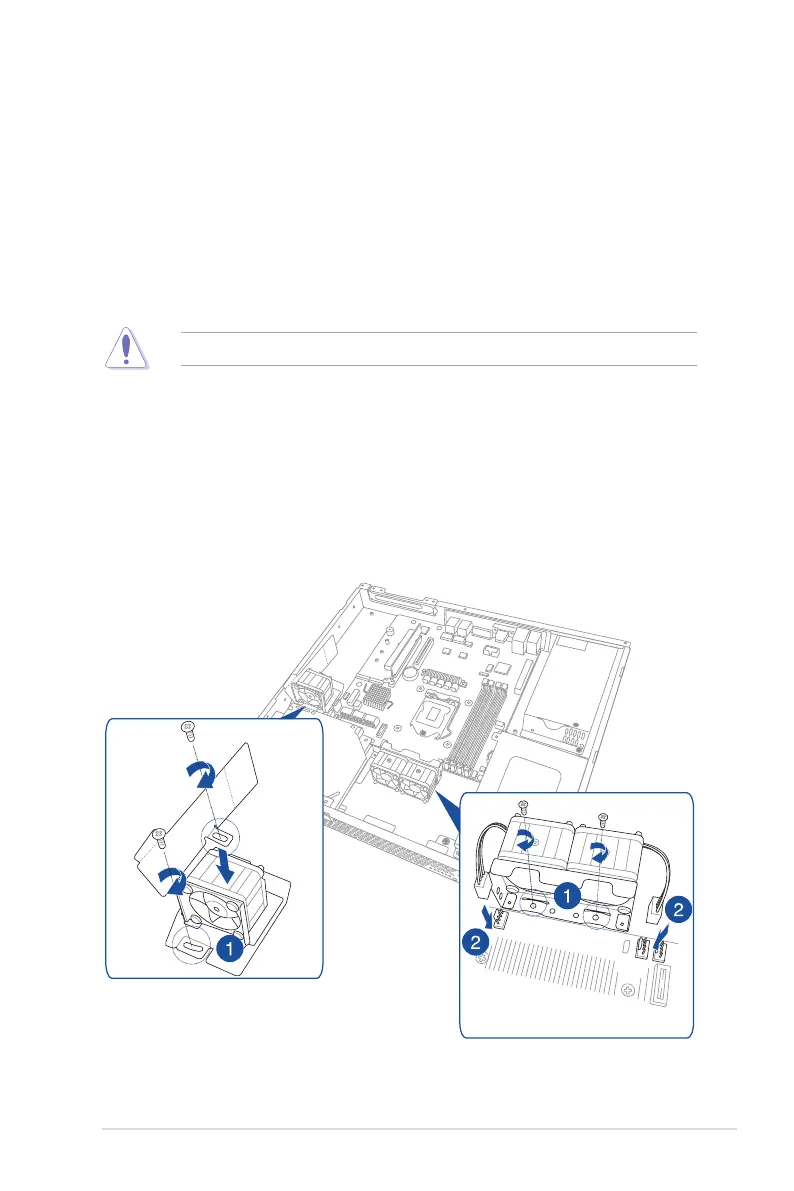
To install the system fans:
1. Position the system fans to match the screw holes on the chassis. Secure the fans onto
the chassis using the provided screws.
2. ConnectthesystemfancablestotheonboardfanconnectorslabeledFRNT_FAN2
andFRNT_FAN3.




 To Next Page