4-22
Chapter 4: Motherboard Information
• DONOTforgettoconnectthe24-pinandthe8-pinpowerplugs;otherwise,thesystem
will not boot up.
• Useofapowersupplyunit(PSU)withahigherpoweroutputisrecommendedwhen
conguringasystemwithmorepower-consumingdevices.Thesystemmaybecome
unstable or may not boot up if the power is inadequate.
• ThismotherboardsupportsATX2.0PSUorlaterversion.
• EnsurethatyourPSUcanprovideatleasttheminimumpowerrequiredbyyour
system.
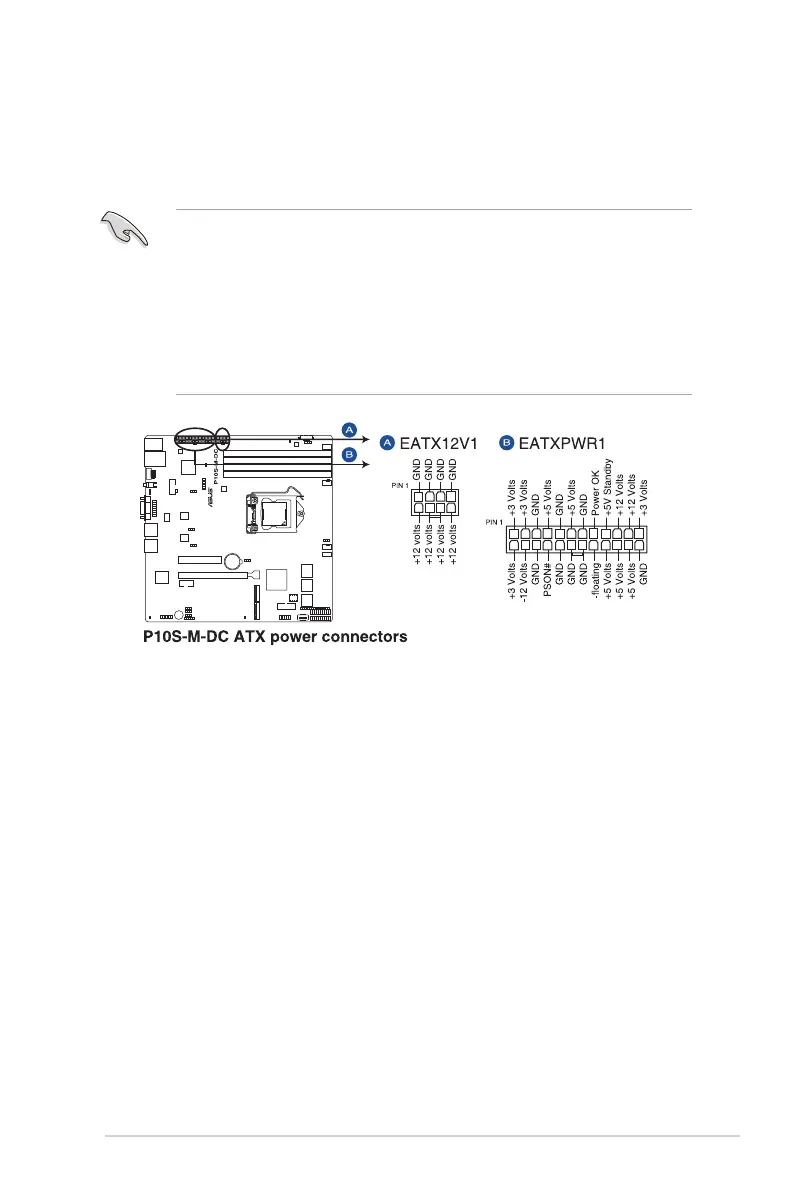
11. ATX power connectors (24-pin EATXPWR1, 8-pin EATX12V1)
TheseconnectorsarefortheATXpowersupplyplugs.Thepowersupplyplugsare
designedtottheseconnectorsinonlyoneorientation.Findtheproperorientationand
pushdownrmlyuntiltheconnectorscompletelyt.














 To Next Page