ASUS RS100-E9-PI2
5-13
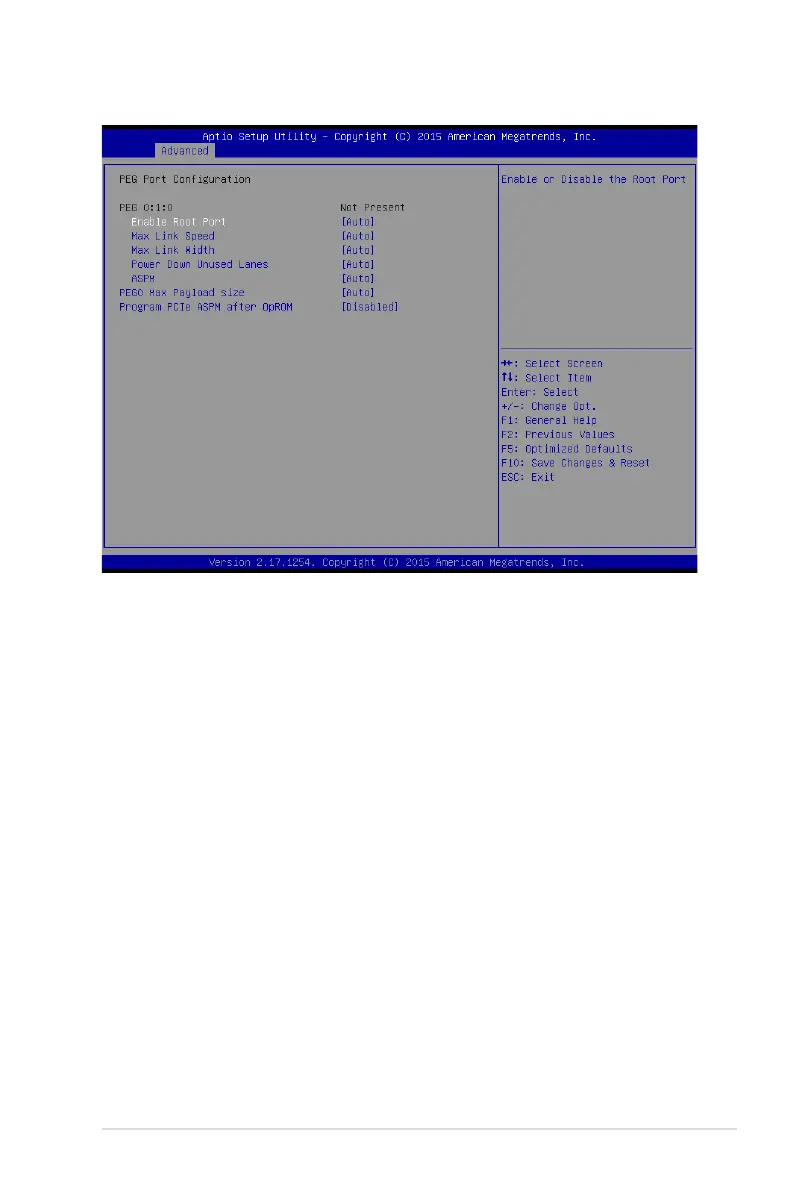
PEG Port Configuration
PEG 0:1:0
Enable Root Port [Auto]
Allows you to enable or disable the root port.
Congurationoptions:[Disabled][Enabled][Auto]
Max Link speed [Auto]
AllowsyoutocongurePEG0:1:0MaxSpeed.
Congurationoptions:[Auto][Gen1][Gen2][Gen3]
Max Link Width [Auto]
AllowsyoutoforcePEGlinktoretrainselectedvalue.
Congurationoptions:[Auto][ForceX1][ForceX2][ForceX4][ForceX8]
Power Down Unused Lanes [Auto]
Allows you to power down unused lanes.
[Disabled] Nopowersaving.
[Auto] BIOSwillpowerdownunusedlanesbasedinthemax
possiblelinkwidth.
ASPM [Auto]
AllowsyoutocongurethePCIEASPM.
Congurationoptions:[Disabled][Auto][ASPML0s][ASPML1][ASPM
L0sL1]
PEG0 Max Payload size [Auto]
Allows you to set the PEG0 max payload size.
Congurationoptions:[Auto][128TLP][256TLP]




 To Next Page