ASUS Z10PH-D16
2-19
2.6 Jumpers
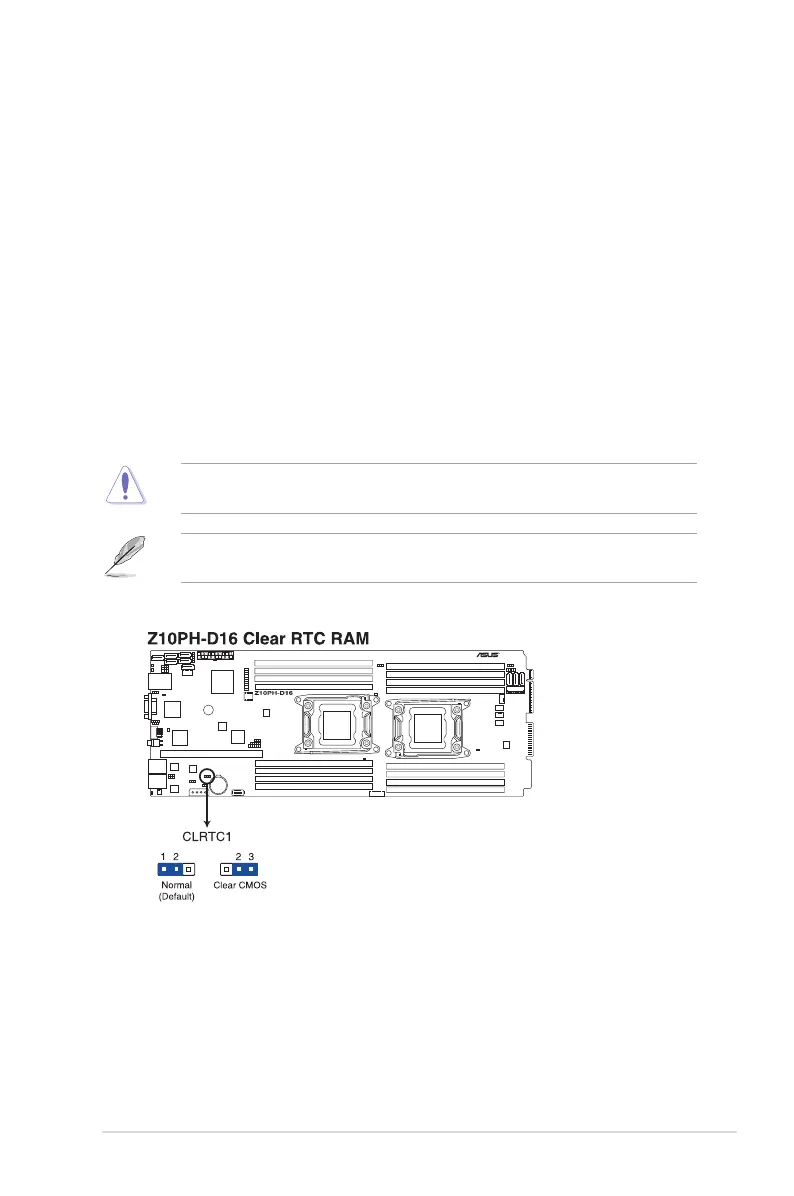
1. Clear RTC RAM (CLRTC1)
ThisjumperallowsyoutocleartheRealTimeClock(RTC)RAMinCMOS.You
cancleartheCMOSmemoryofdate,time,andsystemsetupparametersbyerasing
theCMOSRTCRAMdata.TheonboardbuttoncellbatterypowerstheRAMdatain
CMOS,whichincludesystemsetupinformationsuchassystempasswords.
ToerasetheRTCRAM:
1. Turn OFF the computer and unplug the power cord.
2. Movethejumpercapfrompins1–2(default)topins2–3.Keepthecaponpins2–3
forabout5–10seconds,thenmovethecapbacktopins1–2.
3. Plug the power cord and turn ON the computer.
4. Holddownthe<Del>keyduringthebootprocessandenterBIOSsetuptore-
enter data.
ExceptwhenclearingtheRTCRAM,neverremovethecaponCLRTCjumperdefault
position. Removing the cap will cause system boot failure!
Ifthestepsabovedonothelp,removetheonboardbatteryandmovethejumperagainto
cleartheCMOSRTCRAMdata.AftertheCMOSclearance,reinstallthebattery.


 To Next Page