4-22
Chapter 4: BIOS setup
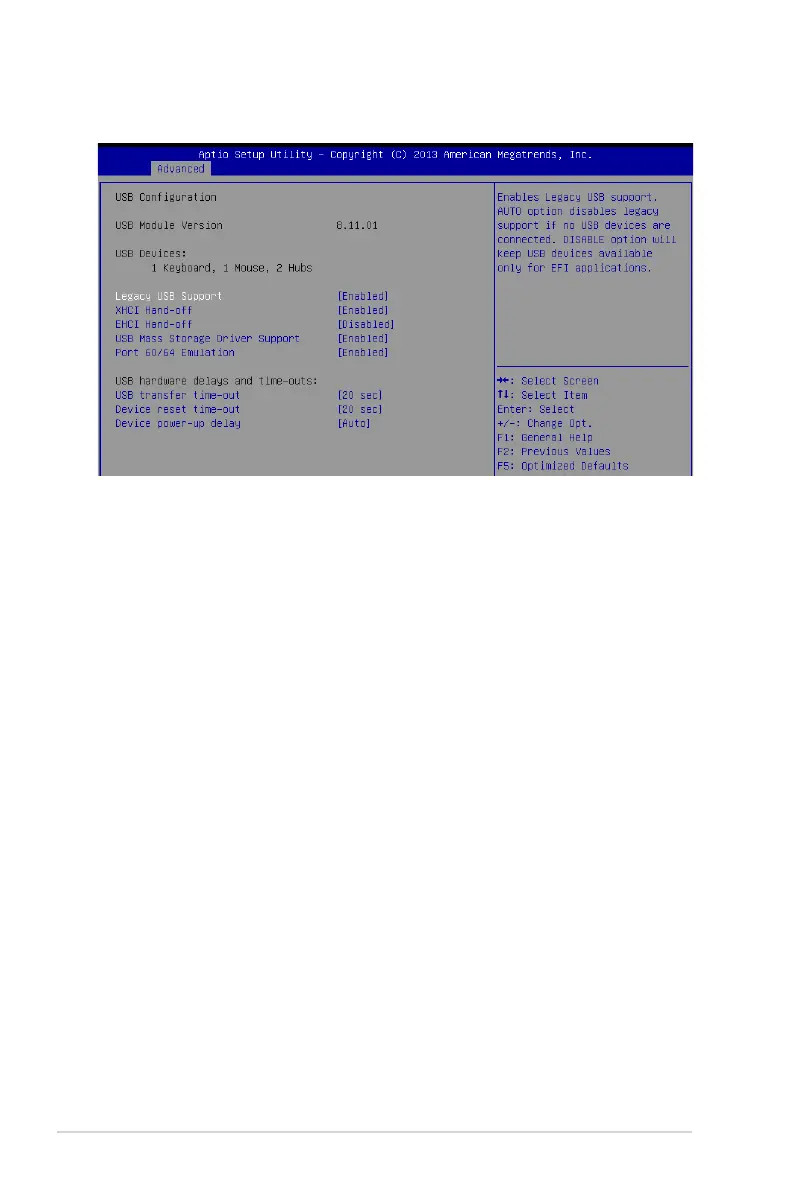
4.4.11 USB Configuration
Legacy USB Support [Enabled]
Allows you to enable or disable Legacy USB device support.
Congurationoptions:[Enabled][Disabled][Auto]
XHCI Hand-off [Enabled]
Thisisaworkaroundfor0SeswithoutXHCIhand-offsupport.TheXHCIownershipchange
shouldbeclaimedbyXHCIdriver.
Congurationoptions:[Disabled][Enabled]
EHCI Hand-off [Disabled]
Thisisaworkaroundfor0SeswithoutEHCIhand-offsupport.TheEHCIownershipchange
should be claimed by EHCI driver.
Congurationoptions:[Disabled][Enabled]
USB Mass Storage Driver Support [Enabled]
Allows you to enable or disable the USB Mass Storage drvier support.
Congurationoptions:[Disabled][Enabled]
Port 60/64 Emulation [Enabled]
This allows you to enable the I/O port 60h/64h emulation support. This should be enabled for
thecompleteUSBkeyboardlegacysupportfornon-USBawareOSes.
Congurationoptions:[Disabled][Enabled]


 To Next Page