4-36
Chapter 4: BIOS setup
USB Configuration
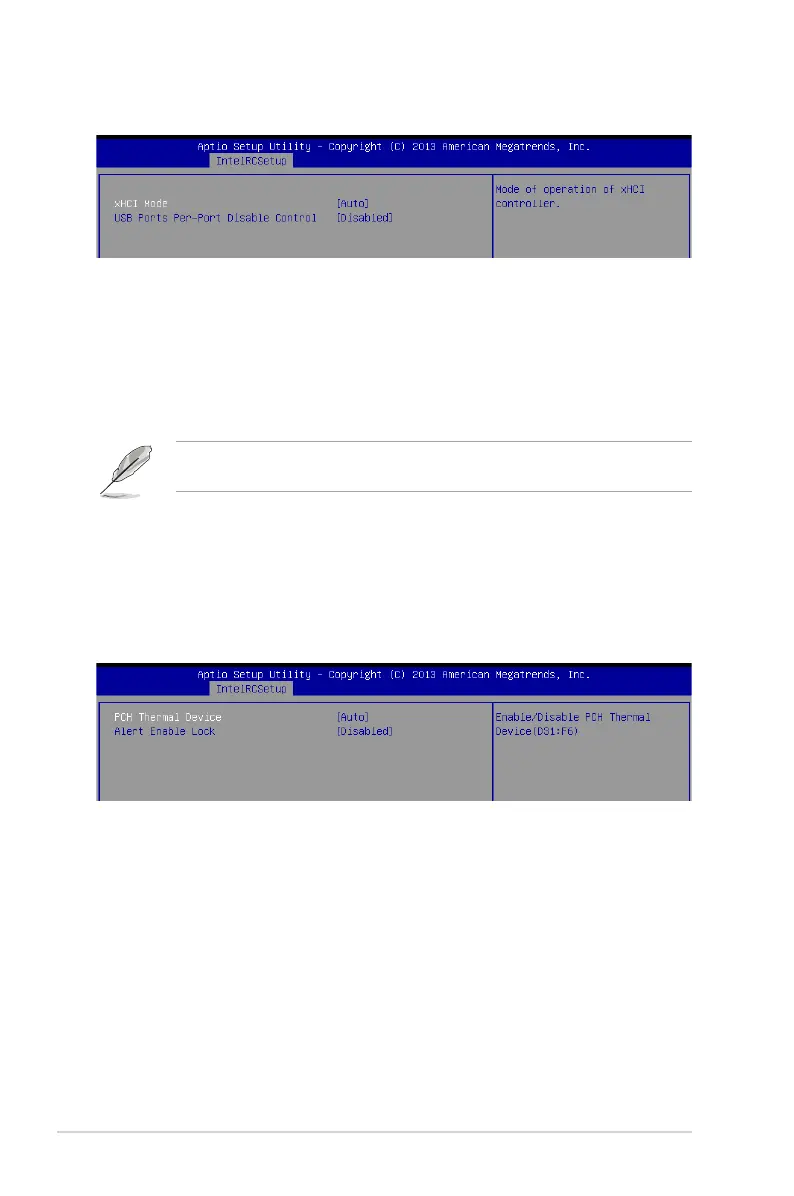
xHCI Mode [Auto]
Allows you to enable or disable the mode of operation of xHCI controller.
Congurationoptions:[Auto][Disabled][Enabled]
USB Ports Per-Port Disable Control [Disabled]
Allows you to control each of the USB ports 1 to 8 disabling.
Congurationoptions:[Disabled][Enabled]
The following items appears only when the USB Ports Per-Port Disable Control is set to
[Enabled].
USB Port #1/ #2/ #3/ [Enabled]
Congurationoptions:[Disabled][Enabled]
USB 3.0 Port #1/ #2/ [Enabled]
Congurationoptions:[Disabled][Enabled]
Platform Thermal Configuration
PCH Thermal Device [Auto]
Allows you to enable or disable the PCH Thermal Device (D31:F6).
Congurationoptions:[Auto][Disabled][Enabled]
Alert Enable Lock [Disabled]
AllowsyoutolockallAlertEnablesettings.
Congurationoptions:[Disabled][Enabled]


 To Next Page