2-16
Chapter 2: Hardware information
2.5.3 Installing an expansion card
Beforeinstallinganexpansioncard,readthedocumentationthatcamewithitandensureto
make the necessary hardware settings.
Toinstallanexpansioncard:
1. Remove the system cover if your motherboard is already installed in a chassis.
2. Prepare the riser card and the expansion card.
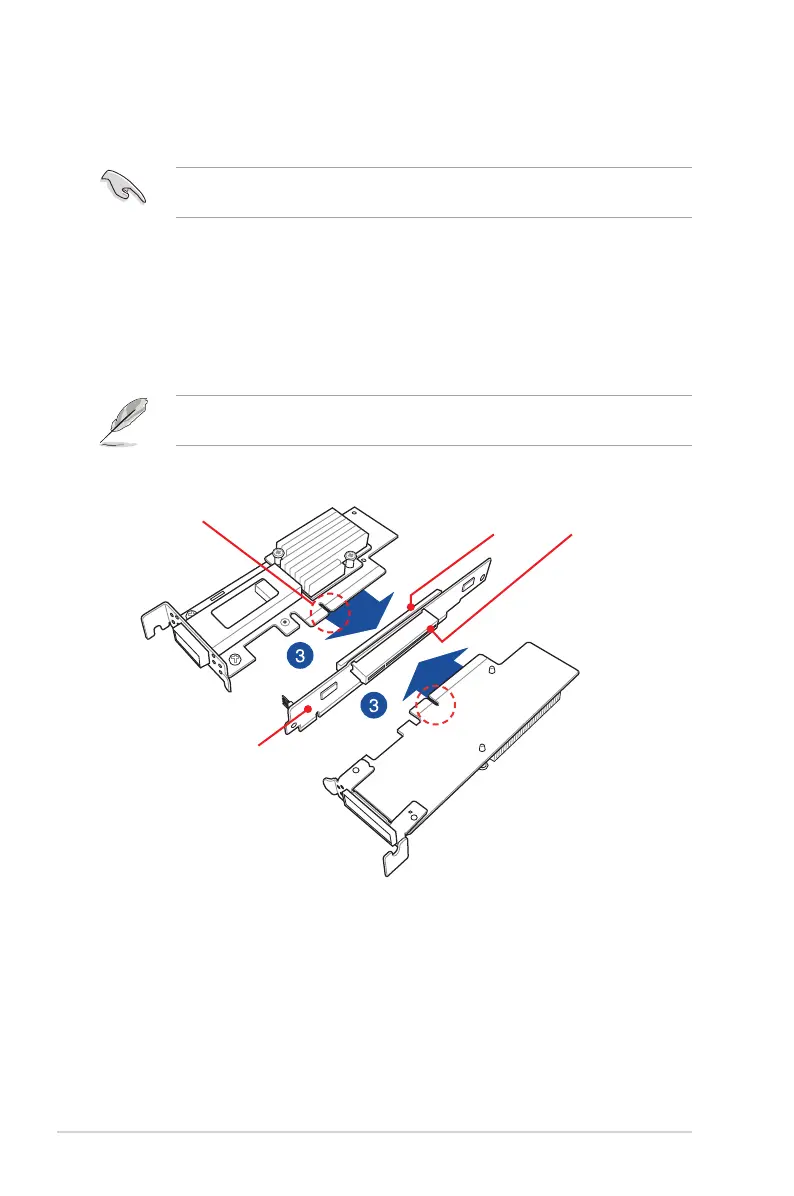
3. AlignandinsertthegoldenngerconnectorsoftheexpansioncardtothePCI-Esloton
the riser card ensuring that the notch on the expansion card matches the notch on the
riser card.
ThedefaultrisercardprovidestwoPCI-Eslots.OnePCI-Ex8slotandonePCI-Ex16slot.
YoucaninstallanexpansioncardoneitherofthePCIEslotorboth.
Riser card
Expansion card
notch on expansion card
notch on riser card
PCI-E x8 slot
PCI-E x16 slot


 To Next Page