Centipede
TM
Figure
6 Self-Test
Procedure
Results
if Test Passes
(if
results
are not
as indicated,
see list of failures
that
follows)
1. Begin:
Set self-test
switch
to
on position
(see
Figure
6).
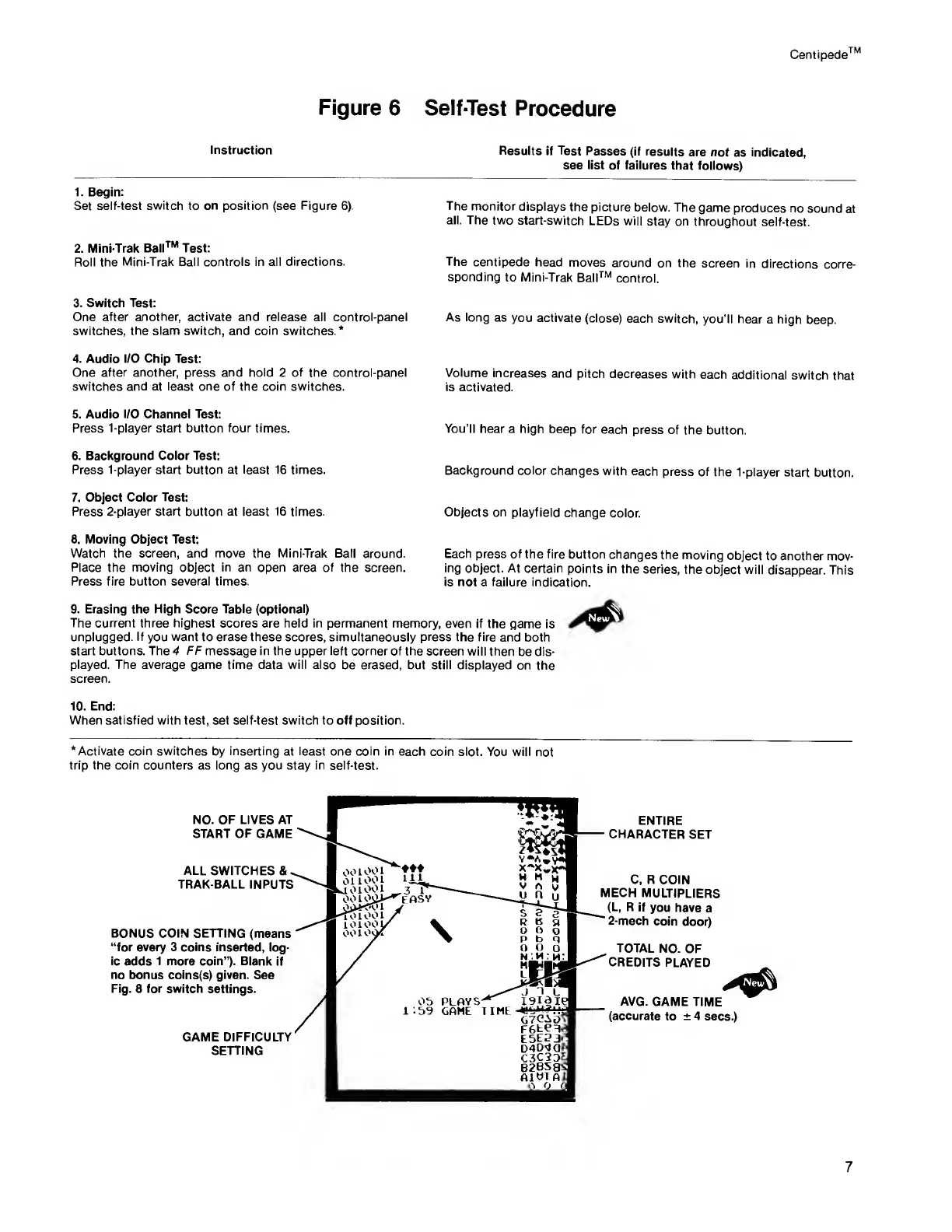
The
monitor
displays
the picture
below. The
game
produces no
sound
at
all. The two
start-switch
LEDs will
stay on
throughout
self-test.
2. Mini-Trak
Ball™ Test:
Roll the
Mini-Trak Ball controls in all
directions. The
centipede
head
moves around
on the
screen in
directions
corre-
sponding
to Mini-Trak
Bail™
control.
3. Switch Test:
One
after another, activate and release
all control-panel As long
as
you activate
(close)
each switch,
you’ll hear
a high
beep,
switches,
the slam switch,
and
coin
switches.*
4. Audio I/O Chip Test:
One
after another, press and hold
2
of
the control-panel Volume
increases
and pitch
decreases
with
each
additional
switch that
switches and at least one of the coin switches.
is activated.
5. Audio
I/O
Channel
Test:
Press 1-player start button
four
times.
You’ll
hear a high
beep for
each press
of the
button.
6. Background Color Test:
Press 1-player start button at least 16 times.
Background color
changes
with each
press of
the
1-player start
button.
7. Object Color
Test:
Press 2-player start button at least 16 times.
Objects on
playfield
change
color.
8. Moving Object Test:
Watch the screen, and move the Mini-Trak Ball
around. Each press
of the fire
button changes
the moving
object
to another mov-
Place
the
moving
object
in an
open area
of
the screen.
ing object. At
certain
points in
the series,
the object will
disappear.
This
Press fire button
several
times.
is
not a failure indication.
9. Erasing the High Score Table (optional)
The current three highest scores
are
held in permanent memory,
even if
the
game
is
unplugged.
If
you
want
to
erase these
scores, simultaneously
press
the fire
and both
start
buttons.
The 4 FF
message in
the upper left
corner of the
screen will then
be dis-
played. The
average
game time data
will
also be erased,
but
still
displayed
on the
screen.
10. End:
When
satisfied with
test, set self-test
switch
to
off
position.
‘Activate coin switches by inserting
at
least
one coin in each coin
slot. You will
not
trip the coin counters as long as you stay in self-test.
NO.
OF LIVES AT
START OF GAME
ALL SWITCHES &
.
TRAK-BALL
INPUTS
BONUS COIN SETTING (means
“for
every
3 coins inserted, log-
ic adds 1 more coin”). Blank
if
no bonus coins(s) given.
See
Fig.
8
for switch settings.
GAME
DIFFICULTY
SETTING
Instruction
7



 To Next Page