Centipede
Figure
6
Self-Test
Procedure,
continued
Results if
Test Fails
1.
Begin:
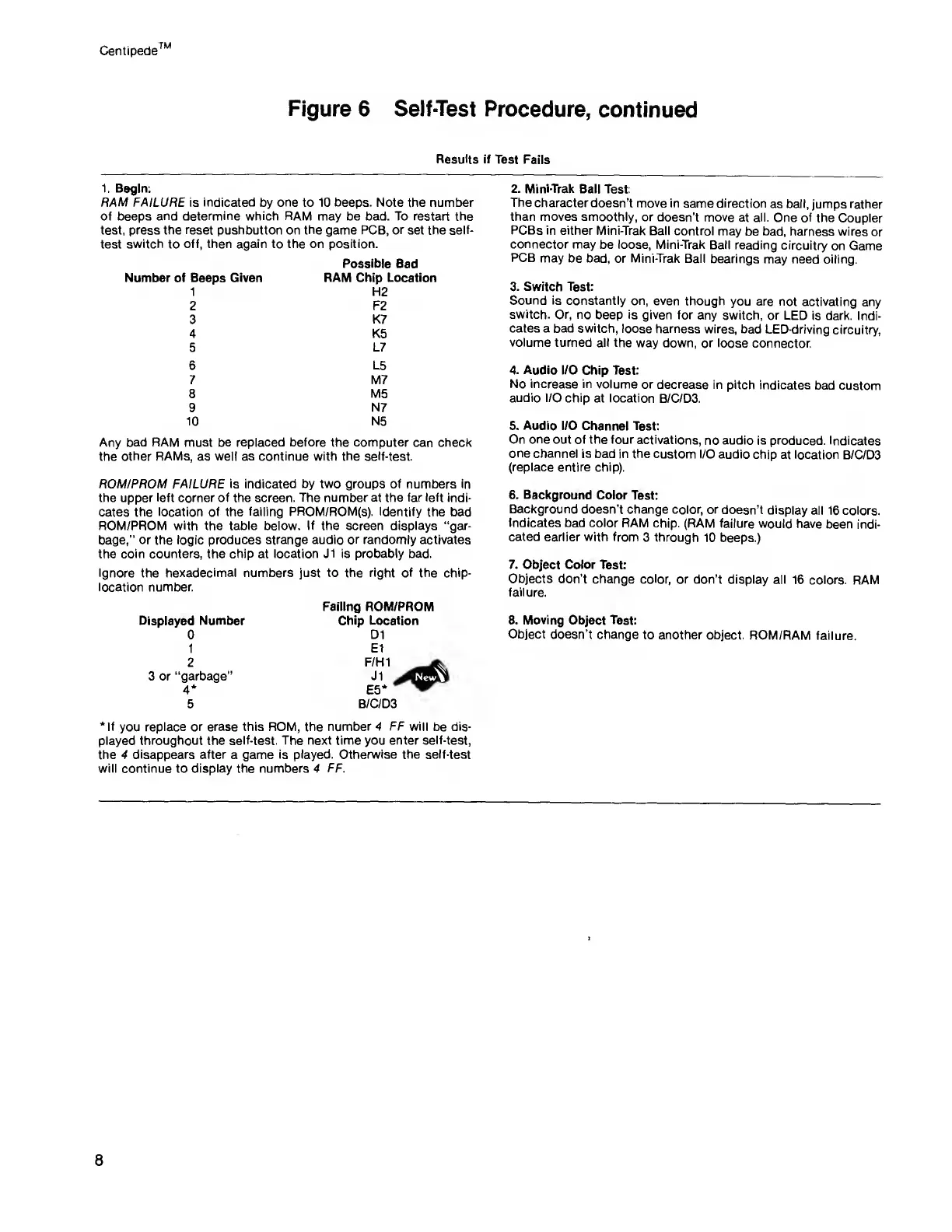
RAM FAILURE
is
indicated
by
one
to 10
beeps.
Note the number
of beeps
and determine which RAM
may be bad. To restart the
test, press the reset pushbutton on
the
game PCB,
or
set the self-
test
switch
to
off, then again to the on position.
Number of Beeps Given
1
2
3
4
5
6
7
8
9
10
Possible Bad
RAM
Chip Location
H2
F2
K7
K5
L7
L5
M7
M5
N7
N5
Any bad RAM must be replaced before
the
computer
can check
the other
RAMs,
as
well as continue with the self-test.
ROM/PROM FAILURE is indicated by two groups of
numbers
in
the upper
left
corner
of
the
screen. The number at the far left indi-
cates the location of the
failing PROM/ROM(s). Identify
the bad
ROM/PROM
with the table
below. If the screen displays "gar-
bage,” or the logic produces strange audio
or randomly
activates
the
coin counters,
the
chip
at
location J1 is probably bad.
Ignore
the
hexadecimal numbers just to the right of
the
chip-
location number.
Displayed Number
0
1
2
3 or
“garbage"
4*
5
Failing ROM/PROM
Chip
Location
D1
El
B/C/D3
‘If
you
replace or erase
this ROM, the number
4
FF will
be dis-
played
throughout
the
self-test. The next time you enter
self-test,
the
4 disappears after
a
game is played. Otherwise the self-test
will continue to
display
the
numbers 4 FF.
2. Mini-Trak
Ball Test:
The
character doesn’t
move in
same direction
as ball, jumps
rather
than moves smoothly,
or doesn’t
move at all.
One of the
Coupler
PCBs in either
Mini-Trak
Ball control
may
be
bad,
harness wires
or
connector may
be loose, Mini-Trak
Ball reading
circuitry
on Game
PCB
may be bad,
or
Mini-Trak
Ball
bearings
may need oiling.
3. Switch
Test:
Sound is
constantly on, even
though
you are not
activating any
switch.
Or, no
beep
is
given for
any switch, or
LED is dark.
Indi-
cates a bad switch,
loose harness
wires, bad
LED-driving
circuitry,
volume turned
all the
way down,
or loose connector.
4.
Audio I/O
Chip
Test:
No increase in
volume or
decrease in pitch
indicates
bad custom
audio I/O chip
at location
B/C/D3.
5. Audio
I/O Channel
Test:
On one
out of the four
activations,
no audio is
produced. Indicates
one
channel is
bad in the custom I/O
audio chip
at location
B/C/D3
(replace entire chip).
6. Background
Color Test:
Background
doesn’t change
color, or
doesn’t display
all 16 colors.
Indicates
bad color RAM
chip. (RAM
failure would have
been indi-
cated earlier with from
3 through
10 beeps.)
7.
Object Color Test:
Objects
don’t change
color, or don’t
display all
16 colors.
RAM
failure.
8. Moving
Object Test:
Object
doesn’t change
to another
object. ROM/RAM
failure.
8



 To Next Page