38
April 2007
e-motion™ Operating Manual - B-Level STD
TROUBLESHOOTING
CLEARING BILL JAM
Follow these procedures to clear a bill jam in a JCM™
UBA-type bill acceptor.
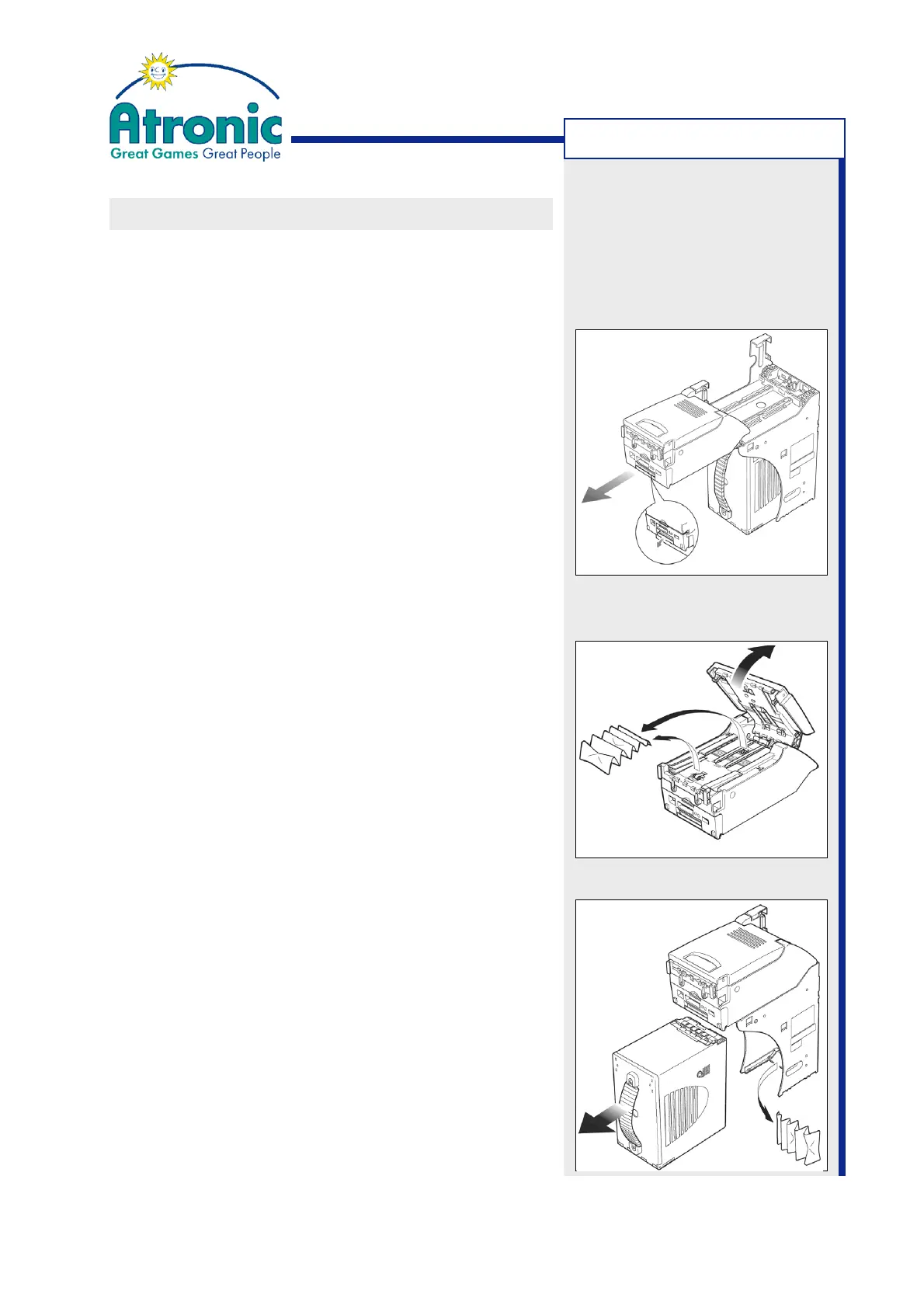
Remove the Transport Unit
If the acceptor is mounted to the machine cabinet, it
is necessary to pull out the transport unit in order
to clear a bill jam or for preventive maintenance.
1. Press down the transport unit release lever and
pull out the transport unit.
2. When re-installing make sure that the transport
unit is properly seated all the way into the frame
and the latches are fully engaged.
3. Clear bill acceptor error message on screen with
the audit key.
Procedure for Transfer Unit
1. Press down the transport unit release lever and
pull out the transport unit.
2. Open the transport unit by pulling on the upper
guide access lever.
3. Remove the jammed bill.
4. Close and re-install the transfer unit.
5. Clear bill acceptor error message on screen with
the audit key.
Procedure for Cashbox Entrance
1. Take out the cashbox.
2. Remove the jammed bill.
3. Re-install the cashbox.



 To Next Page