Telephone
Using the telephone
Opening the telephone
Applies to: vehicles with telephone
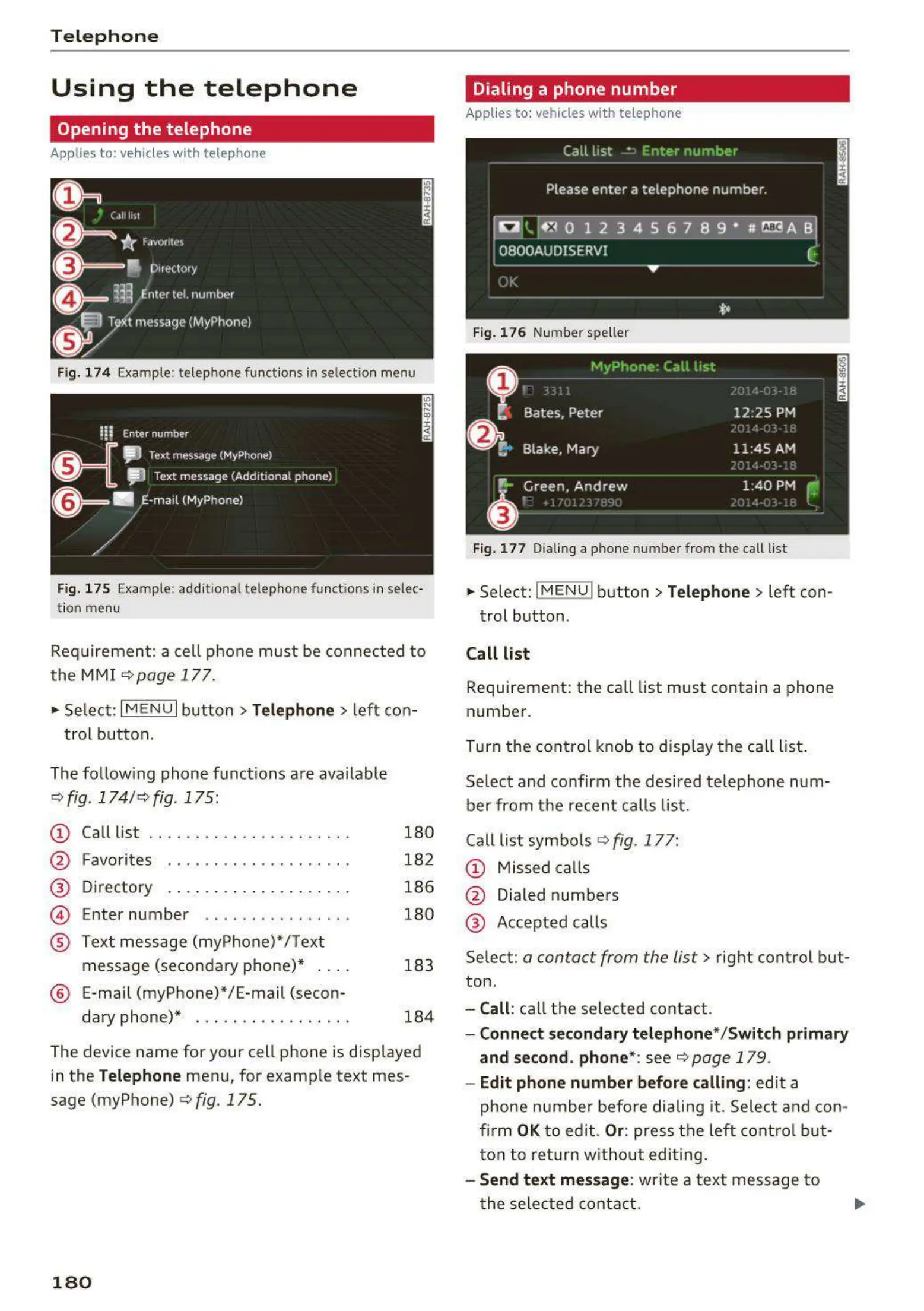
Fig. 174 Example: te lep hone fu nct ions in selection menu
Fig. 175 Example: add itional te lephone funct ions in se lec-
t ion menu
Requi remen t : a cell ph one must be connec t ed to
the MMI
c> page 1 7 7 .
~
Select : I M ENU I but t on> Telephone > left con-
t rol button.
The fo llow ing phone funct ions are available
¢ fig . 174/ c>fig . 175:
CD
@
Call list
Favo rites . . . . . . . . . . . .. . . . . . . .
Directory
Enter number . . . . . . .... . . .. . .
®
©
®
Text mess age (myPhone) */ Text
message (seco ndary phone)* . . . .
® E-ma il (myP hone)*/E-mail (secon-
da ry phone)* . . . ... . ...... . . . .
180
18 2
186
180
183
184
The device name for your cell pho ne is displayed
in the
Telephone men u, for examp le text mes-
sage (myPhone)
c>fig. 175.
180
Dialing a phone number
Applies to: vehicles with telephone
Fig. 176 Number spe ller
Fig . 1 7 7 Dialing a ph one numb er from the call list
~
Select: !M E N UI button> Telephone > left con-
t rol button .
Call list
Requ irement : th e call list must contain a phone
numbe r.
Turn the cont rol knob to disp lay the ca ll list.
Select and confirm the desired te lephone num-
ber from the recen t calls list .
Call list symbo ls
c> fig . 177:
CD Missed ca lls
@ Dialed numbers
@ Accepted calls
Select:
a contact from the list > right control but-
ton .
- Call: ca ll t he se lected contact .
- Connect secondary telephone * / Switch primary
and second . phone *: see r::!) page 179 .
- Edit phone number before calling : edit a
phone number befo re dialing it . Selec t and con-
firm
OK to edit. Or : pre ss t he left contro l but-
ton to ret urn w it hout edi t ing.
- Send text mes sage : write a t ext message t o
t he sele cted conta ct.



 To Next Page