u.
00
.-<
N
l'-
N
.-<
0
N
>
00
Navigation
Opening navigation
Applies to: vehicles with navigat ion system
The navigation system directs you to your desti-
nation, around traffic incidents and on alterna-
tive routes, if desired.
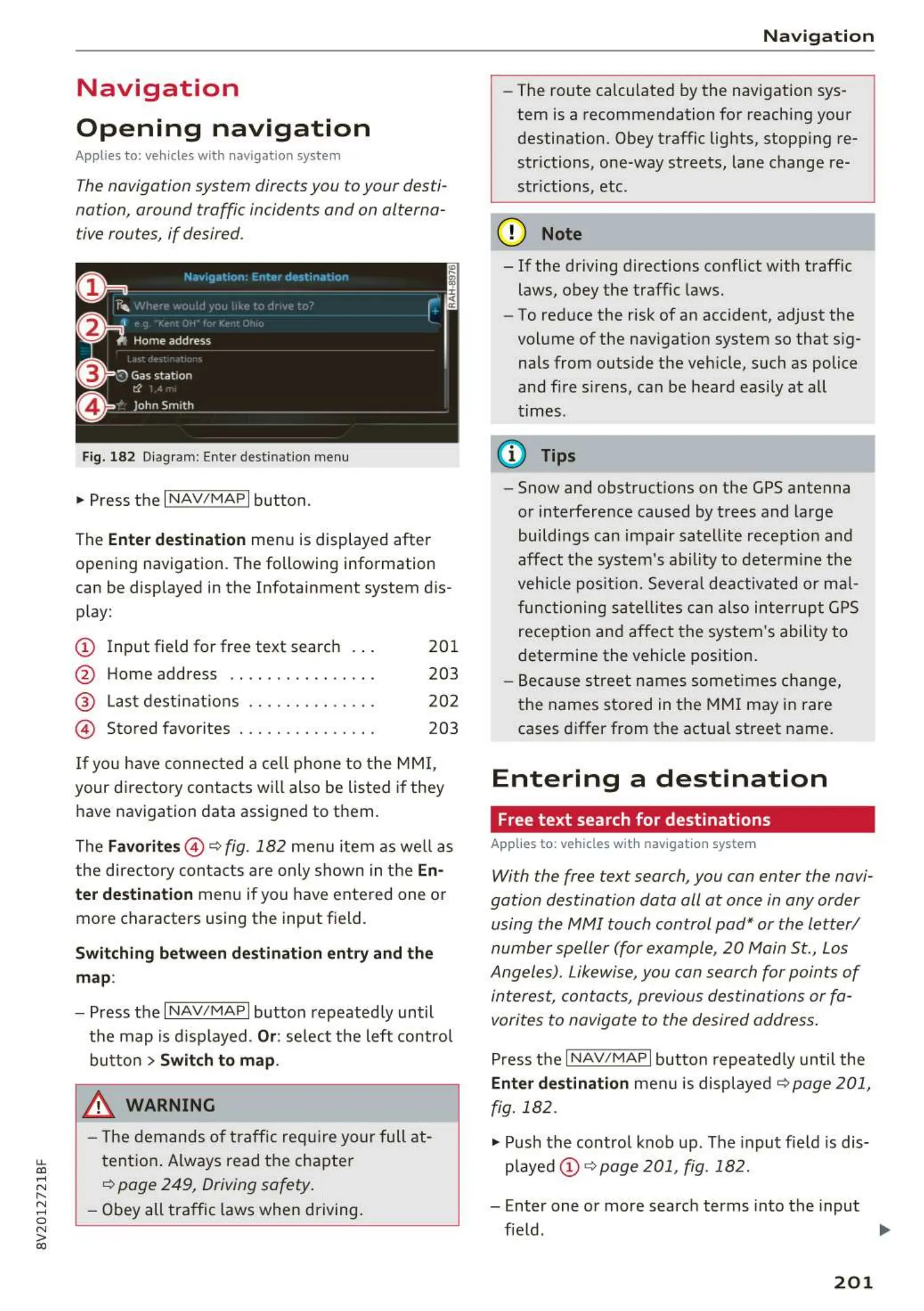
Fig. 182 Diagram: Enter destinatio n menu
.,. Press the I NAV/MAPI button.
The
Enter destin ati on menu is displayed after
opening navigation. The following information
can be displayed in the Infotainment system dis-
play:
(D Input field for free text searc h 20 1
@ Home address . . . . . . . . . . . . . . . . 203
@ Last dest inatio ns . . . . . . . . . . . . . . 202
© Stored favorites . . . . . . . . . . . . . . . 203
If you have connec t ed a ce ll phone to the
MMI,
your directory contacts will also be listed if they
have navigation data assigned to them .
The
Favorites @ ¢ fig. 182 men u item as we ll as
the directory con t acts are only shown in t he
En-
ter destination
menu if you have entered one or
more characters using the input field.
Switching betwe en destination ent ry and th e
map:
- Press the I NAV/MAPI button repeated ly until
the map is d isp layed.
Or: se lect the left contro l
button
> Switch to map .
_& WARNING
- The dem ands of t raff ic requir e your full at -
tention . Always read t he chapter
¢ page 249, Driving safety .
- Obey all tra ffic laws when d riving .
-
Na v igation
- The route calculated by the navigation sys -
tem is a recommendation fo r reaching your
destination. Obey traffic lights, stopp ing re-
strictions, one-way streets, lane change re-
str ictions, etc .
@ Note
- If the dr iving directions conflict with t raffic
laws, obey the traffic laws.
- To red uce the risk of an accident, adjust the
vol ume of the nav igat ion system so that s ig-
nals from outs ide the ve hicle, such as police
and fire s irens, can be heard easi ly at all
t imes .
(D Tips
- Snow and obstruct ions on the GPS antenna
or interference caused by trees and large
buildi ngs can impair satell ite recept io n and
affect the sys t em's ability t o dete rm ine the
veh icle pos it io n. Severa l de activated or ma l-
functioning sa t ell ites can also int er rup t GPS
recept ion and affect t he system 's ability to
determine t he vehicle position.
- Because street names somet imes change,
t he names sto red in the MMI may in rare
cases differ from the actual street name.
Entering a destination
Free text search for destinations
Applies to: vehicles with navigat ion system
With the free text search, you can enter the navi-
gation destination data all at once in any order
using the MMI touch control pad* or the letter/
number speller (for example, 20 Main St., Los
Angeles). Likewise, you can search for points of
intere st, contacts, previous destinations or fa -
vorites to navigate to the desired address .
Press t he I N AV/MAPI button repeated ly until the
Enter destination me nu is displayed ¢ page 201,
fig. 182 .
.,. Push the contro l knob up . The input field is dis-
played @ ¢
page 201, fig. 182.
- Enter one or more searc h terms into the input
fie ld . .,.
201



 To Next Page